
Employee - Advisor
Oct 24, 2024 1:00 PM UTC

Dynamic Dashboards – Passing Parameters with Repeat Arguments.

Introduction

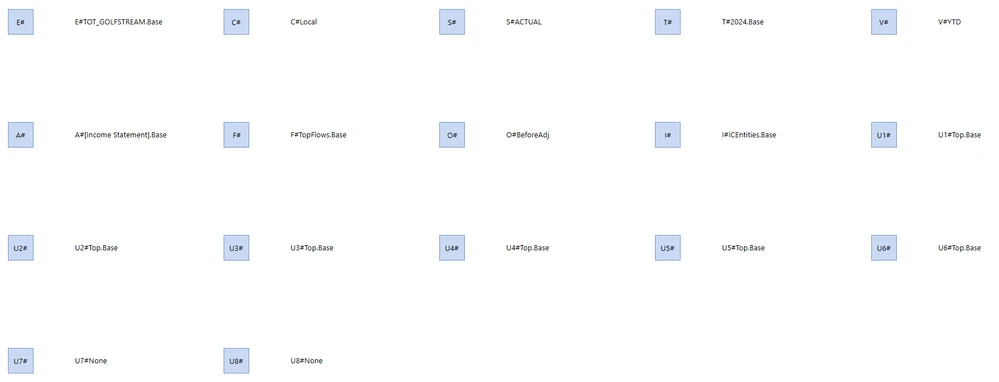
This is an introduction to the power of Repeat Arguments in OneStream Workspaces for v8+.  In this blog we will walk you through a simple example, creating 17 repeat arguments based on the Dimensions in OneStream (Entity / Consolidation / Scenario / Time / View / Account / Flow / Origin / IC / UD1 - UD8) with only a handful of components and almost no code.

NOTE: this blog is not an exhaustive account of how Dynamic Dashboard Repeat Arguments work, but rather an application of these concepts using minimal code. You might want to familiarize yourself with the concepts first, by reading the Embedded Dynamic Repeater Dashboard section of the OneStream Design & Reference guide and setting up an example.

Before version 8, we would not have been able to achieve this without creating 17 dashboards, 17 buttons, 17 labels and 17 parameters. To Dashboard developers, the power of Dynamic Dashboards is kind of a big deal !

Let’s have a quick look at the output before we dive into the setup.
sameburn_0-1724575810806.png


Setup: Dashboards

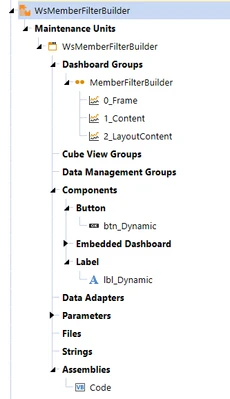
This example has been created in its own workspace called WsMemberFilterBuilder. We have 3 dashboards, 1 button and 1 label.
sameburn_1-1722879173121.png

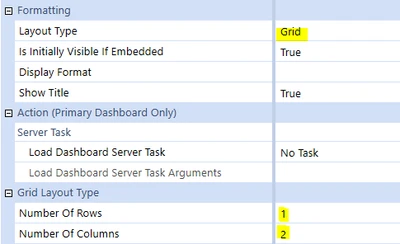
Let’s look at the dashboard from the bottom up. 2_Layout Content is our lowest level dashboard; it has been set with Layout Type Grid and has 1 row and 2 columns. 
sameburn_2-1722879173123.png

This dashboard also contains our button and our label components.
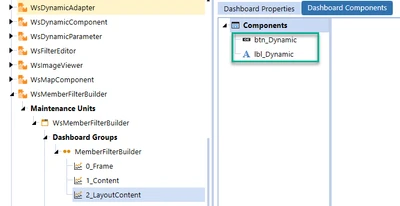
sameburn_3-1722879173125.png

Next, we add the embedded version of this dashboard to 1_Content.
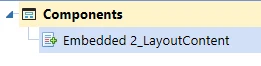
sameburn_4-1722879173126.png

We set the Dashboard Type here to be Embedded Dynamic.  This ensures that we can interact with it in the Dynamic Dashboard Service (more to come on that later)…

sameburn_5-1722879173128.png

Finally, we add the embedded version of this dashboard to 0_Frame.
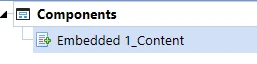
sameburn_6-1722879173128.png

Setup: Components

Let’s now look at the two components.  Firstly we are using a Button with Button Type Member Filter Builder.  This is available from OneStream v8.1.

sameburn_7-1722879173129.png

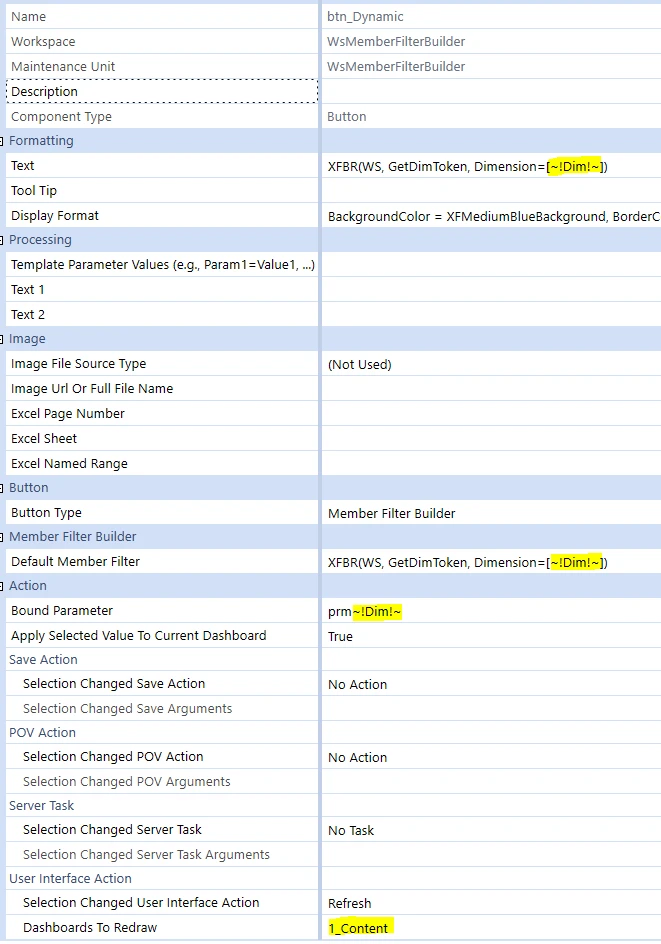
On the button we place an XFBR which will return the Dimension Token for each repeat argument. For example, passing "Entity" will return "E#", "Scenario" will return "S#", etc.
sameburn_8-1722879173132.png

We also have a Template Parameter that only applies to Repeater Dashboards, e.g. ~!Dim!~. It will be populated at each iteration with the dimension name.

What we are passing into the Bound Parameter of this stored component is the most important thing. Here we add a “prm” prefix  to each repeat argument to give us a unique parameter name for each repeat argument e.g. Entity, Consolidation, Scenario, Time, View, Account, Flow, Origin, IC, UD1, UD2, UD3, UD4, UD5, UD6, UD7 and UD8.  This gives us a different parameter result for each dynamic component. We are also refreshing the Embedded Dynamic Repeater dashboard in our interface action, so that interaction with this button will trigger a global refresh.

Next, let’s look at our label component, which will contain the result of each button click. Here we are catching the result of a Parameter in the traditional way, enclosing the parameter name in pipes and exclamation marks; but we are also using the syntax we saw on the button component, pointing to a parameter called |!prm~!Dim!~!|.
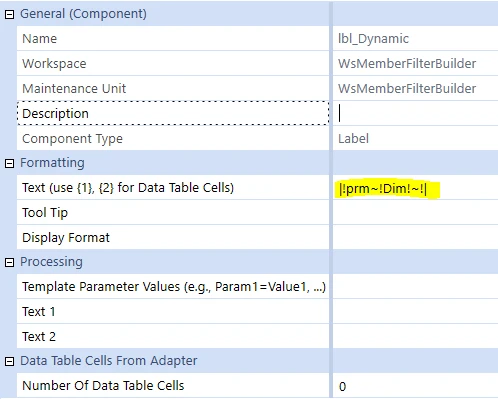
sameburn_9-1722879173134.png

Before we look at the code, let’s pause and review the dashboard in Design Mode. Here you can see that for each repeated component, we have a suffix of _dynamic_~!Dim!~ : _dynamic_Entity, _dynamic_Consolidation, etc. OneStream is creating dynamic components for us based on our repeat arguments.

Note how we still have to follow traditional Dashboard rules: components within an individual workspace must be uniquely named. 

We then end up with a dashboard containing 17 dashboards, 17 buttons, 17 labels and 17 parameters, but created from (a) our stored components and (b) our repeat arguments.
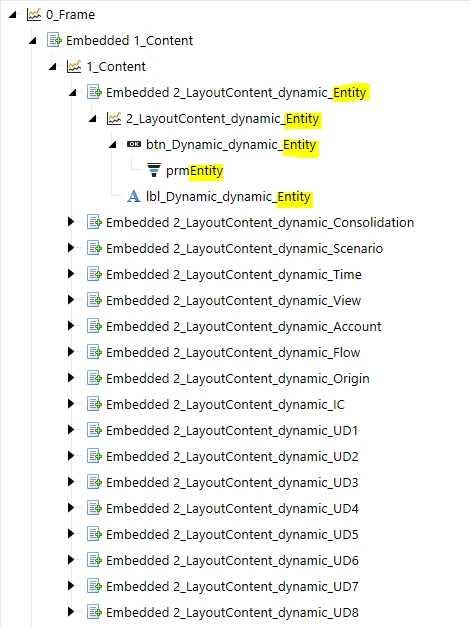
sameburn_1-1724576000478.png


Setup: Dynamic Dashboards Service

In order to make this work, we will need a bit of code, which we will place in a Workspace Assembly. If you are not familiar with Assemblies, you can find more information on them here and here in the OneStream Design & Reference guide.

We are also using something called a Service Factory (new to v8) and a Dynamic Dashboards Service. Again, you can read all about them in the OneStream Design & Reference guide here and here.

So how does all this work?  I’ve talked a lot so far about Repeat Arguments, but how do we create them?

In principle, it is the same concept whether we setup a code or a no-code example. Let’s look at the no-code example first, like the example I shared earlier here from the OneStream Design & Reference guide. If we were to set up our system without code, we would create a list of Template Name Suffixes for our component (e.g. Entity,Consolidation, etc) and a Dictionary of NameValuePairs (e.g. Dim=[Entity], or Dim=[Consolidation], etc). Remember how we are using a variable called Dim to use our repeat arguments in component, with the Template Parameter ~!Dim!~. 

sameburn_11-1722879173141.png

We can do the same thing using the GetDynamicComponentsForDynamicDashboard function. On line 52 we check for the embedded repeater dashboard e.g. 1_Content.
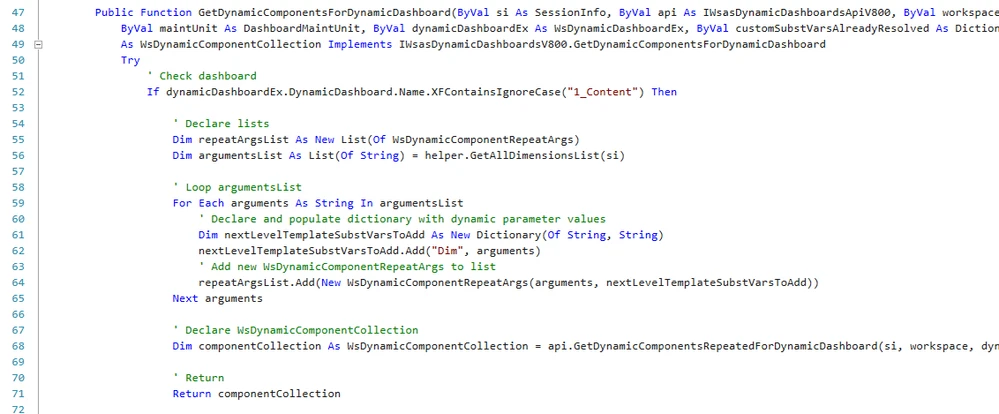
sameburn_12-1722879173147.png

Then we declare a placeholder for our List(Of WsDynamicComponentRepeatArgs) on line 55 and derive our arguments list on row 56.

sameburn_13-1722879173148.png

I am deriving mine as Comma Separated Values from a function, but you can derive the arguments any way that you like.  In my case I am executing the equivalent of this list of dimensions e.g.

sameburn_14-1722879173150.png

Next, we need to populate our Repeat Arguments list. To do so, we loop on our arguments list and inside the loop we create a new dictionary where we use the Key Dim and the value from our loop (e.g. Entity) on line 62.

sameburn_15-1722879173152.png

Then on line 64 we populate our repeatArgsList.  Here we create the WsDynamicComponentRepeatArgs object with two variables:

  1. a string called NextLevelNameSuffixToAdd
  2. a Dictionary(Of String, String) called nextLevelTemplateSubstVarsToAdd.

If this looks familiar, it's because it is exactly the same variables we saw in the no-code example.

sameburn_16-1722879173153.png

So NextLevelNameSuffixToAdd = “Template Name Suffix” and nextLevelTemplateSubstVarsToAdd = “Template Parameter Values”.   

That’s right, we are creating the same repeat arguments in both examples.

sameburn_17-1722879173154.png

Similarities don’t end there: with the no-code example (using Embedded Dynamic Repeater Dashboard Type), we are returning a collection of Component Template Repeat Items.
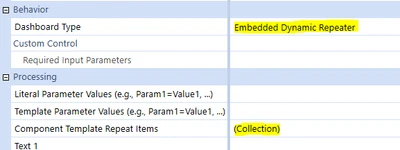
sameburn_18-1722879173155.png

In code, we are returning the object WsDynamicComponentCollection, which is effectively the same thing.

sameburn_19-1722879173156.png

Execution

Now that we have seen the setup, let’s look at what we have created. By harnessing the power of dynamic dashboards, we have generated 17 versions of each component. This means that I can select E# and an Entity Selection e.g.
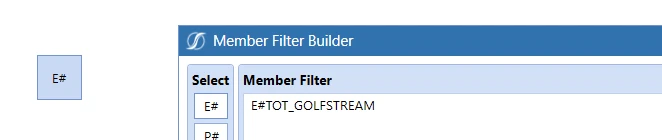
sameburn_20-1722879173157.png

And catch the result in a label…

sameburn_21-1722879173158.png

But it gets better than that, because each button and label now work as pairs in our repeat arguments list, since each one uses a unique parameter (that we created dynamically)
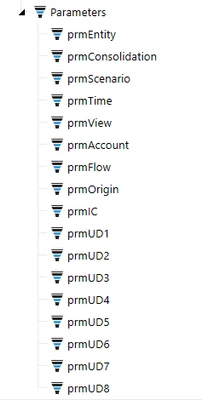
sameburn_2-1724576107426.png

Our repeat arguments interact with the Dashboard Service, which drives our logic, to generate many dynamic components for us. We could make this setup even more dynamic by allowing interaction with the data that creates arguments, for example through the use of a Parameter listing the dimensions. This means you can still create powerful dashboards, but with fewer components and just a bit of dashboard wizardry.

Once you understand how to harness this type of paradigm, you'll quickly find a number of possible applications for it, making your Dashboard development experience much more productive and, hopefully, more fun!

11 replies

Member
Oct 27, 2024 9:32 PM UTC

Very well explained. 
good job!

Nov 18, 2024 10:37 PM UTC

Thanks, this is helpful. When trying to replicate your results, I am having trouble passing the ~!Dim!~ template parameter into my XFBR to retrieve the dimension token, as OneStream is interpreting the template parameter literally. Will args.NameValuePairs.XfGetValue("Key") process template variables, or is an alternate method required to pass the template parameter into an XFBR?  Maybe there is something else I am missing (e.g., Template Parameter Values).

jmohl_0-1731969044020.png

jmohl_1-1731969118012.png

Imports System
Imports System.Collections.Generic
Imports System.Data
Imports System.Data.Common
Imports System.Globalization
Imports System.IO
Imports System.Linq
Imports Microsoft.VisualBasic
Imports OneStream.Finance.Database
Imports OneStream.Finance.Engine
Imports OneStream.Shared.Common
Imports OneStream.Shared.Database
Imports OneStream.Shared.Engine
Imports OneStream.Shared.Wcf
Imports OneStream.Stage.Database
Imports OneStream.Stage.Engine
Imports OneStreamWorkspacesApi
Imports OneStreamWorkspacesApi.V800
Imports OneStreamWorkspacesApi.V820

Namespace Workspace.__WsNamespacePrefix.__WsAssemblyName
	Public Class MyXFBRs
		Implements IWsasXFBRStringV800

        Public Function GetXFBRString(ByVal si As SessionInfo, ByVal globals As BRGlobals, ByVal workspace As DashboardWorkspace, _
			ByVal args As DashboardStringFunctionArgs) As String Implements IWsasXFBRStringV800.GetXFBRString
            Try
                If (globals IsNot Nothing) AndAlso (workspace IsNot Nothing) AndAlso (args IsNot Nothing) Then
					
                    If args.FunctionName.XFEqualsIgnoreCase("GetDimToken") Then
                        
						Dim dimension As String = args.NameValuePairs.XFGetValue("Dimension")
						
						'Create dictionary to store all dim type Ids
						Dim dimDictionary As New Dictionary(Of String, String)
						
						'Add each dimension to the dictionary
						dimDictionary.Add("Entity", "E#")
						dimDictionary.Add("Scenario", "S#")
						dimDictionary.Add("Time", "T#")
						dimDictionary.Add("Consolidation", "C#")
						dimDictionary.Add("Parent", "P#")
						dimDictionary.Add("Account", "A#")
						dimDictionary.Add("Flow", "F#")
						dimDictionary.Add("Origin", "O#")
						dimDictionary.Add("View", "V#")
						dimDictionary.Add("Intercompany", "IC#")
						dimDictionary.Add("UD1", "U1#")
						dimDictionary.Add("UD2", "U2#")
						dimDictionary.Add("UD3", "U3#")
						dimDictionary.Add("UD4", "U4#")
						dimDictionary.Add("UD5", "U5#")
						dimDictionary.Add("UD6", "U6#")
						dimDictionary.Add("UD7", "U7#")
						dimDictionary.Add("UD8", "U8#")				
						
						'Lookup the selected dimension's value in the dictionary
						Dim returnDimToken As String = dimDictionary.Item(Dimension)
						
						'Return the selection if a value exists								
						If Not returnDimToken Is Nothing Then
							Return returnDimToken
							
						Else
							Return Nothing
							
						End If
						
					Else
						Return Nothing
						
					End If
					
				Else
					Return Nothing
					
				End If
				
            Catch ex As Exception
                Throw ErrorHandler.LogWrite(si, New XFException(si, ex))
			End Try
        End Function

	End Class
End Namespace


sameburnEmployee - AdvisorAuthor
Employee - Advisor
Nov 19, 2024 7:32 AM UTC

Hi jmohl 

If you hard code a value on the text property of the button does it actually run as expected e.g repeating components for each set of your template parameters?

If not, maybe have a look at the no code example in the design & reference guide first (link in blog above) to check your setup

Looks like something may be awry in your setup based on that error rather than how you are retrieving the Dimension NameValuePair in your XFBR

Hope this helps 

Sam

Nov 19, 2024 2:51 PM UTC

Thanks, sameburn. I was able to get a similar result to what your blog showed. My issue ended up being specific to the "Default Member Filter" setting. It was still looking up the literal template parameter as a function argument (unsuccessfully) in the dictionary, so I removed the XFBR call and it ran fine. I am still unsure why an identical XFBR call works in the "Text" setting but not the "Default Member Filter" setting (in version 8.2). However, the end result is relatively similar, and this gives me a working example to reference for future builds.

jmohl_1-1732027448300.png

jmohl_0-1732027328081.png


Dec 6, 2024 12:59 PM UTC

Hi sameburn , JackLacava 

I am running into some trouble here and hoping I might get your advice. I'm trying to create a dashboard that dynamically selects the type of component to display (it can either be a button or a combo box). I was leveraging an example from the 2023 dynamic dashboards which works beautifully, but when I try the same thing, it doesn't actually generate the parameters. Here's what I'm seeing in my results: 

Here's what I'm seeing if I run the Dynamic Form example from Wave 2023 using the same parameter with the referenced code - it seems to create that parameter as expected. I've tried fiddling with the GetDynamicParametersForDynamicComponent function but nothing I change there seems to actually generate these parameters. Any ideas would be greatly appreciated!


using OneStream.Shared.Common;
using OneStream.Shared.Engine;
using OneStream.Shared.Wcf;
using OneStream.Shared.Database;
using OneStreamWorkspacesApi.V800;
using OpenXmlPowerTools;
using System;
using System.Collections.Generic;
using System.Data;
using System.Linq;
using System.Text;
using System.Threading.Tasks;
using static System.Net.Mime.MediaTypeNames;
using System.Text.RegularExpressions;

namespace Workspace.__WsNamespacePrefix.__WsAssemblyName
{
    internal static class DynamicFormDashboard
    {

        internal static XFLoadDashboardTaskResult OnLoadDynamicFormDashboard(SessionInfo si, DashboardExtenderArgs args)
        {
            if (args.LoadDashboardTaskInfo.Reason == LoadDashboardReasonType.Initialize && args.LoadDashboardTaskInfo.Action == LoadDashboardActionType.BeforeFirstGetParameters)
            {
                using (var dbConnApp = BRApi.Database.CreateApplicationDbConnInfo(si))
                {
                    var tableExists = DbSql.DoesTableExist(dbConnApp, "DynamicFormItems");
                    if (!tableExists)
                    {
                        var sql = @"IF NOT EXISTS (SELECT * FROM sys.objects WHERE object_id = OBJECT_ID(N'[dbo].[DynamicFrmItems]') AND type in (N'U'))
                                BEGIN
                                CREATE TABLE [dbo].[DynamicFrmItems](
	                                [ComponentType] [nvarchar](50) NOT NULL,
	                                [Text] [nvarchar](100) NOT NULL,
	                                [Required] [bit] NOT NULL,
	                                [BoundParameterName] [nvarchar](100) NOT NULL,
	                                [SortOrder] [int] NOT NULL
                                )
                                END";

                        BRApi.Database.ExecuteActionQuery(dbConnApp, sql, null, false, false);
                    }
                }
            }

            return new XFLoadDashboardTaskResult(); ;
        }

        internal static WsDynamicComponentCollection Get_0000_GeneratedForm_DynamicComponents(SessionInfo si, IWsasDynamicDashboardsApiV800 api, DashboardWorkspace workspace,
            DashboardMaintUnit maintUnit, WsDynamicDashboardEx dynamicDashboardEx, Dictionary<string, string> customSubstVarsAlreadyResolved)
        {

            var wsDynCompMembers = new List<WsDynamicDbrdCompMemberEx>();

            var formItemsTable = GetDynamicFormItemsTable(si);
            if (formItemsTable?.Rows.Count > 0)
            {
                foreach (DataRow drFormItem in formItemsTable.Rows)
                {
                    var compName = drFormItem["ComponentType"].ToString() switch
                    {
                        "TextBox" => "txt_DynamicFormBase",
                        "CheckBox" => "chk_DynamicFormBase",
                        "ComboBox" => "cbx_DynamicFormBase",
                        "DateSelector" => "dpk_DynamicFormBase",
                        "RadioButton" => "rbg_DynamicFormBase"
                    };

                    var text = drFormItem["Text"].ToString() ?? string.Empty;
                    var nameSuffix = Regex.Replace(text, @"\s+", "");
                    var templateSubVars = new Dictionary<string, string>
                    {
                        { "DynamicComponentItem_Text", text },
                        { "DynamicComponentItem_BoundParameter", drFormItem["BoundParameterName"].ToString() }
                    };

                    var wsDynCompMemberEx = BuildDynamicComponentFromStoredComponent(si, api, workspace, maintUnit, dynamicDashboardEx, compName, nameSuffix, templateSubVars, WsDynamicItemStateType.MinimalWithTemplateParameters);

                    if (wsDynCompMemberEx != null)
                    {
                        // Set Formatting
                        if ((bool)drFormItem["Required"])
                        {
                            var comp = wsDynCompMemberEx.DynamicComponentEx.DynamicComponent.Component;
                            var format = new ComponentDisplayFormatBuilder(comp.DisplayFormat);
                            format.SetValue(ComponentDisplayFormatBuilder.constLabelTextColor, XFColors.Firebrick.Name);
                            comp.DisplayFormat = format.FormatString;
                        }

                        wsDynCompMembers.Add(wsDynCompMemberEx);
                    }
                }
            }

            return new WsDynamicComponentCollection(dynamicDashboardEx, wsDynCompMembers);
        }

        private static WsDynamicDbrdCompMemberEx BuildDynamicComponentFromStoredComponent(SessionInfo si, IWsasDynamicDashboardsApiV800 api, DashboardWorkspace workspace, DashboardMaintUnit maintUnit,
            WsDynamicDashboardEx dynamicDashboardEx, string storedComponentName, string nextLevelNameSuffixToAdd, Dictionary<string, string> nextLevelTemplateSubstVarsToAdd, WsDynamicItemStateType dynamicItemStateType)
        {
            var storedComp = EngineDashboardComponents.GetComponent(api.DbConnAppOrFW, workspace.UniqueID, maintUnit.UniqueID, storedComponentName, false, true);
            if (storedComp != null)
            {
                var wsDynamicCompEx = api.GetDynamicComponentForDynamicDashboard(si, workspace, dynamicDashboardEx, storedComp, nextLevelNameSuffixToAdd, nextLevelTemplateSubstVarsToAdd, TriStateBool.TrueValue, dynamicItemStateType);
                if (wsDynamicCompEx != null)
                {
                    var wsDynCompMember = new WsDynamicDbrdCompMember();
                    return new WsDynamicDbrdCompMemberEx(wsDynCompMember, wsDynamicCompEx);
                }
            }

            return null;
        }

        private static DataTable GetDynamicFormItemsTable(SessionInfo si)
        {
            var sql = "SElECT * FROM DynamicFrmItems ORDER BY SortOrder ASC";

            using (var dbConnApp = BRApi.Database.CreateApplicationDbConnInfo(si))
            {
                return BRApi.Database.ExecuteSql(dbConnApp, sql, null, false);
            }
        }

        internal static XFSelectionChangedTaskResult OnSubmitGeneratedFormClick(SessionInfo si, DashboardExtenderArgs args)
        {
            var taskResult = new XFSelectionChangedTaskResult(true, true, string.Empty);

            var sb = new StringBuilder();
            var boundParameters = GetDynamicFormItemsTable(si).AsEnumerable()
                .Where(x => !string.IsNullOrWhiteSpace(x["BoundParameterName"].ToString()))
                .Select(x => x["BoundParameterName"].ToString())
                .ToList();

            foreach (var boundParameter in boundParameters)
            {
                var kvp = args.SelectionChangedTaskInfo.CustomSubstVars.FirstOrDefault(x => x.Key.XFEqualsIgnoreCase(boundParameter));
                sb.AppendLine($"{kvp.Key}:      {kvp.Value}");
            }

            taskResult.Message = sb.ToString();

            return taskResult;
        }
    }
}


Employee - Sage
Dec 6, 2024 1:30 PM UTC

BHM could be a red herring, but this sort of issues is usually due to one of the calls passing False in convertStoredComponentsToDynamic.

For any specific advice we would need to see the entire code of the Dynamic Dashboard Service, which would not fit well here - consider placing it somewhere like https://gist.github.com and linking them.

Dec 6, 2024 1:51 PM UTC

JackLacavaThanks for that - I checked to make sure and I'm passing in True for convertStoredComponentsToDynamic, but still no dice. Let me see what I can do to link this up.

Thanks!

-Ben

Newcomer
Jul 18, 2025 3:28 PM UTC

Hey BHM​ , did you end up finding a solution for this problem. Facing the same issue right now when binding the parameters to combo boxes. 

Anything will be helpful, Thanks!

-GM.

Member
Sep 3, 2026 2:57 PM UTC

Is it possible to create dynamic select member buttons rather than select member filter? I am using a code approach but this fails because:

  • I cant pass a dynamic parameter into the dimension type drop down list
  • I am not able to to edit this in code (i.e. via code you seem to be able to set your actions but not much else)


sameburnEmployee - AdvisorAuthor
Employee - Advisor
Sep 4, 2026 7:34 AM UTC

Hi ​@Sam 

This is possible in code but requires you to step into the Component Collection and manipulate the dynamic component(s) directly, since you cannot set a template parameter on the Dimension Type property on a Select Member button (as per your current setup)

To do this you need to add the DimensionType e.g Entity, Time, Scenario, etc to your Repeat Args (if not already).  Then loop on the componentCollection.Components (this is a List<WsDynamicDbrdCompMemberEx>) so that you can directly manipulate the actual dynamic button component(s) e.g WsDynamicDbrdCompMemberEx

This OneCommunity post explains some of the concepts for a different dashboard component e.g SQL Table Editor (but concepts are the same)

Modifying SQL Editor component in Dynamic Dashboards not working | Community

I’ve also added an example below of one way to achieve this

// I have provided an example in C# below of one way to achieve your use case
public WsDynamicComponentCollection GetDynamicComponentsForDynamicDashboard(SessionInfo si, WsDynamicDashboardEx dynamicDashboardEx, Dictionary<string, string> customSubstVarsAlreadyResolved)
{
// Derive Repeat Args List
List<WsDynamicComponentRepeatArgs> repeatArgsList = _pov.GetRepeatArgsForPovDimensions();
// Derive dynamic component collection using api
WsDynamicComponentCollection componentCollection = _api.GetDynamicComponentsRepeatedForDynamicDashboard(si, _workspace, dynamicDashboardEx, repeatArgsList, convertStoredComponentsToDynamic: TriStateBool.Unknown, dynamicItemStateType: WsDynamicItemStateType.Unknown);
// Loop List<WsDynamicDbrdCompMemberEx>
foreach (WsDynamicDbrdCompMemberEx dynamicComponent in componentCollection.Components)
{
// Create dynamic component object
DashboardComponent component = dynamicComponent.DynamicComponentEx.DynamicComponent.Component;
// Check it is a button (optional)
if (component.DashboardComponentType != DashboardComponentType.Button)
continue;

// Retrieve values you want from dynamic component template subst vars (you set these in repeatArgsList)
string cubeName = dynamicComponent.DynamicComponentEx.TemplateSubstVars.XFGetValue("YourTemplateParameterForCube");
string dimTypeName = dynamicComponent.DynamicComponentEx.TemplateSubstVars.XFGetValue("YourTemplateParameterForDimType");
string dimName = dynamicComponent.DynamicComponentEx.TemplateSubstVars.XFGetValue("YourTemplateParameterForDim");
string memberFilter = dynamicComponent.DynamicComponentEx.TemplateSubstVars.XFGetValue("YourTemplateParameterForMemberFilter");

// Retrieve XFButtonDefinition from dynamic component(this sets the properties you want based on the button type of the stored component)
XFButtonDefinition btnDefinition = XFButtonDefinition.ReadXmlString(si, component.XmlData);

// Set the peoperties applicable to the Select Member Info button properties
XFButtonSelectMemberInfo selectMemberInfo = new()
{
DimTypeName = dimTypeName,
UseAllDimsForDimType = true,
DimName = dimName,
CubeName = cubeName,
MemberFilter = memberFilter
};

// Set the button type in code (if not already set)
btnDefinition.ButtonType = XFButtonType.SelectMemberDialog;
// Set button properties with your selections
btnDefinition.SelectMemberInfo = selectMemberInfo;
// Write the xml back to the component
component.XmlData = btnDefinition.WriteXmlString(si);

// Save dynamic component state (this is important for multi-server environmments)
_api.SaveDynamicComponentState(si, dynamicDashboardEx.DynamicDashboard, dynamicComponent.DynamicComponentEx, WsDynamicItemStateType.EntireObject);
}
}

Hope this helps clarify

Sam

Member
Sep 4, 2026 9:05 AM UTC

Thanks Sam really appreciate the help. This resolves my issue and is another useful tool to know when working with dynamic dashboards 😁