Member
June 2, 2026
Solved

Modifying SQL Editor component in Dynamic Dashboards not working

  • June 2, 2026
  • 4 replies
  • 22 views

Hi there,

I'm working on a client using the version 8.5.2 and I'm trying to use the Dynamic Dashboards functionallity to modify a property from a SQL Editor Component.

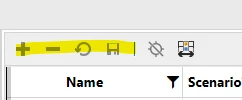
The purpose of this logic is to set a dashboard in "ReadOnly" mode when the parameter is set, and in this case, the read only mode I want to achieve is by setting "ShowDataManipulationButtons = False".

The BR logic used is the following:

If Component.DashboardComponentType = DashboardComponentType.SqlTableEditor Then
Dim sqlDefinition = XFSqlTableEditorDefinition.ReadXmlString(si,Component.XmlData)
sqlDefinition.ShowDataManipulationButtons = False
Component.XmlData = sqlDefinition.WriteXmlString(si)
End If
 
I have checked that after this point the component XmlData has changed, however, despite returning the modified component, the changes as not being displayed in the dashboard.
If instead of modifying an SqlEditor component, I change any property on a Button component, the changes are being displayed correctly.
 
Is this a known issue for the version 8.5.2 or is there any specific thing I might be missing for the SqlEditor component?
 
PD: I know I can achieve creating a copy of the component, but it doesn't makes sense to do something twice (or ten times) when there is a way to solve it dynamically once for all.
 
Thank you in advance!
Best answer by sameburn

Hi sameburn​ ,

That sounded promising but unfortunately nothing changed.

Looks like that method must be executed already after the "GetDynamicComponentsForDynamicDashboard" function, doesn't it?

Any other component modification I have tried has worked fine, it's just the SqlEditor component that is not taking any modifications.

Thank you!


Hi ogonzalez​ 

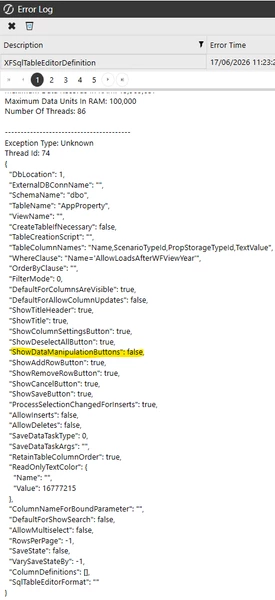
I managed to find time to build a quick test on this and can confirm that I get the same result in v9.0.0 for the SQL Table Editor Dashboard Component e.g. I can see the updated property in my  XFSqlTableEditorDefinition, when I log  e.g. 

... But when the Dynamic Dashboard Component renders, it ignores my xml update (if i physically change the property instead of dynamically, it works as expected). 

I would recommend reaching out to Support and share your findings.  I think this might be a bug with the SQL Table Editor component,  rendered dynamically.  

As per your original assertion this approach does work with other Dashboard components. 

Hope this helps

Sam

4 replies

Advisor
June 5, 2026

Hi ogonzalez

I think you need to save the dynamic component after you've changed it.

Im not in front on my PC at the moment but there is a method on the api called something like SaveDynamicComponentState

That should ensure any changes you make are reflected in the component collection returned 

Hope this helps

Sam

Advisor
June 5, 2026
api.SaveDynamicComponentState(si, dynamicDashboardEx.DynamicDashboard,dynamicComponent.DynamicComponentEx, WsDynamicItemStateType.EntireObject);


ogonzalezAuthor
Member
June 10, 2026

Hi sameburn​ ,

That sounded promising but unfortunately nothing changed.

Looks like that method must be executed already after the "GetDynamicComponentsForDynamicDashboard" function, doesn't it?

Any other component modification I have tried has worked fine, it's just the SqlEditor component that is not taking any modifications.

Thank you!