WorkflowEventHandler AfterEvent Action
Hello,
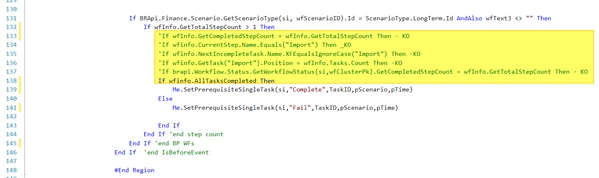
I am currently working on the Business Rule WorkflowEventHandler to update a custom table when certain tasks are manually completed in a workflow. The scripts shown in the screenshot are located in the section where Case Is = BREventOperationType.Workflow.UpdateWorkflowStatus, with the following condition: If NOT args.IsBeforeEvent Then.
I want to trigger the function after the current workflow is fully completed. However, despite testing various syntax alternatives, the function consistently executes before the workflow is fully completed.
For example, when I initiate the last step of the current workflow, the function is always triggered at line 141. For context, this issue occurs when the workflows consist of multiple tasks. The final task varies depending on the workflow—it may end with Import, Confirm, or another task.
Below are the syntaxes I tested but without success.
Could you please help me resolve this issue?
Thanks