Contributor
June 30, 2023
Solved

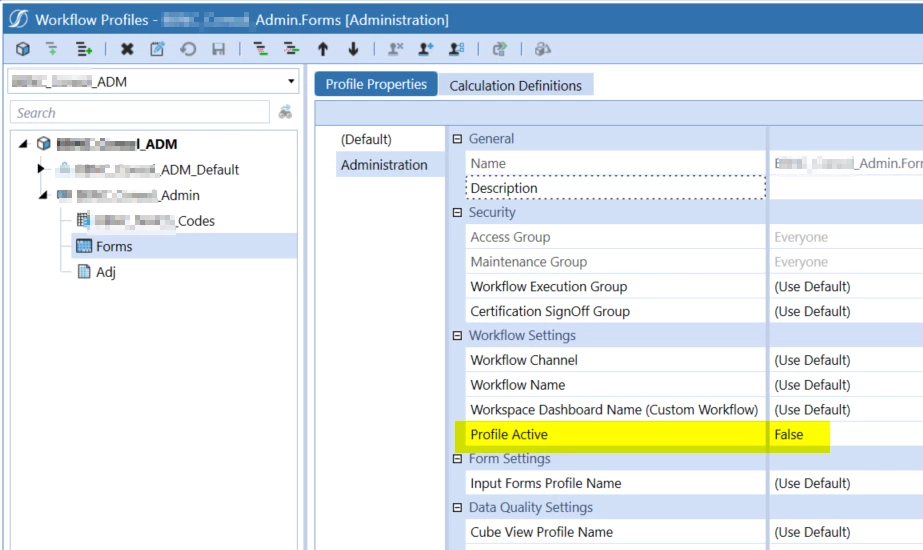
Workflow Profile Active Property

  • June 30, 2023
  • 4 replies
  • 0 views

I have a data adapter with a query that lists all workflow profiles in the application. I need to exclude from that list all the inactive profiles (Profile Active=False)

Where is this property in the database table?

2023-06-30 10_27_21-OneStream.png

Best answer by NicolasArgente

Gidon_Albert In your case above, if the scenario is not in the list then it is disabled. It will leave this table.

Take the code below and paste it into your data adaptor.
Test like this : 9 is a Variance scenario. Try there to disable and enable. You will see the result of the query. It will disapear.
Obgiously also chagne the name of the ProfileName. 

SELECT
  WorkflowProfileHierarchy.ProfileKey
 ,WorkflowProfileAttributes.ProfileKey
 ,WorkflowProfileHierarchy.ProfileName
 ,WorkflowProfileHierarchy.CubeName
 ,WorkflowProfileHierarchy.ProfileType
 ,WorkflowProfileAttributes.ScenarioTypeID
 ,WorkflowProfileAttributes.AttributeIndex
 ,WorkflowProfileAttributes.ProfileAttributeValue
FROM dbo.WorkflowProfileHierarchy
INNER JOIN dbo.WorkflowProfileAttributes
  ON WorkflowProfileHierarchy.ProfileKey = WorkflowProfileAttributes.ProfileKey
WHERE WorkflowProfileHierarchy.ProfileName LIKE '%Task_A1%'
AND WorkflowProfileAttributes.ScenarioTypeID = 9


 Later you can simplify this query to only get the profile names...

4 replies

Veteran
June 30, 2023

Hey Gibon!
Hope you are fine since the bootcamp! 🙂
You would also need the scenarios right? As you can have the same WF profile activated for BUDGET and disabled for ACTUALS. How would you handle that?

Contributor
June 30, 2023

Hi Nick,

Great to see you on OneCommunity!

You are correct. We need to account for the ScenarioTypeID, Property 1300 in the WorkflowProfileAtribute table is delimited by ScenarioTypeID so I suspect it stores the Profile Active status. However, values in that property don't change when I change the status in the Workflow Profile.

2023-06-30 11_48_20-OneStream.png 

Contributor
June 30, 2023

Thinking about it more, this isn't it. All the properties are ScenarioType specific. Property 1300 must be controlling something else. 

Veteran
June 30, 2023

Gidon_Albert In your case above, if the scenario is not in the list then it is disabled. It will leave this table.

Take the code below and paste it into your data adaptor.
Test like this : 9 is a Variance scenario. Try there to disable and enable. You will see the result of the query. It will disapear.
Obgiously also chagne the name of the ProfileName. 

SELECT
  WorkflowProfileHierarchy.ProfileKey
 ,WorkflowProfileAttributes.ProfileKey
 ,WorkflowProfileHierarchy.ProfileName
 ,WorkflowProfileHierarchy.CubeName
 ,WorkflowProfileHierarchy.ProfileType
 ,WorkflowProfileAttributes.ScenarioTypeID
 ,WorkflowProfileAttributes.AttributeIndex
 ,WorkflowProfileAttributes.ProfileAttributeValue
FROM dbo.WorkflowProfileHierarchy
INNER JOIN dbo.WorkflowProfileAttributes
  ON WorkflowProfileHierarchy.ProfileKey = WorkflowProfileAttributes.ProfileKey
WHERE WorkflowProfileHierarchy.ProfileName LIKE '%Task_A1%'
AND WorkflowProfileAttributes.ScenarioTypeID = 9


 Later you can simplify this query to only get the profile names...
Contributor
June 30, 2023

Got it.

So if ProfileAttributeValue for AttributeIndex 1300 is 1, the profile is active for the respective ScenarioTypeID.

It looks like:

  • ScenarioTypeID 0 = Actual
  • SceanrioTypeID 1 = Budget
  • ScenarioTypeID 9 = Variance

Not sure about all the other types.

Veteran
June 30, 2023

-5, "All"
-1, "Unknown"
0, "Actual"
1, "Budget"
2, "Flash"
3, "Forecast"
4, "FXModel"
5, "History"
6, "Model"
7, "Plan"
8, "Tax"
9, "Variance"
10, "Administration"
11, "Control"
12, "LongTerm"
13, "Operational"
14, "Sustainability"
15, "Target"
101, "ScenarioType1"
102, "ScenarioType2"
103, "ScenarioType3"
104, "ScenarioType4"
105, "ScenarioType5"
106, "ScenarioType6"
107, "ScenarioType7"
108, "ScenarioType8"

Please give some kudos if it helps. 🙂