
Newcomer
September 9, 2024

Workflow Import Error

  • September 9, 2024
  • 3 replies
  • 0 views

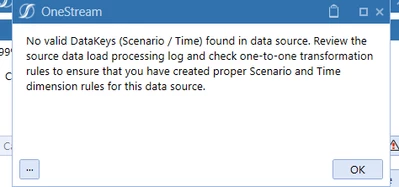
When loading data through a workflow- and when "Load and Transform" is clicked-> we can get Import error like below. Where are these import error stored? I need to put the contents of below error in an email.
ST1_0-1725900582757.png


Where are these errors stored. 

3 replies

Newcomer
September 9, 2024

It looks like you are executing this step manually, why do you need put the error content into a an email?

TT8Author
Newcomer
September 9, 2024

It will be executed ad a batch. Also, there will be other users who need to notified about what the error is.

I want to know where the error is stored.

Newcomer
September 9, 2024

If you are executing a batch process then you can get to most of that information via the items in the WorkFlowBatchFileColllection returned by the ExecuteFileHarvestBatch method

TT8Author
Newcomer
September 10, 2024

I need to capture that error and send in an email to multiple people, whether it is manually or through batch

OneStream Employee
September 11, 2024

Hi TT 

That error is telling you that your data source isn't picking up any data to process. Rather than any activity related to Load & Transform. I would recommend reviewing the source data load processing log in the first instance (as per error) and resolve, to ensure you are returning data; before seeking to automate this via batch harvest

Hope this helps

Sam