



RobbSalzmann
Legend
May 3, 2023
Solved

Unable to get value from another column in Parser BR

  • May 3, 2023
  • 3 replies
  • 0 views

OneStream V7.0.1
We have a Data Source that takes data file that has 12 data columns Oct ... Sep.
The year for the data in the 12 data columns is a field "Fiscal Year", the first column of the data file.
We have a Parser BR that is called on each of the 12 data columns that looks at the first field in each record to get the year and concatenates that with the M<number> month for each month column to give the correct Time dimension member in which to store the data.  e.g. 2023M1

The problem is we're getting the row header "Fiscal Year" instead of the year value in the record, so the string being returned looks like Fiscal YearM1

How do we get the year data from the first column instead of the column header?


Public Function Main(ByVal si As SessionInfo, ByVal globals As BRGlobals, ByVal api As ParserDimension, ByVal args As ParserArgs) As Object
                Dim fiscalYear As String() = {"Oct","Nov","Dec""Jan","Feb","Mar","Apr","May","Jun","Jul","Aug","Sep"}
                Dim YearColPosition As Integer = 0
                Dim year As String = String.Empty
                Dim month As String = String.Empty

            Try
                'Both of these keep giving us the column header "Fiscal Year" 
                'instead Of the value In the currently parsed record
                year = api.Parser.DelimitedParsedValues(YearColPosition)
                'year = args.Line.Split(",")(YearColPosition)

                'this marries the index of the month name in the months array
                'with M to give us the M1 notation for period.
                month = $"M{Array.IndexOf(fiscalYear, args.Value)+1}"
                BRApi.ErrorLog.LogMessage(si, $"Time: {year}{month}")

                Return $"{year}{month}"            
            Catch ex As Exception
                Throw ErrorHandler.LogWrite(si, New XFException(si, ex))
            End Try
        End Function
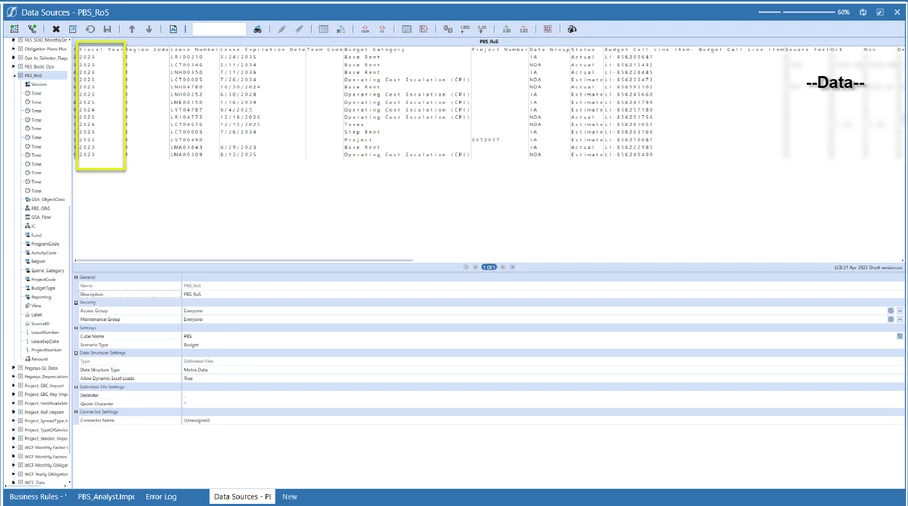
 

RobbSalzmann_0-1683144413630.png


Best answer by JackLacava

This approach should work

  1. add a new Source Dimension for Time of type "Matrix DataKey Text".
  2. change that data type to "DataKey Text" and assign it to the Fiscal Year column
  3. modify the rule above to just return M1, M2, etc.

The result should automatically concatenate year and period for the exploded records.

3 replies

OneStream Employee
May 3, 2023

This approach should work

  1. add a new Source Dimension for Time of type "Matrix DataKey Text".
  2. change that data type to "DataKey Text" and assign it to the Fiscal Year column
  3. modify the rule above to just return M1, M2, etc.

The result should automatically concatenate year and period for the exploded records.

RobbSalzmann
Legend
May 4, 2023

This and the following code in a BR called by each of the month columns solved for this requirement.  Thanks JackLacava  ckattookaran and franciscoamores for all the considerations.
RobbSalzmann_0-1683207568597.png


Newcomer
May 3, 2023

I think I've this rule somewhere 🤣🤣 I was not happy with the split the rule and then go by the index. I've to look this up and see if I still have it somewhere where you can lookup a value by giving the column header.


Newcomer
May 4, 2023

It was a struggle to remember where it was. Luckily I thought of blogging about it and found it in my drafts. (almost a year later ðŸ¤£)


Dim dimensionKey As String = String.Empty
Using dbConn As DbConnInfo = BRApi.Database.CreateApplicationDbConnInfo(si)
	' Layout name is nothing but the name of the data source
	Dim dbwIDParserWheres As New List(Of DbWhere) From {New DbWhere("LayoutName", DbOperator.IsEqualTo, "SalesPlanning_Temp")}
	Dim layoutKey As String = BRApi.Database.LookupRowFieldValue(si, "App", "ParserLayouts", dbwIDParserWheres, "UniqueID", "")
	' we need to get the dimension key from the parserdimensions table
	' key for the sorteddictonary is as follows
	' datatype\displayorder\dimensionname
	If Not String.IsNullOrEmpty(layoutKey)
		Dim dbwParserDimWheres As New List(Of DbWhere) From {New DbWhere("LayoutKey", DbOperator.IsEqualTo, layoutKey), New DbWhere("DimensionName", DbOperator.IsEqualTo, "Ic")}
		dimensionKey = BRApi.Database.LookupRowFieldValue(si, "App", "ParserDimensions", dbwParserDimWheres, "Concat(Concat(Concat(Concat(DimensionDataType, '\'),DisplayOrder), '\') , DimensionName)", "")						
	End If
End Using

' get IC dimension of current line, location is mapped to IC
Dim icDim As ParserDimension =  api.Parser.Dimensions.Item(dimensionKey)				
Dim locationCode As String = icDim.Value


I've updated it to use the DbWhere clause. 

Newcomer
May 4, 2023

Hi Celvin,

dimension keys and all other parser layout details is also available in the transformer object.

Api.Parser.Dimensions is a dictionary which has ParserDimension as value. In that object I think we can find all details for the line being processed.

There is also api  api.Parser.GetFieldValuesForSourceDataRow(si As SessionInfo, rowID As Guid) wew you can pass the rowID to get a dictionary with all values from source row. RowID is stored in the ParserDimension object.

Newcomer
May 4, 2023

I'd need to do some testing but you could assign year column to attribute and then use it to concatenate in BR assigned to Time. To get Mx you can use replace expression in Time dim, similar to this:


franciscoamores_0-1683182382437.png


RobbSalzmann
Legend
May 4, 2023

Francisco! 🙂
We thought about using an attribute also, but are unable to figure out which object the attribute is hiding in in the BR, or if the BR even has access to it.  Maybe you will find it in your testing.

Back in the days of Upstream, the record being operated on was one of the arguments of the parsing/transformation function.  Its odd how that design didn't follow here. It made things very easy having the entire record available while parsing, as it's common to apply logic using the contents of multiple columns.

OneStream Employee
May 4, 2023

It does work like that, just not with Matrix loads.