Newcomer
July 5, 2024
Solved

Set parameter from Task Scheduler

  • July 5, 2024
  • 1 reply
  • 0 views

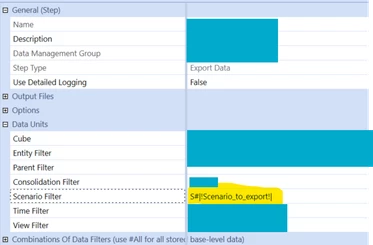
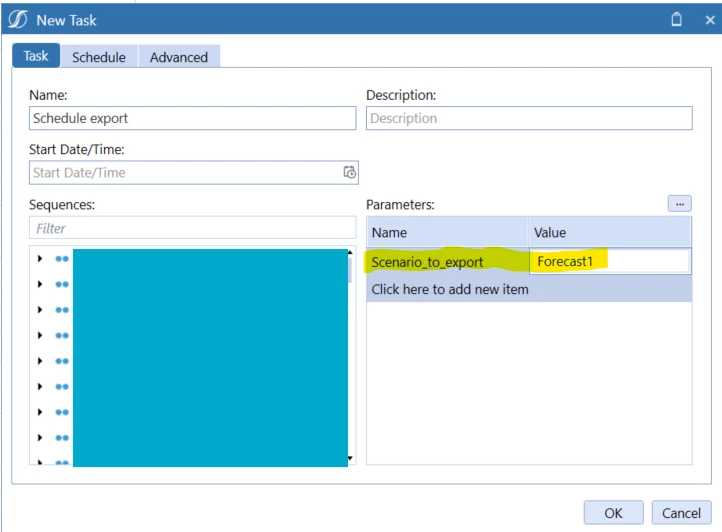
Hi, is there a way to set a parameter via task scheduler and pass it to the data management sequence and also its' steps?

I've been able to pass a parameter to the sequence but I need it to reach the DM-step.

(pictures to prove example)
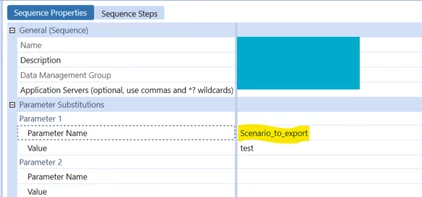
dm-seq1.pngdm-step1.pngscheduler1.png

Best answer by T_Kress

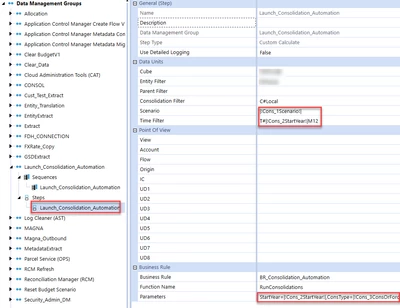
Have you tried adding the parameter into your step, not just on the DM sequence.  Here is one example:

T_Kress_0-1720187043119.png


1 reply

T_Kress
OneStream Employee
T_KressOneStream EmployeeAnswer
OneStream Employee
July 5, 2024

Have you tried adding the parameter into your step, not just on the DM sequence.  Here is one example:

T_Kress_0-1720187043119.png


SaraAuthor
Newcomer
July 8, 2024

Hi Teresa!

I've tried it but it doesn't seem to get the value. Do I have to create a parameter in the dashboard maintenance unit first?


Regards

Sara

SaraAuthor
Newcomer
July 8, 2024

Nevermind, it was only a typo 🙂 thanks!