
Newcomer
January 31, 2022

Saving data released on a gridview directely to a shared folder

  • January 31, 2022
  • 4 replies
  • 0 views

Dear OneStream community,

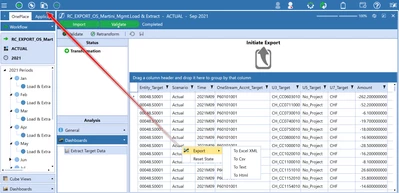
I'm trying to save the data on this gridview on a shared folder, does anyone know how i can do it ? 
hoaphan_0-1643642823733.png

Once i will save it on a shared folder, i will put a business rule on the "initiate export" to tranform it and eport it in my computer this time.
Please advice if you have any idea how i can do this,
Thank you

4 replies

OneStream Employee
January 31, 2022
hoaphanAuthor
Newcomer
February 1, 2022

Hi Christian,
Thank you for your answer, yes it your BR will help me a lot,i have one more question what type of BR is yours? extesibility Rule or Dashboard Extender one?
Regards

Newcomer
February 3, 2022

Hi hoaphan 


Were you able to implement this BR? I'm trying to figure how did you setup the source target? 

OneStream Employee
February 3, 2022

Yes, I used it several times. You just need to use the same sql statement that you used for the grid with one of the brapi.database functions.

OneStream Employee
February 1, 2022

It can be both, if you want it behind a button, you need a dashboard extender, if you want a data management job, or if you like to run it directly form the business rules sceen, you can use an extensibility rule.

Cheers

OneStream Employee
February 3, 2022

So to call that function from a dashboard, you have two options really, to simplify it a little.

1: Create the function in a Dashboard extender Rule that is triggered from the Dashboard

2: Create an extensibility rule, setup a DataManagement job to trigger that rule, then setup the button on the dashboard to trigger the DataManagement sequence.

The potential benefit of option 2 is that now you also have a way to Schedule/Automate the same DataManagement job to generate the file, which option 1 does not give you.