
Newcomer
October 24, 2024
Solved

SAP SIC Data Source

  • October 24, 2024
  • 2 replies
  • 0 views

Once my SIC Gateway is online, how can I apply the data sources to specific workflow profiles?

The "data source name" shown on the Custom System Configuration is not one of the available options to select for the workflow profiles.
Best answer by JakeSteinberg

Shawn,

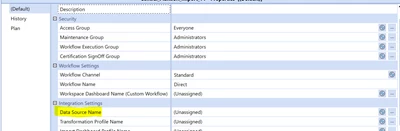
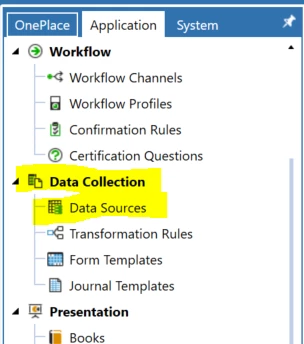
The "Data Source Name" you see on the Workflow Profiles page is meant for you to choose a Data Source configured in the Data Source tab in the Application pane.

JakeSteinberg_2-1729785274977.png


JakeSteinberg_0-1729784922426.png

In the Data Source configuration, I would recommend setting up a Connector data source paired with a Connector Business Rule which queries the external source you are using with SIC. If you would like example code on querying an external database using a connector, please let me know.


2 replies

Newcomer
October 24, 2024

The SIC provides one or more "Connections" to OneStream.  You will still need to build a Connector Data Source that uses a Connector Business Rule that in turn uses that connection to query SAP.  The Data Source is then what gets attached to an Import Workflow.  So, having the SIC up and running is great, but you still have a fair bit of heavy lifting before you can see anything from a Workflow.

Contributor
October 24, 2024

Shawn,

The "Data Source Name" you see on the Workflow Profiles page is meant for you to choose a Data Source configured in the Data Source tab in the Application pane.

JakeSteinberg_2-1729785274977.png


JakeSteinberg_0-1729784922426.png

In the Data Source configuration, I would recommend setting up a Connector data source paired with a Connector Business Rule which queries the external source you are using with SIC. If you would like example code on querying an external database using a connector, please let me know.