Newcomer
Mar 31, 2023 12:12 PM UTC
Solved

REST API Endpoint to extract data from cube view

Is there a way to extract data from a cubeview with the OneStream REST API?  I've tried using the

"DataProvider/GetAdoDataSetForCubeViewCommand?api-version=5.2.0" endpoint from the doc via Python - however
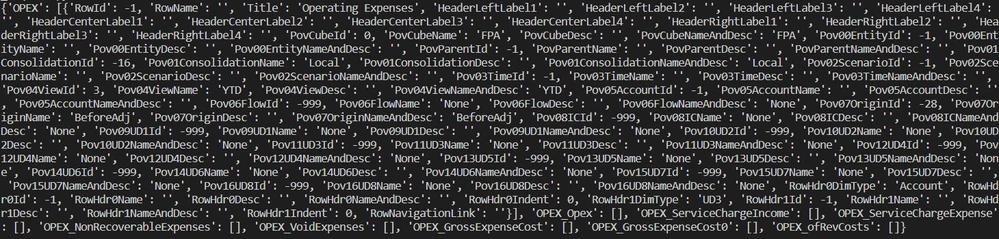
when I try to print the result from the response, it doesn't contain data, only metadata ( i.e 'Title', 'HeaderLeftLabel1' etc as seen in the screenshot below)
 
dbug_0-1680264611829.png


Im trying to see the numerical values within the cells. Can this be done ?
Veteran
Mar 31, 2023 2:01 PM UTC

Yes. You can use that copy paste in the body of the API call.

{
    "BaseWebServerUrl": "https://contoso.onestreamcloud.com/OneStreamWeb",
    "ApplicationName": "GolfStream_v37",
    "CubeViewName": "Gross Margin",
    "DataTablePerCubeViewRow": false,
    "ResultDataTableName": "ResultDataTableNames",
    "CustomSubstVarsAsCommaSeparatedPairs": "",
    "CubeViewDataTableOptions": {
				"IncludeTitle": false,
				"IncludeHeaderLeftLabel1" : true,
				"IncludeHeaderLeftLabel2" : true,
				"IncludeHeaderLeftLabel3" : true,
				"IncludeHeaderLeftLabel4" : true,
				"IncludeHeaderCenterLabel1" : true,
				"IncludeHeaderCenterLabel2" : true,
				"IncludeHeaderCenterLabel3" : true,
				"IncludeHeaderCenterLabel4" : true,
				"IncludeHeaderRightLabel1" : true,
				"IncludeHeaderRightLabel2" : true,
				"IncludeHeaderRightLabel3" : true,
				"IncludeHeaderRightLabel4" : true,
				"IncludePovCube" : true,
				"IncludePovEntity" : true,
				"IncludePovParent" : true,
				"IncludePovCons" : true,
				"IncludePovScenario" : true,
				"IncludePovTime" : true,
				"IncludePovView" : true,
				"IncludePovAccount" : true,
				"IncludePovFlow" : true,
				"IncludePovOrigin" : true,
				"IncludePovIC" : true,
				"IncludePovUD1" : true,
				"IncludePovUD2" : true,
				"IncludePovUD3" : true,
				"IncludePovUD4" : true,
				"IncludePovUD5" : true,
				"IncludePovUD6" : true,
				"IncludePovUD7" : true,
				"IncludePovUD8" : true,
				"IncludeMemberDetails": true,
				"IncludeRowNavigationLink" : true,
				"IncludeHasDataStatus" : true,
				"IncludeAnnotation" : true,
				"IncludeAssumptions" : true,
				"IncludeAuditComment" : true,
				"IncludeFootnote" : true,
				"IncludeVarianceExplanation" : true
				}
}
11 replies

Employee - Sage
Mar 31, 2023 1:17 PM UTC

As far as I know, that's supposed to return data as well - note the format is organized by rows... This requires however that the cubeview will return some data with default settings, without relying on UserPov (you can pass variables in the post call).

If that's not possible for whatever reason, a simple fallback is to configure a DataAdapter that uses the cubeview, and then use the GetAdoDataSetForAdapter instead.

dbugAuthor
Newcomer
Mar 31, 2023 1:49 PM UTC

Hi JackLacava Thanks for getting back so fast !

I have tried passing variables (the only ones I'm aware of are the ones from the doc - see screenshots below from the doc examples)

dbug_0-1680270294622.png

dbug_2-1680270343326.png

Are these the variables you're referring to ? If so, are you perhaps aware of other variables that would enable data to be visible? Otherwise I will attempt your DataAdapter suggestion instead


Employee - Sage
Mar 31, 2023 2:04 PM UTC

What I meant is: check the definition of your cubeview for things like the following:

JackLacava_0-1680271167060.png

That |WFYear| variable cannot be resolved automatically when executing the view from REST. So you have to pass the required value with the property "CustomSubstVarsAsCommaSeparatedPairs": [comma separated list of key value pairs as substitution variables with the following format: "VariableName1=[VariableValue1],VariableName2= [VariableValue2],..."]

In addition, make sure that all dimensions have a member specified either in the main POV or in row/columns, because via REST there won't be a UserPOV to fallback on.

Veteran
Mar 31, 2023 2:01 PM UTC

Yes. You can use that copy paste in the body of the API call.

{
    "BaseWebServerUrl": "https://contoso.onestreamcloud.com/OneStreamWeb",
    "ApplicationName": "GolfStream_v37",
    "CubeViewName": "Gross Margin",
    "DataTablePerCubeViewRow": false,
    "ResultDataTableName": "ResultDataTableNames",
    "CustomSubstVarsAsCommaSeparatedPairs": "",
    "CubeViewDataTableOptions": {
				"IncludeTitle": false,
				"IncludeHeaderLeftLabel1" : true,
				"IncludeHeaderLeftLabel2" : true,
				"IncludeHeaderLeftLabel3" : true,
				"IncludeHeaderLeftLabel4" : true,
				"IncludeHeaderCenterLabel1" : true,
				"IncludeHeaderCenterLabel2" : true,
				"IncludeHeaderCenterLabel3" : true,
				"IncludeHeaderCenterLabel4" : true,
				"IncludeHeaderRightLabel1" : true,
				"IncludeHeaderRightLabel2" : true,
				"IncludeHeaderRightLabel3" : true,
				"IncludeHeaderRightLabel4" : true,
				"IncludePovCube" : true,
				"IncludePovEntity" : true,
				"IncludePovParent" : true,
				"IncludePovCons" : true,
				"IncludePovScenario" : true,
				"IncludePovTime" : true,
				"IncludePovView" : true,
				"IncludePovAccount" : true,
				"IncludePovFlow" : true,
				"IncludePovOrigin" : true,
				"IncludePovIC" : true,
				"IncludePovUD1" : true,
				"IncludePovUD2" : true,
				"IncludePovUD3" : true,
				"IncludePovUD4" : true,
				"IncludePovUD5" : true,
				"IncludePovUD6" : true,
				"IncludePovUD7" : true,
				"IncludePovUD8" : true,
				"IncludeMemberDetails": true,
				"IncludeRowNavigationLink" : true,
				"IncludeHasDataStatus" : true,
				"IncludeAnnotation" : true,
				"IncludeAssumptions" : true,
				"IncludeAuditComment" : true,
				"IncludeFootnote" : true,
				"IncludeVarianceExplanation" : true
				}
}
dbugAuthor
Newcomer
Mar 31, 2023 2:49 PM UTC

Thanks a lot for the reply NicolasArgente ! At first I was going to omit them but then realized omitting them seems to set everything to 'True', which would show some unnecessary data for my purpose - hence I indeed needed to include them in the body.

As JackLacava mentioned above, I had an issue with my custom variables in my cubeview which seemed to be hiding the data.

Thanks to you both !

Newcomer
Oct 13, 2023 8:31 PM UTC

Could someone please help with the BR code to parse the CustomSubstVarsAsCommaSeparatedPairs please. If I use an Extender then will that work. Any help is appreciated. 


Thank You.