
Newcomer
May 26, 2022
Solved

Members are in unedit mode. How to i make it editable and delete them

  • May 26, 2022
  • 4 replies
  • 0 views

Team

I have 2 concerns:-

  1. Few members under account dimension i see grey out which am not able to edit. How do i make them editable
  2. How do i mass delete the members in Hierarchy and under Orphans without loading the entire metadata


Regards

Varun
 

Best answer by NidhiMangtani

Hi,

1. Your account members appear in gray as they are inherited at Account_VK level. Please access these at DRM_Account level to edit. Kindly read about extensibility feature of OneStream.

2. XML load is easiest to delete bulk metadata members along with their relationships. If selecting bulk members looks tedious to you, pull just one member in XML and then edit this XML in notepad++ to add additional metadata members you want to delete.

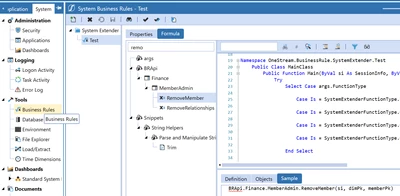
Alternatively you can write a system business rule to remove the required metadata members along with their relationships.

BhartiParyani_0-1653567881313.png


4 replies

Veteran
May 26, 2022

Hi,

1. For this point it is not clear where are you seeing the account members in read only mode, is it in a cube view or spreadsheet or form template or journal template. Check basic things like "Allow Input" property should be true for those accounts. All other intersections like origin, entity, etc should be base nodes. Workflow channel should be appropriate to allow input. 

2. Refer to KB article for mass deleting metadata members:

https://onestreamsoftware.service-now.com/sp?id=kb_article&sys_id=2ce683b7dbd3a380a5405eea4b961949

You can also explore ACM marketplace solution for this.

Hope this helps.

SKVKAuthor
Newcomer
May 26, 2022

Thanks Bharati for your response.


  1. Am refereeing to Account members  under "Dimensions" > "Account Dimensions". And yes, the accounts have allow inputs set as True
  2. The article talks about deleting member One by one since we need to manually by clicking + button
Veteran
May 26, 2022

Hello,

1. Still not clear on which screen are you seeing the accounts as read only.

2. Please read the second method mentioned in KB article "Use the Load/Extract Metadata feature in OneStream". 

https://onestreamsoftware.service-now.com/sp?id=kb_article&sys_id=2ce683b7dbd3a380a5405eea4b961949


SKVKAuthor
Newcomer
May 26, 2022

Hi

Please see the attached screenshot for 1 & 2.

#1 - Application > Dimensions > Account Dimension is the screen am OneStm_Q.JPGrefereeing to

#2 - Pls refer screenshot

Veteran
May 26, 2022

Hi,

1. Your account members appear in gray as they are inherited at Account_VK level. Please access these at DRM_Account level to edit. Kindly read about extensibility feature of OneStream.

2. XML load is easiest to delete bulk metadata members along with their relationships. If selecting bulk members looks tedious to you, pull just one member in XML and then edit this XML in notepad++ to add additional metadata members you want to delete.

Alternatively you can write a system business rule to remove the required metadata members along with their relationships.

BhartiParyani_0-1653567881313.png


Newcomer
June 1, 2022

For #2, If data exists for these orphan members, Will this remove member work even without clearing the data?

SKVKAuthor
Newcomer
May 26, 2022

Thanks a lot !! I was able to get to the point#1.

Am very new to the OneStream.. If you can share a sample business rule to delete members/hierarchy, that will help please.