
Newcomer
August 12, 2024
Solved

launch automatically the import that uses a connector data source

  • August 12, 2024
  • 3 replies
  • 0 views

Hello,

I'm looking for a function to put in a extensibility rule that will be handled via a data management sequence to execute an automatic import in a workflow that uses a connector datasource:
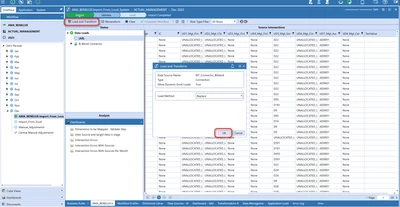
mtejjini_1-1723468502331.png


This function : Dim batchInfo As WorkflowBatchFileCollection = BRApi.Utilities.ExecuteFileHarvestBatch(si, fixedScenario, systemTime, valTransform, valIntersect, loadCube, processCube, confirm, autoCertify, False) executes the harvest file, in my case i want it to execute the connector businessrule

Does anyone know how to do this? your help is much appreciated.
thank you mtejjini_2-1723468509958.png


Best answer by TheJonG

Here is a BRApi call that will trigger an Import from an import step that uses a connector rule. Note the SourceDataOriginTypes.FromDirectConnection argument which specifies that it is a direct connect.

Dim impProcessInfo As LoadTransformProcessInfo = BRApi.Import.Process.ExecuteParseAndTransform(si, si.WorkflowClusterPk, "", Nothing, TransformLoadMethodTypes.Replace, SourceDataOriginTypes.FromDirectConnection, True)


3 replies

TheJonGOneStream EmployeeAnswer
OneStream Employee
August 12, 2024

Here is a BRApi call that will trigger an Import from an import step that uses a connector rule. Note the SourceDataOriginTypes.FromDirectConnection argument which specifies that it is a direct connect.

Dim impProcessInfo As LoadTransformProcessInfo = BRApi.Import.Process.ExecuteParseAndTransform(si, si.WorkflowClusterPk, "", Nothing, TransformLoadMethodTypes.Replace, SourceDataOriginTypes.FromDirectConnection, True)


mtejjiniAuthor
Newcomer
August 13, 2024

Thank you, this is working!

OneStream Employee
August 13, 2024

So, I see you have had one reply above, which works, but just to expand on this a little.

You can use that function you are referring to, all you would need to do is to first make sure you create an empty file in the Batch Harvest folder, lets call it a "trigger" file, with the correct naming convention to identify the WF name, Scenario, Time and load method (just the same as it would have been a file containing data). Then when you execute the BRApi.Utilities.ExecuteFileHarvestBatch the system will know its a connector based import workflow and will trigger the import to take place.

Secondly, there is a solution available on Solution Exchange, in OpenPlace, called "Data Import Schedule Manager" which is a tool to help you schedule connector based workflows in a very easy way.

Hope that helps.

mtejjiniAuthor
Newcomer
August 14, 2024

Hello JoakimK?,
I downloaded the "Data Import Schedule Manager" solution and set up an automatic import with it but the import failed because of this:

mtejjini_1-1723622672740.png


mtejjini_0-1723622489455.png

Do you know how this can be solved ? 
Thank you for you help.


mtejjiniAuthor
Newcomer
August 14, 2024

The version of the solution downloaded is DSM_PV8.2.0_SV100_PackageContents.
Framework 4.8

mtejjiniAuthor
Newcomer
August 13, 2024

Thank you so much Joakim, i will look at the solution available on OnePlace 👌👍