

RobbSalzmann
Legend
June 6, 2023

How to Update UI Workflow Status When Run Via Extensibility Rule

  • June 6, 2023
  • 2 replies
  • 0 views

We have several workflows that involve many steps.  The requirement is to have a button in a dashboard that runs the entire sequence or sequences.  This is coded and works.

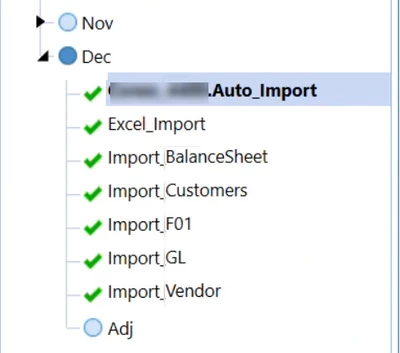
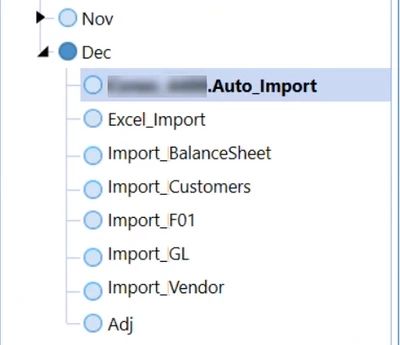
The problem is when running workflows using a BR, the UI status doesn't update unless the refresh button is clicked.  This action is not practical when operating in a dashboard because it closes the dashboard.

How can I update the UI workflow status indications from the business rule?

I need to go from this:
RobbSalzmann_0-1686078983970.png

To this:

RobbSalzmann_1-1686079008381.png

Without clicking this:

RobbSalzmann_1-1686157396227.png


Or leaving the dashboard.

2 replies

Veteran
June 7, 2023

Hi RobbSalzmann 
Have you tried that :


'Can be called from a dashboard extender business rule:
Dim selectionResult As New XFSelectionChangedTaskResult()
selectionResult.WorkflowWasChangedbyBusinessRule = True
Return selectionResult

Source : Accepted Code Samples
Thanks

RobbSalzmann
Legend
June 7, 2023

Thanks NicolasArgente .  Yes, I have the following, with no effect on updating the UI:


  Dim selectionChangedTaskResult As XFSelectionChangedTaskResult = Nothing      
...

   selectionChangedTaskResult = New XFSelectionChangedTaskResult With { 
   	.IsOK = True, 
	.WorkflowWasChangedByBusinessRule = True, 
	.PovWasChangedByBusinessRule = True,
	.ChangeSelectionChangedUIActionInDashboard = True
	.ChangeSelectionChangedUIActionInDashboard = XFSelectionChangedUIActionType.Refresh
   }

...

Return selectionChangedTaskResult 


MikeG
Contributor
June 7, 2023

I was able to get this to work.  There are API calls to complete each step along the way, Import > Validate > Load (or Process) or also Confirm steps.  See if you can grab snippets of the code below to support your specific rule and solution:


selectionChangedTaskResult.WorkflowWasChangedByBusinessRule = True
selectionChangedTaskResult.IsOK = True
selectionChangedTaskResult.ShowMessageBox = True
'---other code
'----set status
If Not wfStatus.GetOverallStatus().Equals(WorkflowStatusTypes.Completed) Then

'Complete workspace
BRApi.Workflow.Status.SetWorkflowStatus(si, currentWF, StepClassificationTypes.Workspace, WorkflowStatusTypes.Completed, "Workspace Completed", "", "User clicked complete workflow", Guid.Empty)
'Complete import
Dim objLoadTransformProcessInfo As LoadTransformProcessInfo = BRApi.Import.Process.ExecuteParseAndTransform(si, currentWF, "", Nothing, TransformLoadMethodTypes.Replace, SourceDataOriginTypes.FromDirectConnection, False)
'Complete validate
Dim objValidationTransformationProcessInfo As ValidationTransformationProcessInfo = BRApi.Import.Process.ValidateTransformation(si, currentWF, True)
Dim objValidateIntersectionProcessInfo As ValidateIntersectionProcessInfo = BRApi.Import.Process.ValidateIntersections(si, currentWF, True)
'Complete Load
Dim objLoadCubeProcessInfo As LoadCubeProcessInfo = BRApi.Import.Process.LoadCube(si, currentWF)

End If 'Not Completed
Return selectionChangedTaskResult
RobbSalzmann
Legend
June 7, 2023

Thanks MikeG .  Can you show the instantiation and initialization of wfStatus and currentWF please?

I'm a bit confused by the BRApi call to set the status of the workflow to completed before running the steps below it?

Is the line 
"BRApi.Workflow.Status.SetWorkflowStatus(si, currentWF, StepClassificationTypes.Workspace, WorkflowStatusTypes.Completed, "Workspace Completed", "", "User clicked complete workflow", Guid.Empty)"
the part that compels your workspace UI to update with the completed workflow?

MikeG
Contributor
June 7, 2023

I created a Workspace that essentially is a summary of all the Workflow tasks I want to automate.  In your instance, you would not need to complete the 'Workspace' complete step, you could delete that or comment it out, and in your solution the first step in your Workflow to complete would be the 'Import' task/step.