Contributor
March 31, 2023
Solved

How to make the workflow year show FY20XX instead of 20XX

  • March 31, 2023
  • 2 replies
  • 0 views

Hello,

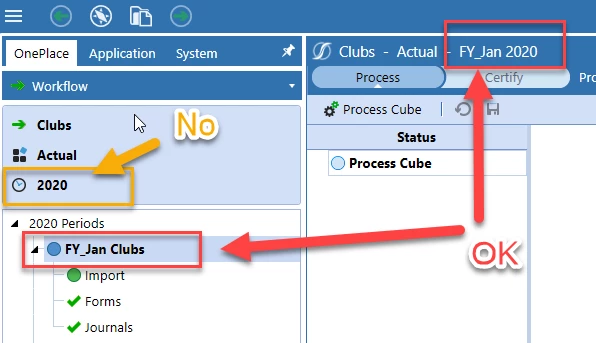
I was wondering if it's possible to change the workflow year to show FY20XX instead of just 20XX. In our legacy system we used FY20XX as our current year and we would like to continue with that style. I cannot seem to find a spot where to change it but I've seen images of other workflows with the year showing FY20XX.


Thanks,


Will
Best answer by NicolasArgente

Hi Will,

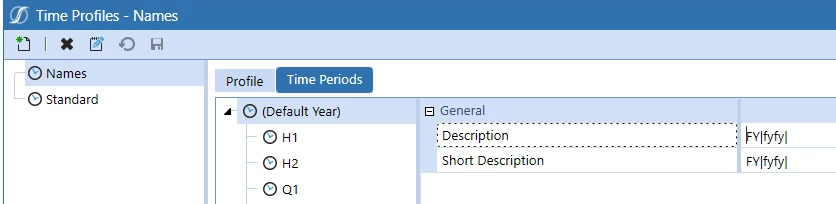
There are 2 places that you can "customise" the time : 
1- Under system > Time Dimensions before app creation.
2- Under Application > Cube > Time Profiles. That is the place you are looking for.
You can change the descriptions of time to look like that. Some changes are possible but are limited. (Or not that I am aware of)
Hope it helps

NicolasArgente_2-1680503900748.png


NicolasArgente_1-1680503834811.png


2 replies

Veteran
April 3, 2023

Can you share image of the workflow with FY2XXX.

Veteran
April 3, 2023

Hi Will,

There are 2 places that you can "customise" the time : 
1- Under system > Time Dimensions before app creation.
2- Under Application > Cube > Time Profiles. That is the place you are looking for.
You can change the descriptions of time to look like that. Some changes are possible but are limited. (Or not that I am aware of)
Hope it helps

NicolasArgente_2-1680503900748.png


NicolasArgente_1-1680503834811.png


Contributor
April 3, 2023

Hi Nicolas,

So where you put no, that can never read as FY2020? It will always say 2020 or whatever year we're doing WF for?

Thanks

Veteran
April 3, 2023

Correct. As far as my knowledge goes 🙂