
Newcomer
December 13, 2021
Solved

Excel load Time

  • December 13, 2021
  • 4 replies
  • 0 views

Hello everyone,
Hope you are doing good.
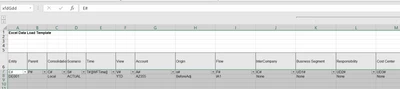
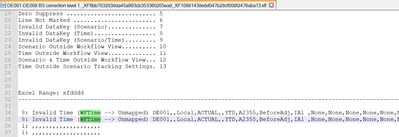
I have a little question, im trying to load an excel data file using a time parameter that will allow to put load the workflow time automatically, but OS tell me that |WFTime| is Unmapped.
hoaphan_0-1639412307131.png


hoaphan_1-1639412333897.png

does anyone know if using the parameter wrongly or shouldi use another parameter ? 
Thanks in advance for you help.
Best answer by tsandi

Did you try as described in the documentation?

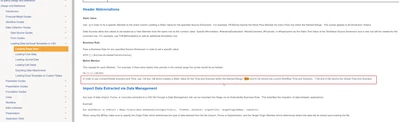
"In order to use Current/Global Scenario and Time, use .C# and .G# which creates a Static Value for the Time and Scenario within the Named Range.  T.C# and S.C# returns the current Workflow Time and Scenario.  T.G# and S.G# returns the Global Time and Scenario."

tsandi_0-1639412727987.png

You could also configure the data source to use CurrentDataKey for time

4 replies

hoaphanAuthor
Newcomer
December 13, 2021

The parameter im using is this one T#:[|WFTime|] .
thanks 

tsandiOneStream EmployeeAnswer
OneStream Employee
December 13, 2021

Did you try as described in the documentation?

"In order to use Current/Global Scenario and Time, use .C# and .G# which creates a Static Value for the Time and Scenario within the Named Range.  T.C# and S.C# returns the current Workflow Time and Scenario.  T.G# and S.G# returns the Global Time and Scenario."

tsandi_0-1639412727987.png

You could also configure the data source to use CurrentDataKey for time

hoaphanAuthor
Newcomer
December 14, 2021

Hello,
"You could also configure the data source to use CurrentDataKey for time" 
this doesnt work, it seems that all the parameters in the excel data source don't work, if you want to put a complex expression or a business rules it won't work by putting it in the excel datasource even a static value won't.
all the param should be set in the excel file.
i'm saying this because of all the tests i did, i can be wrong, if so please don't hesitate to share if you have others ideas.

Thanks

hoaphanAuthor
Newcomer
December 13, 2021

Hello Tsandi, "T.C#"worked.
Grazie mille 🙂 


OneStream Employee
December 14, 2021

Did you try removing the time (in this case) dimension entirely form the excel file? Lets say that generally speaking excel based load should be used for smaller amount of data and in any case the columns that are not relevant, such as time in this case, can be hidden in the excel file itself. For larger volumes it is better to use a flat file which will perform better. 

hoaphanAuthor
Newcomer
December 14, 2021

Yes i did try, when you remove the column time from the excel file OS pops up a message error saying that the dimension time is defined in the cube, so it's necessary to put in the excel file all the dimension that are defined in the cube (Time dimension is a native dimension, i don't think it can be undefined).

OneStream Employee
December 14, 2021

Ok thanks for testing that. Since the T.C# worked instead would be be able to mark the answer as a solution?

hoaphanAuthor
Newcomer
December 14, 2021

Yes absolutey and i thank you a lot 🙂