Contributor
August 21, 2023
Solved

Deleted DM job

  • August 21, 2023
  • 2 replies
  • 0 views

Hi,

Did anyone have any situation when they deleted a DM Job by accident?

How can you retrieve that? There's no Orphaned area for DM jobs for us, unfortunately. I can't find any back up for it.

Would save us a lot of time if we avoid rebuilding it.

Thanks in advance.

Regards,

Irina

Best answer by NicolasArgente

Hi Irina, 
I hope you are doing fine!
If the DM jobs got deleted, the easiest for you could be to ask OS to recover a back up of the application. It will be there.
Also, I recommend that you use the task scheduler to run a full XML back up on a daily basis. It is an easiest and independant way to recover lost metadata. Your consultant could implement that for you. There should be a guide on this community too. I will try to have a look for you.
Now, there is also another more manual approach and it is to use the Audit tables. 

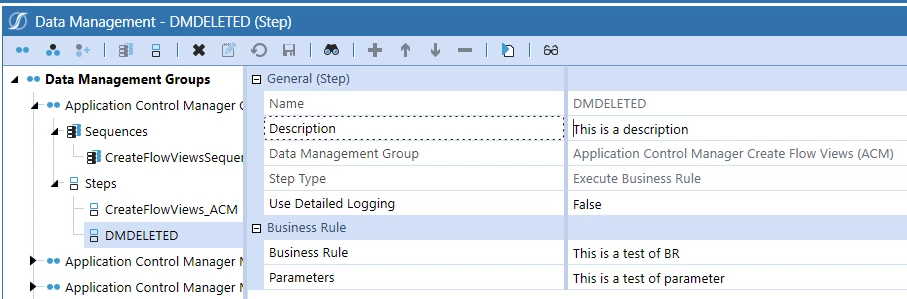
 Lets assume you created this DM Step below
NicolasArgente_0-1692692278320.png

If you go to the System > Database > AuditDataMgmtStep table you should see something like this. Do a filter on your DMJob name (I assume the name was unique)

NicolasArgente_1-1692692358010.png

Look on the left side you will find the XML content of the DM job. 

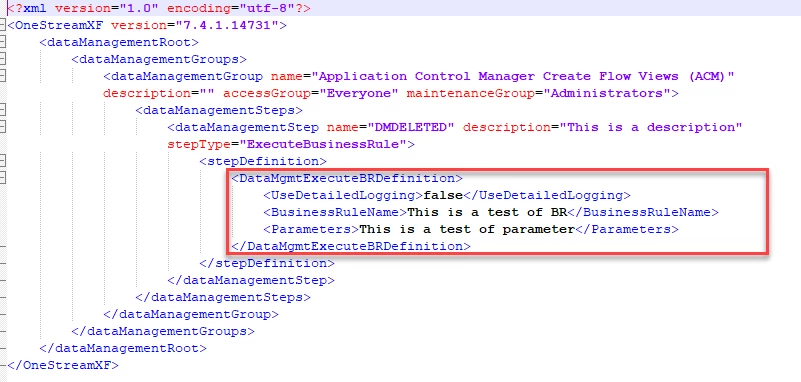
And from there you can recreate the XML file like this to reload in OS. You are still missing some information (outside of the red box)
NicolasArgente_2-1692692480615.png

I know that this method seems a bit more complex.  Easiest is to ask for a back up in another app.

Hope it helps,

2 replies

Veteran
August 22, 2023

Hi Irina, 
I hope you are doing fine!
If the DM jobs got deleted, the easiest for you could be to ask OS to recover a back up of the application. It will be there.
Also, I recommend that you use the task scheduler to run a full XML back up on a daily basis. It is an easiest and independant way to recover lost metadata. Your consultant could implement that for you. There should be a guide on this community too. I will try to have a look for you.
Now, there is also another more manual approach and it is to use the Audit tables. 

 Lets assume you created this DM Step below

NicolasArgente_0-1692692278320.png

If you go to the System > Database > AuditDataMgmtStep table you should see something like this. Do a filter on your DMJob name (I assume the name was unique)

NicolasArgente_1-1692692358010.png

Look on the left side you will find the XML content of the DM job. 

And from there you can recreate the XML file like this to reload in OS. You are still missing some information (outside of the red box)

NicolasArgente_2-1692692480615.png

I know that this method seems a bit more complex.  Easiest is to ask for a back up in another app.

Hope it helps,

Contributor
August 22, 2023

Hi Nicolas,

Thank you for your help. This is really useful.

I did Admin course with you 2 years ago and I found it interesting and I really enjoyed it.

Best wishes,

Irina

Veteran
August 22, 2023

Thanks IrinaDragusanu , for sure I remember your participation in the ABA. Good to hear from you. Hope to see you soon in maybe another training!

Veteran
August 23, 2023

Hi Irina, 
I would disagree with those people :-). I used it many many times...
It can be schedule overnight and only for DEV environement. It is not taking a lot of space as it is on containing XML metadata. It does not contain Data. 
Look the code can be found here and was even created by our beloved guru the OSAdmin 🙂
https://community.onestreamsoftware.com/t5/Accepted-Code-Samples/Extender-Automate-Application-Metadata-Backup/ta-p/6914
Have a good day,
Nic