
Expert
July 20, 2023
Solved

Connector rule - drill back IF statement

  • July 20, 2023
  • 1 reply
  • 0 views

Hi,

I am experiencing a strange behavior with a piece of code in the drill back of a connector rule.

I have the following piece of code:


If StageTableFields.StageSourceData.DimUD1.XFEqualsIgnoreCase("Zero") Then
    whereClause.Append("And (Department IS NULL) ")
'Else
'    whereClause.Append("And (Department = '" & SqlStringHelper.EscapeSqlString(sourceValues.Item(StageTableFields.StageSourceData.DimUD1).ToString) & "') ")
End If


 When the ELSE condition is excluded as above the first IF works:
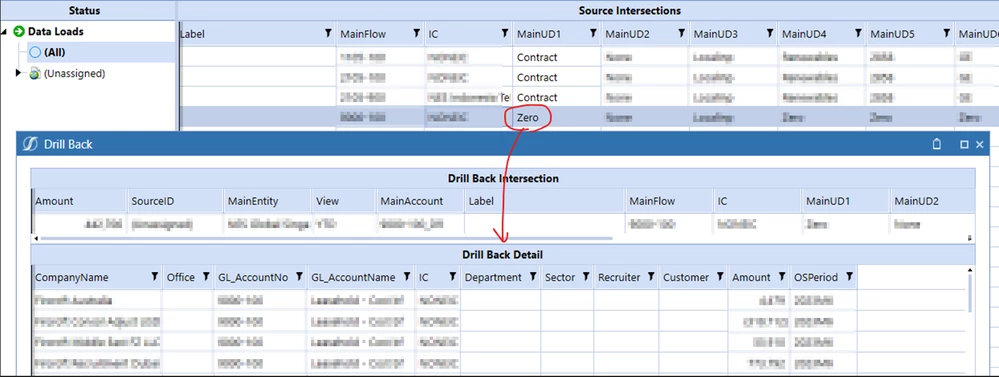
AndreaF_0-1689874495507.png

However, with the ELSE condition included (see code below) the retrieve from the Zero values does not work anymore:


If StageTableFields.StageSourceData.DimUD1.XFEqualsIgnoreCase("Zero") Then
    whereClause.Append("And (Department IS NULL) ")
Else
    whereClause.Append("And (Department = '" & SqlStringHelper.EscapeSqlString(sourceValues.Item(StageTableFields.StageSourceData.DimUD1).ToString) & "') ")
End If
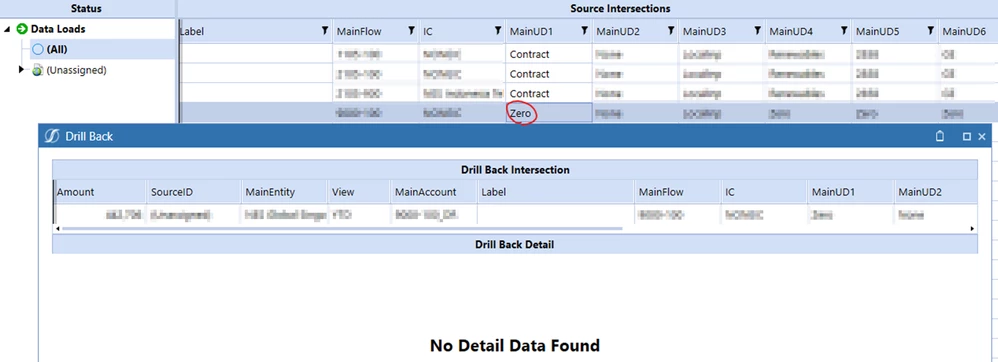
 

AndreaF_1-1689874695121.png

Any idea why this is happening? Thank you

Best answer by AndreaF

Thank you Daniel, I have used the below to check what was happening with the IF statement

Throw New XFUserMsgException(si,sqlScript.ToString,"","")

and I discovered that the StageTableFields.StageSourceData.DimUD1 command returns the string "UD1", while what I wanted was the source value (e.g. "Zero"), so the correct code is the following

If sourceValues.Item(StageTableFields.StageSourceData.DimUD1).ToString.XFEqualsIgnoreCase("Zero") Then
    whereClause.Append("And (Department IS NULL) ")
Else
    whereClause.Append("And (Department = '" & SqlStringHelper.EscapeSqlString(sourceValues.Item(StageTableFields.StageSourceData.DimUD1).ToString) & "') ")
End If

 It was only a coincidence that in my original code was returning rows with Null Department when excluding the Else condition.

1 reply

Contributor
July 21, 2023

It sounds like your assumption is that your initial IF condition is being met. Are you sure that is the case? Perhaps no 'where' clause is getting appended when you omit the ELSE as it's not meeting the IF condition and whe you include it, all of a sudden you're limiting the query to an empty resulset

AndreaFAuthorAnswer
Expert
July 21, 2023

Thank you Daniel, I have used the below to check what was happening with the IF statement

Throw New XFUserMsgException(si,sqlScript.ToString,"","")

and I discovered that the StageTableFields.StageSourceData.DimUD1 command returns the string "UD1", while what I wanted was the source value (e.g. "Zero"), so the correct code is the following

If sourceValues.Item(StageTableFields.StageSourceData.DimUD1).ToString.XFEqualsIgnoreCase("Zero") Then
    whereClause.Append("And (Department IS NULL) ")
Else
    whereClause.Append("And (Department = '" & SqlStringHelper.EscapeSqlString(sourceValues.Item(StageTableFields.StageSourceData.DimUD1).ToString) & "') ")
End If

 It was only a coincidence that in my original code was returning rows with Null Department when excluding the Else condition.

Contributor
July 24, 2023

Nothing seems to beat fresh eyes on an issue sometimes!