


Expert
August 24, 2026
Solved

Complete/Revert buttons - Dashboard extender workflow access

  • August 24, 2026
  • 4 replies
  • 69 views

Hi, I am facing an issue with a dashboard extender rule, in the bit of code that Completes or Revert the workflow and is called by the Complete and Revert buttons of the dashboard.

For example, this is the Revert function:

		Public Function WorkflowRevert(ByVal si As SessionInfo, ByVal globals As BRGlobals, ByVal wfClusterPK As WorkflowUnitClusterPk) As XFSelectionChangedTaskResult
Try

Dim selectionChangedTaskResult As New XFSelectionChangedTaskResult()
'Check the Workflow status of the parent (We can't calculate plan if the parent is certified)
Dim wfRegParent As WorkflowProfileInfo = BRApi.Workflow.Metadata.GetParent(si, wfClusterPK)
Dim wfRegParentPk As New WorkflowUnitClusterPk(wfRegParent.ProfileKey, wfClusterPK.ScenarioKey, wfClusterPK.TimeKey)
Dim wfRegParentStatus As WorkflowInfo = BRApi.Workflow.Status.GetWorkflowStatus(si, wfRegParentPk, False)

If Not wfRegParentStatus.AllTasksCompleted Then
'PROCESS INDIVIDUAL SOLUTION WORKFLOWS
'-------------------------------------

'Update the Workflow to COMPLETED
Dim wfClusterDesc As String = BRApi.Workflow.General.GetWorkflowUnitClusterPkDescription(si, wfClusterPK)
BRApi.Workflow.Status.SetWorkflowStatus(si, wfClusterPK, StepClassificationTypes.Workspace, WorkflowStatusTypes.InProcess, StringHelper.FormatMessage(Me.m_MsgWorkflowReverted, wfClusterDesc), "", Me.m_MsgWorkflowRevertedReasonButton, Guid.Empty)
'BRApi.Workflow.Status.SetWorkflowStatus(si, wfPk, StepClassificationTypes.Workspace, WorkflowStatusTypes.Completed, StringHelper.FormatMessage(Me.m_MsgWorkflowCompleted, wfClusterDesc), "", Me.m_MsgWorkflowCompletedReasonButton, Guid.Empty)
selectionChangedTaskResult.WorkflowWasChangedByBusinessRule = True
selectionChangedTaskResult.IsOK = True

Else
'If Not wfRegParentStatus.AllTasksCompleted Then
'Parent Certified, cannot update Workflow
selectionChangedTaskResult.WorkflowWasChangedByBusinessRule = False
selectionChangedTaskResult.IsOK = True
selectionChangedTaskResult.ShowMessageBox = True
selectionChangedTaskResult.Message = Me.m_MsgCannotCompleteWorkflow
End If

Return selectionChangedTaskResult

Catch ex As Exception
Throw ErrorHandler.LogWrite(si, New XFException(si, ex))
End Try
End Function

The code is checking the parent workflow, so that if the parent workflow is completed the user is not allowed to revert the the workflow. The issue is that some users don’t have access to the parent workflow, and this is the error message they get when trying to revert the workflow:
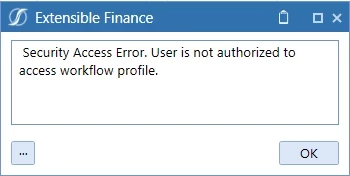
Is there any workaround to this issue? It seems a bit silly that the code would not even check the status of the parent workflow if the user does not have access to it.

Is there a way to run some code lines as admins? For example by grabbing the SessionInfo (si) of an Admin (just thinking out loud, I am not sure how to do that)?
Best answer by sameburn

Hi ​@AndreaF 

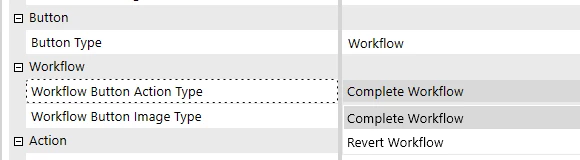
Have you tried using the standard out of the box option for this e.g. set Button Type to “Workflow” and  Workflow Button Action Type to “Revert Workflow”?

If your requirement is to prevent reverting a Child Profile workspace after its Parent is completed (e.g. AllTasksCompleted()); you can use the native Revert Workflow button which already performs these checks and the functionality you are requesting e.g.

  1. If the parent is Completed, it will refuse to revert the child and throw an exception e.g. something like “Workflow NOT Reverted: Parent Workflow has been Completed.”.
  2. If the Parent is not completed, it reverts the child Workspace step to InProcess as expected.


But, this might not overcome your Workflow Security issue, this is separate to core checks and based on your environmental setup.  The current exception is expected behaviour based on the platform rules of Workflow Security e.g. this is a valid platform exception. 

So worth testing this out first to see if this resolves or you run into the same issue .

I suspect you might hit same the same platform validation based on Workflow Security

Hope this helps

Sam


4 replies

sameburnAdvisorAnswer
Advisor
August 25, 2026

Hi ​@AndreaF 

Have you tried using the standard out of the box option for this e.g. set Button Type to “Workflow” and  Workflow Button Action Type to “Revert Workflow”?

If your requirement is to prevent reverting a Child Profile workspace after its Parent is completed (e.g. AllTasksCompleted()); you can use the native Revert Workflow button which already performs these checks and the functionality you are requesting e.g.

  1. If the parent is Completed, it will refuse to revert the child and throw an exception e.g. something like “Workflow NOT Reverted: Parent Workflow has been Completed.”.
  2. If the Parent is not completed, it reverts the child Workspace step to InProcess as expected.


But, this might not overcome your Workflow Security issue, this is separate to core checks and based on your environmental setup.  The current exception is expected behaviour based on the platform rules of Workflow Security e.g. this is a valid platform exception. 

So worth testing this out first to see if this resolves or you run into the same issue .

I suspect you might hit same the same platform validation based on Workflow Security

Hope this helps

Sam


AndreaFAuthor
Expert
August 25, 2026

Hi ​@sameburn,

Thanks for this information! I wasn't aware that you can set a button type to Workflow. This is great, it removes the need to maintain custom code for Complete/Revert buttons, and I'll definitely use them going forward.

However, as you anticipated, the out-of-the-box option is giving me the same issue as my previous custom buttons. Users receive an error when they don't have access to the parent workflow. Are you aware of a way to configure the workflow security to avoid this problem?

The buttons sit on a dashboard that also contains a large Execute button running some code. I can't grant users access to the parent workflow, as that would allow them to access the parent workflow dashboard and run the Execute button there.

Advisor
August 25, 2026

Hey ​@AndreaF 

It has been a while since I have done much with Workflow design but you may need to get creative. 

Have you considered raising this with Remote Consulting via Support?  Please bear in mind, this will likely be considered a billable activity

BR

Sam

AndreaFAuthor
Expert
August 25, 2026

Thanks for suggesting that ​@sameburn , I'll likely reach out to Support. Appreciate the guidance