
Contributor
Jan 10, 2022 7:47 PM UTC

Excel VBA automation - Refresh Workbook function

SOURCE: CHAMPIONS

Does anyone know if we can call the Refresh Workbook function using VBA? I’m looking to introduce a button on worksheets that performs the Refresh Workbook option that’s located on the OneStream XF ribbon.
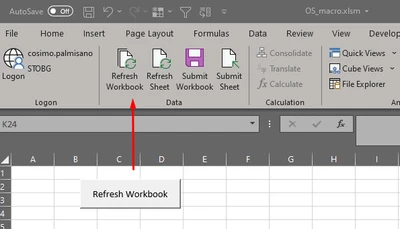
Cosimo_0-1641844028987.png


9 replies

Member
Jan 10, 2022 7:48 PM UTC

Hi Cosimo,

There is a OS Knowledge Base article about this: KB0010071

https://onestreamsoftware.service-now.com/sp/?sys_kb_id=09389b291be7601099ce86e1604bcb5d&id=kb_article_view&sysparm_rank=1&sysparm_tsqueryId=9ec76c471b6a381099ce86e1604bcb0c

In practice, it looks something like this:

Sub RefreshXFFunctions()
Set XFAddIn = application.COMAddIns("OneStreamExcelAddIn")
If Not XFAddIn Is Nothing Then
    If Not XFAddIn.Object Is Nothing Then
        Call XFAddIn.Object.RefreshXFFunctions
    End If
End If

End Sub

or

Sub RefreshCubeViews()
    Set XFAddIn = application.COMAddIns("OneStreamExcelAddIn")
    If Not XFAddIn Is Nothing Then
        If Not XFAddIn.Object Is Nothing Then
            Call XFAddIn.Object.RefreshCubeViews
        End If
    End If
End Sub
CosimoAuthor
Contributor
Jan 10, 2022 7:49 PM UTC

Thank Phil. This is exactly what I was looking for. Interesting to note that I had to run 3 functions to simulate “Refresh Workbook”:

> Sub Refresh_Workbook()
>     Set XFAddin = Application.COMAddIns("OneStreamExcelAddIn")
>     If Not XFAddin Is Nothing Then
>         If Not XFAddin.Object Is Nothing Then
>             Call XFAddin.Object.RefreshXFFunctions
>             Call XFAddin.Object.RefreshQuickViews
>             Call XFAddin.Object.RefreshCubeViews
>         End If
>     End If
> End Sub
 
Contributor
Mar 30, 2022 9:59 AM UTC

Thanks Cosimo for this extra info, also I found that in the Preferences... Enable Macros for XF Event Processing needed to be set to FALSE for it to work.

MarkHoughton_0-1648634302269.png


Jan 25, 2022 10:53 AM UTC

With an Okta user you could try the following:

' Set Excel Addin object
Set xfAddin = Application.COMAddIns("OneStreamExcelAddIn").Object

'OneStream Web URL
url = "https://server/OneStreamWeb"

'okta user credentials
oktaUsername = "enter okta username"
oktaPassword = "enter okta password"

' app name
app = "enter application name"

' get SSO Token
ssoToken = xfAddin.ProcessSSOAuthenticationAndCreateToken(url, oktaUsername, oktaPassword)

' display token, only use for validating, if no token exists then login will not be successful
MsgBox ssoToken

' Get user from SSO token
user = xfAddin.GetXFUserNameFromSSOToken(ssoToken)

' log into application using token
isLoggedIn = xfAddin.LogonAndOpenApplication(url, user, ssoToken, app)

If isLoggedIn Then

MsgBox ("Logged into OneStream")

Refresh = xfAddin.RefreshQuickViewsForActiveWorksheet()

xfAddin.Logoff

Else
MsgBox ("Problem with login")
End If

Contributor
Mar 30, 2022 10:00 AM UTC

Thanks for this very useful piece of code, it certainly works for my OKTA sign in.

Aug 2, 2022 4:49 PM UTC

any example for PingFed sing in?

Sep 2, 2022 10:57 AM UTC

Can you describe your requirement in detail?

Oct 5, 2022 6:14 PM UTC

I want to automate OneStream refresh, but for authentication we use PingFed.