


Workforce Planning Express Alternate Instance Setup Checklist
Workforce Planning Express was developed using the Workforce Planning 1 (limb1) instance, based on the expectation that Express will typically be implemented for customers who are new to Workforce Planning. If Workforce Planning Express is being implemented using a different Workforce Planning instance, this checklist outlines the additional setup and configuration steps needed to support that implementation.
The following references will need to be reviewed & updated:
| X | Reference |
|---|---|
| Workforce Planning Express Workspace 2 locations (sharedWorkspaceNames and embeddedDashboardName) | |
| Limb1 Schema (SQL) 9 occurrences (8 SQL locations and 1 VB AppendLine) | |
| {Workspace.LIMB1.WS} Method Calls 9 occurrences | |
| (Optional) Configuration File Naming Update 20 references to review and update for the alternate Workforce Planning instance and 3 optional references. |
Identifying the Workforce Planning Instance
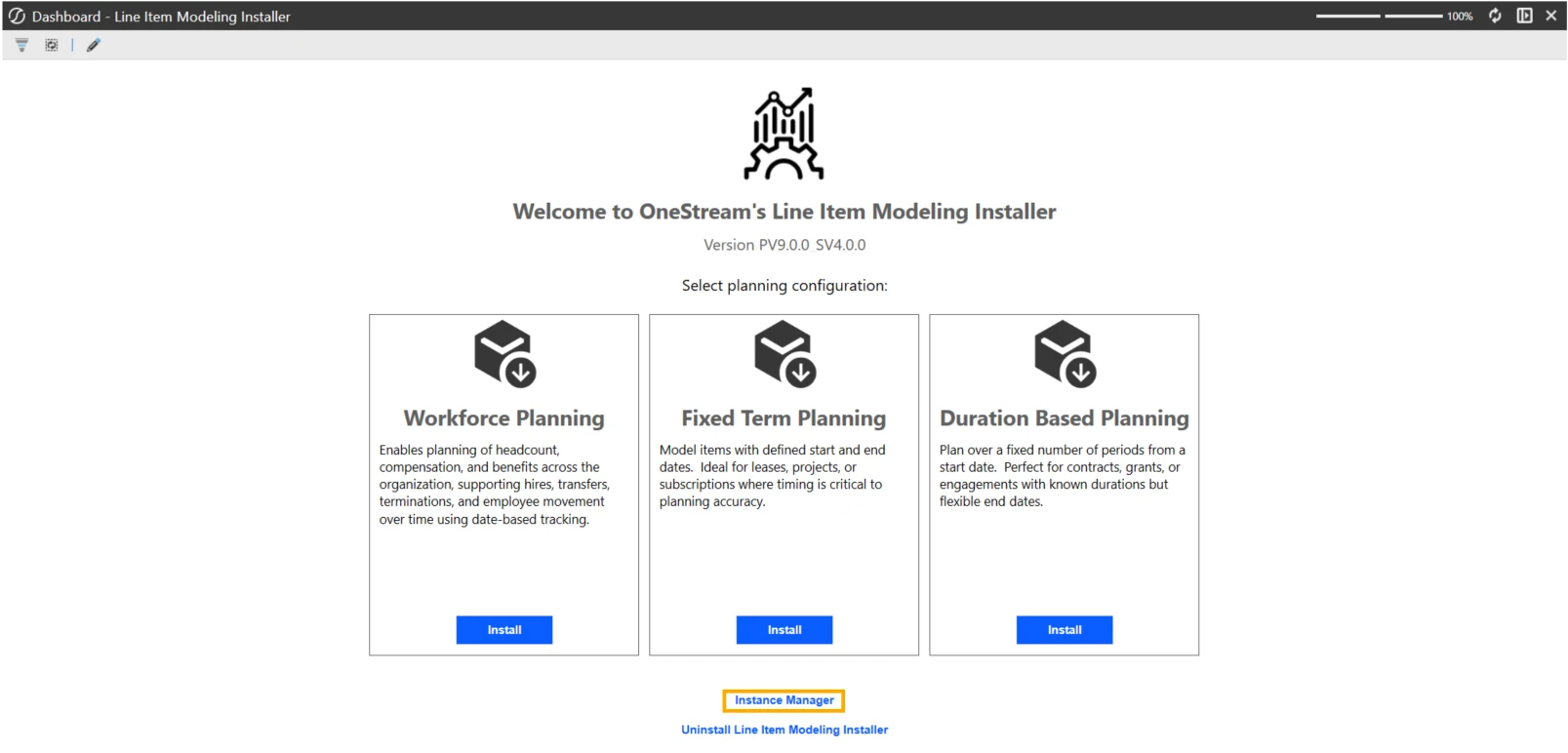
Before completing this checklist, determine which Workforce Planning instance is being used in the application. From the Line Item Modeling Installer, select Instance Manager.
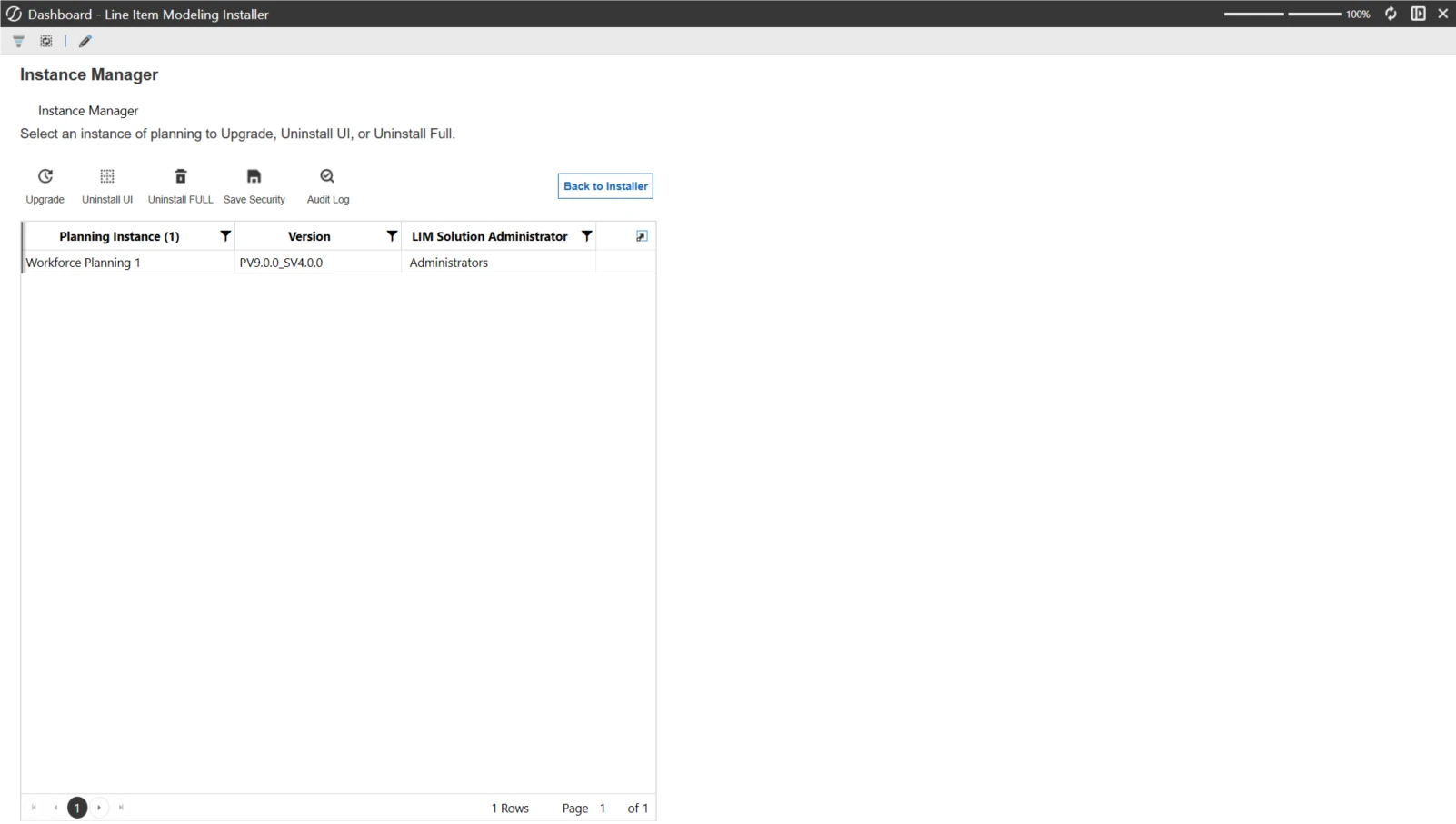
Within Instance Manager, refer to the Planning Instance column to identify the installed Workforce Planning instance. If the instance being configured for Workforce Planning Express is anything other than Workforce Planning 1, use this checklist to complete the additional setup required for Workforce Planning Express.
Workspace and Embedded Dashboard
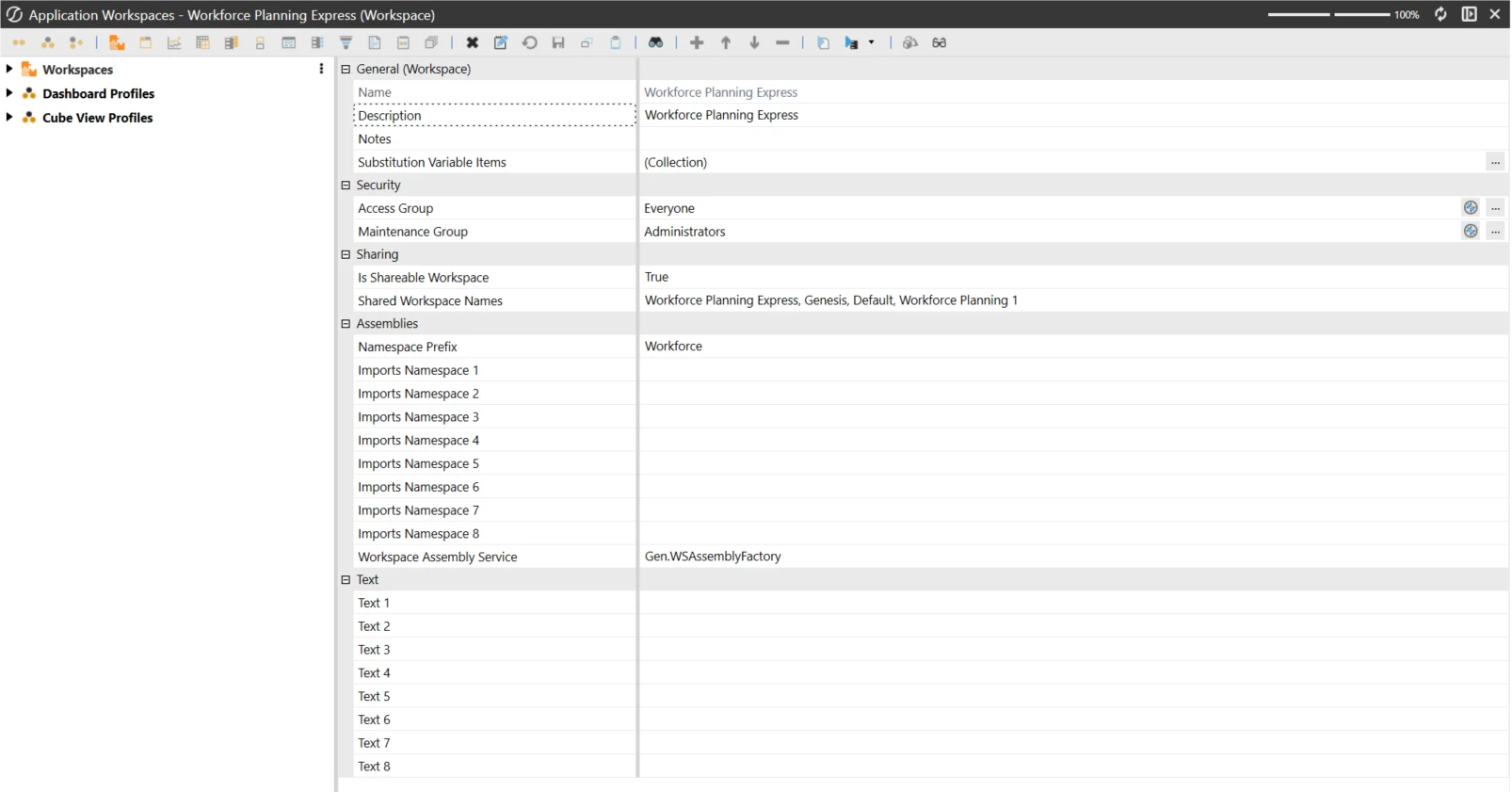
The Workforce Planning Express workspace lists Workforce Planning 1 as a shared workspace. The Home Workforce Planning page embeds a dashboard from that workspace.
| Where | What to Change |
|---|---|
| Workforce Planning Express Workspace > Sharing > Shared Workspace Names | Verify that Shared Workspace Names includes the workspace name associated with the Workforce Planning instance being used. Replace Workforce Planning 1 with applicable Workforce Planning workspace name. If modifying the XML, replace Workforce Planning 1 in sharedWorkspaceNames="Workforce Planning Express, Genesis, Default, Workforce Planning 1" with applicable Workforce Planning workspace name. |
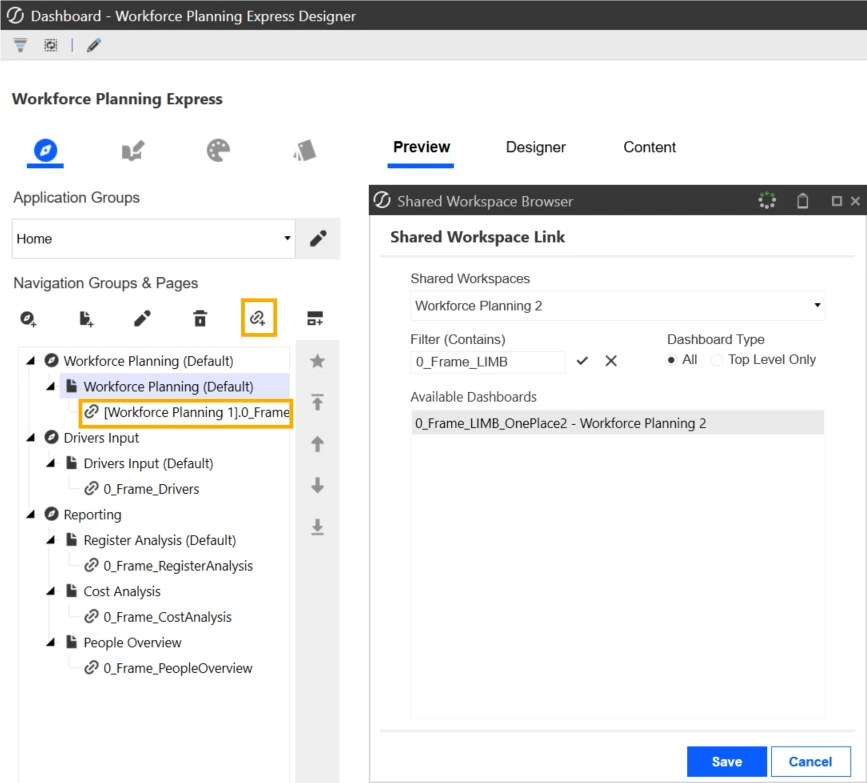
| Embedded Dashboard Component | Navigate to Workforce Planning Express Designer. Select the Home Application Group, assign the linked content with the Workforce Planning instance being used.
If modifying the XML, update the component name and componentMember name to reference the instance number being used: ebd_XLL_Home_WorkforcePlanning_WorkforcePlanning Update the embeddedDashboardName to reference the embedded dashboard associated with the Workforce Planning instance being used: embeddedDashboardName ="[Workforce Planning 1].0_Frame_LIMB_OnePlace1" |
Limb1 Schema (SQL)
All of these use the application database. Replace limb1 with the limb Workforce Planning instance that is being used.
| Maintenance Unit | Object (Type) | Current SQL Query |
|---|---|---|
| Solution_Admin_ Integration | bl_Register DefinitionFields_ Integration (Bound List Parameter) | FROM limb1. XFW_LIM_ RegisterColumn Types |
| Solution_Home_ Reporting_ CostAnalysis | bl_PlanName_ CostAnalysis (Bound List Parameter) | FROM limb1. XFW_LIM_Plans |
| Solution_Home_ Reporting_ CostAnalysis | bl_Scenario_ CostAnalysis (Bound List Parameter) | FROM limb1. XFW_LIM_Plans |
| Solution_Home_ Reporting_ PeopleOverview | bl_PlanName_ PeopleOverview (Bound List Parameter) | FROM limb1. XFW_LIM_Plans |
| Solution_Home_ Reporting_ PeopleOverview | bl_Scenario_ PeopleOverview (Bound List Parameter) | FROM limb1. XFW_LIM_Plans |
| Solution_Home_ Reporting_ RegisterAnalysis | bl_PlanName_ RegisterAnalysis (Bound List Parameter) | FROM limb1. XFW_LIM_Plans |
| Solution_Home_ Reporting_ RegisterAnalysis | bl_Scenario_ RegisterAnalysis (Bound List Parameter) | FROM limb1. XFW_LIM_Plans |
| Solution_Home_ Reporting_ RegisterAnalysis | da_GetRegisterData_ RegisterAnalysis (Data Adapter) | FROM limb1. XFW_LIM_ Register |
| Solution_Home_ Reporting_ RegisterAnalysis | GetTableViewDetails (#Region "GetTableView") (Spreadsheet.vb) | sql.AppendLine( "From limb1. XFW_LIM_ Register") |
Tables Impacted: XFW_LIM_RegisterColumnTypes, XFW_LIM_Plans, XFW_LIM_Register
{Workspace.LIMB1.WS} Method Calls
These call business rules on the LIMB1 workspace. Replace limb1 with the limb Workforce Planning instance that is being used.
| Maintenance Unit | Parameter or Data Adapter | Current Method |
|---|---|---|
| Cost Analysis | bl_StartDate_CostAnalysis | {Workspace.LIMB1.WS}{GetPlanStartDate} |
| Cost Analysis | bl_EndDate_CostAnalysis | {Workspace.LIMB1.WS}{GetPlanEndDate} |
| Cost Analysis | da_GetPlanData_CostAnalysis | {Workspace.LIMB1.WS}{GetPlanData} |
| People Overview | bl_StartDate_PeopleOverview | {Workspace.LIMB1.WS}{GetPlanStartDate} |
| People Overview | bl_EndDate_PeopleOverview | {Workspace.LIMB1.WS}{GetPlanEndDate} |
| People Overview | da_GetPlanData_PeopleOverview | {Workspace.LIMB1.WS}{GetPlanData} |
| Register Analysis | bl_StartDate_RegisterAnalysis | {Workspace.LIMB1.WS}{GetPlanStartDate} |
| Register Analysis | bl_EndDate_RegisterAnalysis | {Workspace.LIMB1.WS}{GetPlanEndDate} |
| Register Analysis | da_GetPlanData_RegisterAnalysis | {Workspace.LIMB1.WS}{GetPlanData} |
Optional Configuration File Naming Update
The following update is optional and is not required when configuring Workforce Planning Express to function with an alternate Workforce Planning instance. The existing configuration file name does not impact which Workforce Planning instance is used.
However, to maintain a consistent naming convention with the alternate Workforce Planning instance, you may choose to rename the configuration file. If the file is renamed, the corresponding references in the assembly code must also be updated.
| Location | Component | What to Change |
|---|---|---|
| Solution_Configure_ ConfigFileSetup | File Resource | Navigate to Files, rename LIMB1_Configuration.json file with the Workforce Planning instance being used. If modifying the XML, update the fileResource fileName to reference the instance number being used: |
| ConfigFileSetup → Svc.Component.vb | SaveConfigFile | If modifying the code in either the Application or the XML, replace Dim configFileName As String = "LIMB1_Configuration.json" with the instance number being used |
| ConfigFileSetup → Svc.Component.vb | ExportConfigFile | If modifying the code in either the Application or the XML, replace Dim configFileName As String = "LIMB1_Configuration.json" with the instance number being used |
Note: If the configuration file is renamed, both references in the SvcComponent.vb must be updated to match the new file name. If the file is not renamed, no changes are required and solution functionality is unaffected.
Alternate Instance Summary
In summary, when configuring Workforce Planning Express to use an alternate Workforce Planning instance, the following references will need to be updated:
| X | Reference |
|---|---|
| Workforce Planning Express Workspace 2 locations (sharedWorkspaceNames and embeddedDashboardName) | |
| Limb1 Schema (SQL) 9 occurrences (8 SQL locations and 1 VB AppendLine) | |
| {Workspace.LIMB1.WS} Method Calls 9 occurrences | |
| (Optional) Configuration File Naming Update 20 references to review and update for the alternate Workforce Planning instance and 3 optional references. |