

LIM: Understanding CSV Import Criteria 2
VERSION: PV900 SV200
PLATFORM: 9.X
While importing data to the Register via CSV file, you encounter the following error message: “One or more required columns is missing data. Populate the file and reload”. This article covers tips for troubleshooting and resolving this error.
When loading data via a CSV file import, you may encounter the following error message:
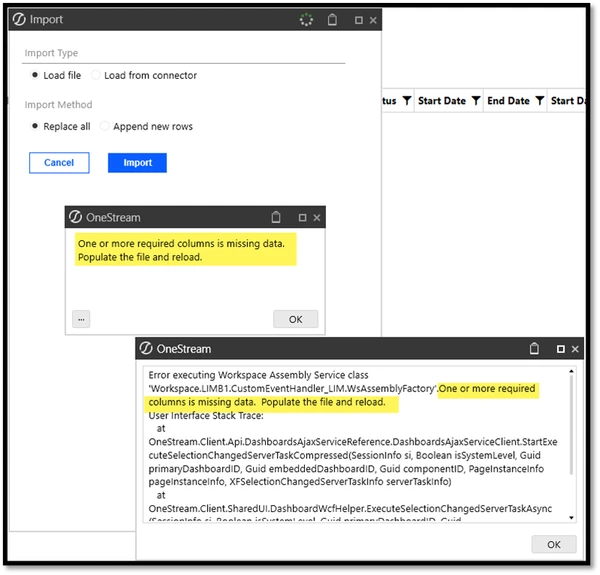
This error message can be a red herring or false error message. It may not be because you are missing any required data, but instead it can be because the register Display Names in your file (when trimmed of spaces) do not match the Register Field Names.
For example, consider the following list of Register Fields:
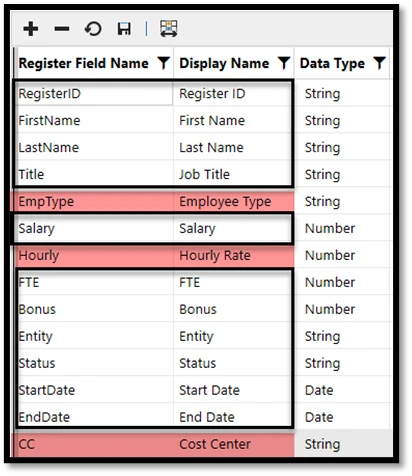
In the example register above, all the Display Names circled in black, when trimmed of spaces, match the Register Field Name column. However, for the three highlighted, the Display Names, trimmed of spaces, do not match the Register Field Names.
Why does this pose a problem? When you are importing data through a CSV file, the data load is done off a match in the first row of your file to the Register Field Name, not the Display Name. But across all LIM user screens, the Display Name is presented to the user and not the Register Field Name. So, you may assume that the load works off the Display Name that you see as a user. But that is not the case!
If your Display Name is used in the first row of your file and, when trimmed, matches your Register Field Name you will be able to successfully load. But that is sheer luck! For any Display Names (trimmed) that do not match the Register Field Name, you will get the false error message "One or more required columns is missing data. Populate the file and reload”.
Resolution
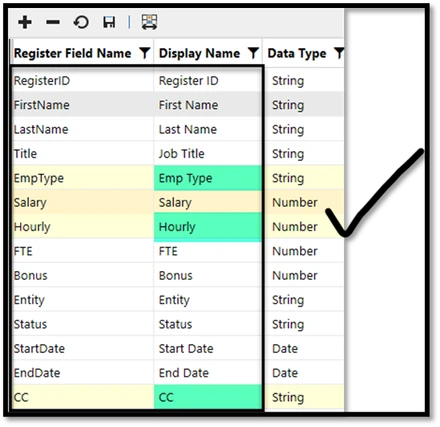
When loading data to LIM via a CSV file, ensure that the header row in the CSV file is the Register Field Name OR align your Display Names with the Register Field Names, with or without spaces. In the example above, the Register would need to appear as below to work for all these fields:
Overall Recommendation
The solution you choose to employ is up to you, and your company needs. This is a design consideration when setting up your initial register. The easiest resolution, when setting up your initial register, is to use a list of Register Field Names (without spaces) that match what you wish to use as the Display Name (with spaces). This will avoid future potential problems.
If your register is already set up and since you cannot change the Register Field Name, I would then choose to update the Display Name (which can be changed after the fact) to match the Field Name with spaces.
DISCLAIMER: It should be noted that the focus of this technical guide is to provide general information, considerations, and guidelines for an identified topic. It is NOT to be interpreted as the ONLY approach nor a guarantee that there will not be any issues encountered by using this approach as a customer’s requirements or application configuration may render this guidance as not applicable.
In addition, statements that “we believe” and similar statements reflect our beliefs and opinions on the relevant subject. These statements are based upon information available to us as of the date of this article, and while we believe such information forms a reasonable basis for such statements, such information may be limited or incomplete, and our statements should not be read to indicate that we have conducted an exhaustive inquiry into, or review of, all potentially available relevant information. OneStream does not warrant as to the accuracy of this guidance, which is provided on an as-is basis.
Any forward-looking statements contained herein are based on information available at the time those statements are made and/or good faith beliefs and assumptions as of that time with respect to future events and are subject to risks and uncertainties that could cause actual performance or results to differ materially from those expressed in or suggested by the forward-looking statements. Considering these risks and uncertainties, the forward-looking events and circumstances discussed in this guide may not occur and actual results could differ materially from those anticipated or implied in the forward-looking statements.