


LIM: Example of Sequential ID Update for New Adds
| DISCLAIMER: It should be noted that the focus of this technical guide is to provide general information, considerations, and guidelines for an identified topic. It is NOT to be interpreted as the ONLY approach nor a guarantee that there will not be any issues encountered by using this approach as a customer’s requirements or application configuration may render this guidance as not applicable. In addition, statements that “we believe” and similar statements reflect our beliefs and opinions on the relevant subject. These statements are based upon information available to us as of the date of this article, and while we believe such information forms a reasonable basis for such statements, such information may be limited or incomplete, and our statements should not be read to indicate that we have conducted an exhaustive inquiry into, or review of, all potentially available relevant information. OneStream does not warrant as to the accuracy of this guidance, which is provided on an as-is basis. Any forward-looking statements contained herein are based on information available at the time those statements are made and/or good faith beliefs and assumptions as of that time with respect to future events and are subject to risks and uncertainties that could cause actual performance or results to differ materially from those expressed in or suggested by the forward-looking statements. Considering these risks and uncertainties, the forward-looking events and circumstances discussed in this guide may not occur and actual results could differ materially from those anticipated or implied in the forward-looking statements. |
VERSION: PV900 SV200

PLATFORM: 9.2.0

USE CASE: rather than having users freely input whatever s/he wants as the ID or to have the same generic ID, you want to create a standardized naming convention for new adds with sequential ordering.

PURPOSE: to provide you with an example that you can leverage as part of your build, whether you decide to incorporate this to existing input options (Register, Spreadsheet).

ASSUMPTIONS: my example assumes new adds are only to be done on the Register or through the Spreadsheet.

Create your custom parameter (e.g., prm_LastNewNumber_LIMB2).
-
Refer to the technical guide,

LIM: Example of Setting up my Customizations Outside of LIM’s Workspace(s) for Future Upgrades -
Customizations are recommended to be setup outside of the LIM-related workspace to facilitate future upgrades
Next, write your logic to the relevant Services' files!

Example logic for the Register (WsDynamicGridService):

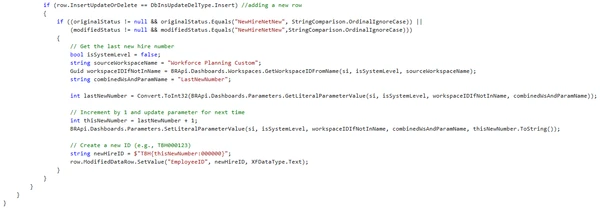
if ((originalStatus != null && originalStatus.Equals("NewHireNetNew", StringComparison.OrdinalIgnoreCase)) || (modifiedStatus != null && modifiedStatus.Equals("NewHireNetNew",StringComparison.OrdinalIgnoreCase)))
{
	// Get the last new hire number
	bool isSystemLevel = false;
	string sourceWorkspaceName = "LIM Customizations";
	Guid workspaceIDIfNotInName = BRApi.Dashboards.Workspaces.GetWorkspaceIDFromName(si, isSystemLevel, sourceWorkspaceName);
	string combinedWsAndParamName = "prm_LastNewNumber_LIMB2";

	int lastNewNumber = Convert.ToInt32(BRApi.Dashboards.Parameters.GetLiteralParameterValue(si, isSystemLevel, workspaceIDIfNotInName, combinedWsAndParamName));

	// Increment by 1 and update parameter for next time
	int thisNewNumber = lastNewNumber + 1;
	BRApi.Dashboards.Parameters.SetLiteralParameterValue(si, isSystemLevel, workspaceIDIfNotInName, combinedWsAndParamName, thisNewNumber.ToString());

	// Create a new ID (e.g., TBH000123)
	string newHireID = $"TBH{thisNewNumber:000000}";
	row.ModifiedDataRow.SetValue("EmployeeID", newHireID, XFDataType.Text);
}Example logic for Spreadsheet (WsTableViewService):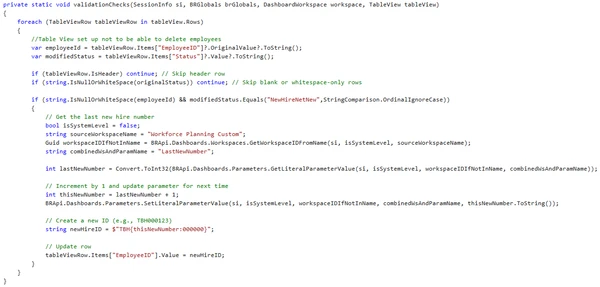
if (string.IsNullOrWhiteSpace(employeeId) && modifiedStatus.Equals("NewHireNetNew",StringComparison.OrdinalIgnoreCase))
{
	// Get the last new hire number
	bool isSystemLevel = false;
	string sourceWorkspaceName = "LIM Customizations";
	Guid workspaceIDIfNotInName = BRApi.Dashboards.Workspaces.GetWorkspaceIDFromName(si, isSystemLevel, sourceWorkspaceName);
	string combinedWsAndParamName = "prm_LastNewNumber_LIMB2";

	int lastNewNumber = Convert.ToInt32(BRApi.Dashboards.Parameters.GetLiteralParameterValue(si, isSystemLevel, workspaceIDIfNotInName, combinedWsAndParamName));

	// Increment by 1 and update parameter for next time
	int thisNewNumber = lastNewNumber + 1;
	BRApi.Dashboards.Parameters.SetLiteralParameterValue(si, isSystemLevel, workspaceIDIfNotInName, combinedWsAndParamName, thisNewNumber.ToString());

	// Create a new ID (e.g., TBH000123)
	string newHireID = $"TBH{thisNewNumber:000000}";

	// Update row
	tableViewRow.Items["EmployeeID"].Value = newHireID;
}