Member
July 24, 2026
Solved

XFBR Syntax in Default Workspace, but not default maintenance unit

  • July 24, 2026
  • 8 replies
  • 60 views

Hello,

I have an XFBR rule written in an assembly file in a dashboard maintenance unit that is under the default workspace, but not in the default maintenance unit.  When I try to call it using XFBR(workspace.Default.AssemblyName.BusinessRule, FunctionName,) I get an error.  If I build the same rule in a XFBR string rule under Business Rules it runs fine when called by XFBR(RuleName, FunctionName,).  Furthermore, I am not experiencing this issue for any XFBR dashboard string rule housed in an assembly in any other workspace.

Is there a different syntax that is needed to call dashboard string rules that are in an assembly in default?

As a note, the rule does not need any input parameters.

Thanks,
Best answer by sameburn

Hey ​@Tom_R 

I ran same test on v920 of platform and it works as expected for me using same named variables as your screenshot.  I believe this is a syntax error rather than a platform bug.  Please see below

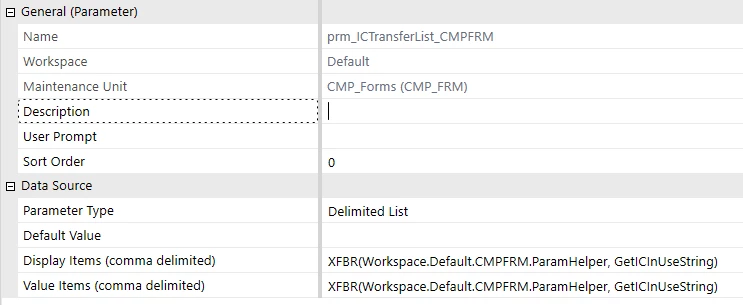
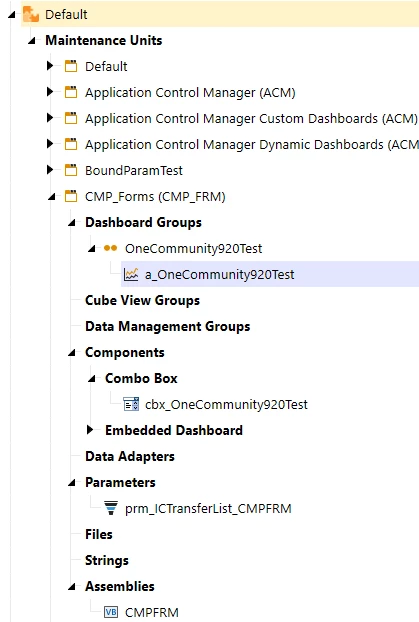
  1. Maintenance Unit Setup
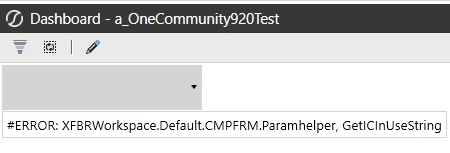
  1. XFBR call from Parameter.  Observe your rule is called ParamHelper not Paramhelper.  I believe this is the cause of your error (e.g. it is case sensitive as per earlier post).  If I use incorrect Paramhelper as per your example, I can replicate error


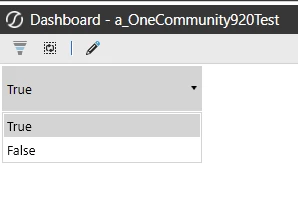
  1. Whereas when I use correct case-sensitive syntax e.g. ParamHelper it works as expected e.g.
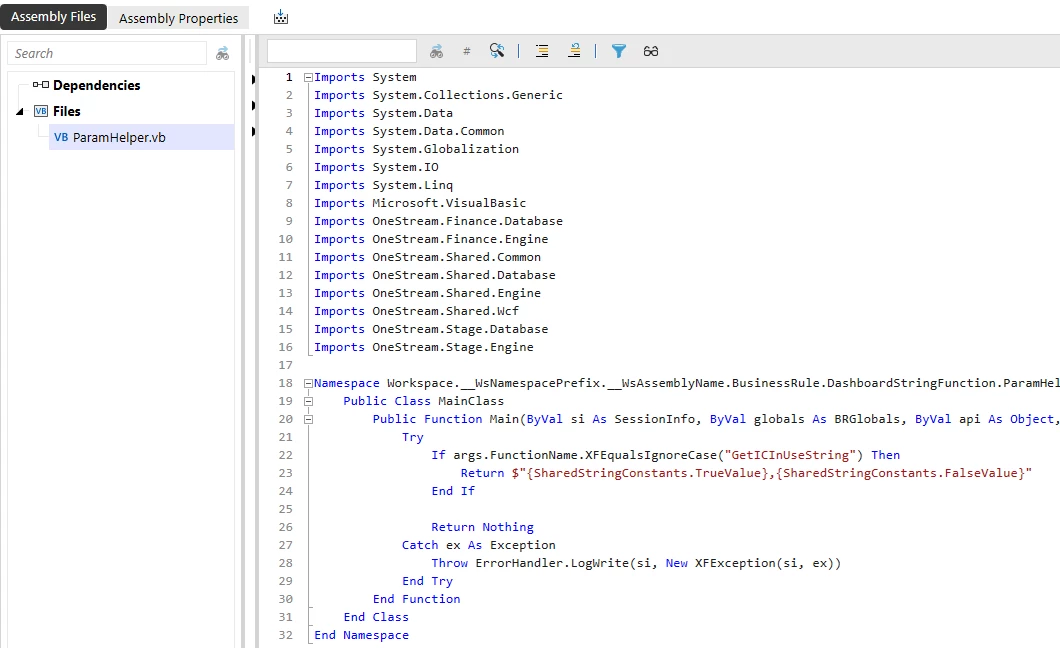
  1. For completeness. my code is simple and just returning a delimited string result e.g. “True,False”


Hope this helps

Sam

8 replies

Advisor
July 27, 2026

Hi @TomR

I just tested this in v9.0.0 and it works as expected with both syntax examples below

  • XFBR(Workspace.Default.AssemblyName.RuleName, FunctionName)
  • XFBR(Workspace.Current.AssemblyName.RuleName, FunctionName)
1) Maintenance Unit setup under Default workspace


2) Label Component that returns XFBR result

Which version of Onestream are you running this on?

Sam

Tom_RAuthor
Member
July 28, 2026

I am running on version 9.2.1.18605

My string to call the rule into the parameter is 

XFBR(workspace.default.cmpfrm.Paramhelper, GetICInUseString,)

What is returned is

#ERROR XFBRworkspace.default.cmpfrm.Paramhelper, GetICInUseString,

However, if I call the exact same rule from Business Rules it returns the expected result.

Regards,

Tom

Advisor
July 28, 2026

Thanks.  Have you tried case sensitive version see example below (I don’t know how your setup is actually spelt), but ensuring it 100% matches the real case of your setup

XFBR(Workspace.Default.cmpfrm.Paramhelper, GetICInUseString)

a screenshot of your current setup might also help demystify :)

Tom_RAuthor
Member
July 28, 2026

I have tried the case sensitive version of it, and it returns the same error.  What would you want to see in the screenshot?

Advisor
July 28, 2026

expand everything in your setup e.g. MU (like my screenshot) and then show me in a separate screenshot where you are calling the XFBR from e.g. code at call point.  I can see if i can replicate

Tom_RAuthor
Member
July 28, 2026


This is my set up.

sameburnAdvisorAnswer
Advisor
July 29, 2026

Hey ​@Tom_R 

I ran same test on v920 of platform and it works as expected for me using same named variables as your screenshot.  I believe this is a syntax error rather than a platform bug.  Please see below

  1. Maintenance Unit Setup
  1. XFBR call from Parameter.  Observe your rule is called ParamHelper not Paramhelper.  I believe this is the cause of your error (e.g. it is case sensitive as per earlier post).  If I use incorrect Paramhelper as per your example, I can replicate error


  1. Whereas when I use correct case-sensitive syntax e.g. ParamHelper it works as expected e.g.
  1. For completeness. my code is simple and just returning a delimited string result e.g. “True,False”


Hope this helps

Sam

Tom_RAuthor
Member
July 29, 2026

It does help.  I have never had the case be an issue before when calling rules.

Thanks.