
OneStream Employee
June 6, 2024
Solved

Workspace Assembly - Call functions from Finance or Connector business rules

  • June 6, 2024
  • 5 replies
  • 0 views

Hi Everyone, has anyone already tried to reference a Workspace Assembly business rule from a Finance or a Connector business rule?

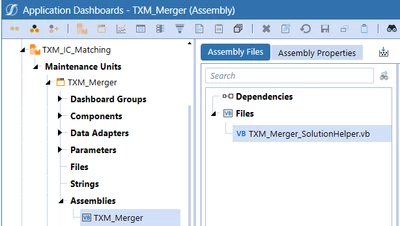
I have a business rule that is packaged to an Assembly in a Workspace:
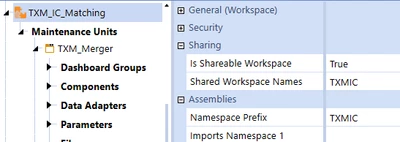
alesage_0-1717678999084.png


alesage_0-1717678462245.png
It has a set of public functions returning dictionaries and other variables. And I would like these functions being called from a Connector.

I can successfully reference it from another Assembly workspace. But when I am using the same syntax in a connector, that is not working:
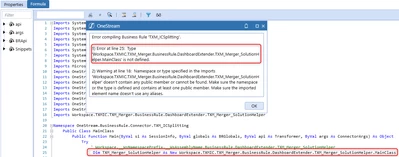
alesage_2-1717678514004.png


I am assuming the referenced Business rule must be declared in the Properties, but I am not sure of the syntax. Or even sure this is accepted.
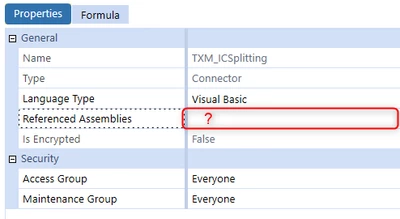
alesage_3-1717678534316.png

Many thanks to anyone who can helps!

Best answer by RobbSalzmann

Assemblies are referenced by importing the namespace 


Imports Workspace.__WsNamespacePrefix.__WsAssemblyName.DashboardExtender.TXM_Merger_SolutionHelper


Then to use it:

Dim merger_SolutionHelper as new TXM_Merger_SolutionHelper.MainClass

Also, don't use the implementation namespace (TXM_Merger_SolutionHelper) as a variable name.  It will cause issues.


5 replies

OneStream Employee
June 6, 2024

Hi, I think Daniel already figured this one out - quoting DanielWillis :

In your Referenced Assemblies you want to put: WS\Workspace.YourWorkspaceName.YourAssemblyName

Then in your rule you should be able to do something like these depending on your setup:

Dim yourClassName As New Workspace.YourWorkspaceName.YourAssemblyName.YourClassName

Dim yourClassName As Workspace.YourWorkspaceName.YourAssemblyName.BusinessRule.DashboardExtender.YourFileName.MainClass


Let us know if this works so that other members can leverage that as well!

OneStream Employee
June 6, 2024

Hi Henning, 

No, that is not working. I tried different options with the Namespace prefix or the workspace name, that doesn't work.
I tried different options, that I mentioned below. Unfortunately, none of them works so far... 

Thanks for your time and your help Henning. 


WS\Workspace.TXM_IC_Matching.TXM_Merger
WS\Workspaces.TXM_IC_Matching.TXM_Merger
WS\TXM_IC_Matching.TXM_Merger
BR\Workspace.TXM_IC_Matching.TXM_Merger
BR\Workspaces.TXM_IC_Matching.TXM_Merger  

WS\Workspace.TXM_IC_Matching.TXM_Merger\TXM_Merger_SolutionHelper
WS\Workspaces.TXM_IC_Matching.TXM_Merger\TXM_Merger_SolutionHelper
WS\TXM_IC_Matching.TXM_Merger\TXM_Merger_SolutionHelper
BR\Workspace.TXM_IC_Matching.TXM_Merger\TXM_Merger_SolutionHelper
BR\Workspaces.TXM_IC_Matching.TXM_Merger\TXM_Merger_SolutionHelper

RobbSalzmann
Legend
June 6, 2024

Assemblies are referenced by importing the namespace 


Imports Workspace.__WsNamespacePrefix.__WsAssemblyName.DashboardExtender.TXM_Merger_SolutionHelper


Then to use it:

Dim merger_SolutionHelper as new TXM_Merger_SolutionHelper.MainClass

Also, don't use the implementation namespace (TXM_Merger_SolutionHelper) as a variable name.  It will cause issues.


OneStream Employee
June 6, 2024

Hi Rob, thank you for your answer.

 I have tried to add the following imports in my Connector business rule:

Imports Workspace.__WsNamespacePrefix.__WsAssemblyName.DashboardExtender.TXM_Merger_SolutionHelper
Imports Workspace.TXM_IC_Matching.TXM_Merger.DashboardExtender.TXM_Merger_SolutionHelper 
Imports Workspace.TXM_IC_Matching.TXM_Merger.BusinessRule.DashboardExtender.TXM_Merger_SolutionHelper.MainClass

This is providing Warnings, that doesn't seem to be recognized. 

alesage_0-1717685901801.png

Thank you for your time. 


RobbSalzmann
Legend
June 6, 2024

The code is compiling and working.  The issue is none of your assembly seems to be public.  post the code and I can help.

RobbSalzmann_0-1717686188065.png


Contributor
December 12, 2024

Hi Robb!

Hoping to get some guidance on how to accomplish the following. I am working with OneStream Financial Close PV840-SV100. 

We basically need to embed Dashboard 0000_Frame_RCM (sits under OFC Workspace) into a customized dashboard that sits under the Default Workspace. We have to execute OnLoadMainDashboard to set the many parameters required. I created a dependency but the code below is returns an error. Could you please shed some light into how to execute OnLoadMainDashboard(). Thank YoU!!!!!!!!


RobbSalzmann
Legend
December 12, 2024

Hi Oscar 
A couple of things...

This is an old thread.  Please start a new one to get better visibility.
Your namespace statement should not end with a semicolon.


The classname is MainDashboard, so your instantiation should be more along the lines of:
Dim oPHelper as New Workspace.OFC.RCM.Dashboards.MainDashboard(si, args, "OnLoadMainDashboard")

Your MainDashboard class declaration is not correct. it should look more like:

internal class MainDashboard : DashboardEvent
{
    public MainDashboard(DashboardEventArgs eventArgs) : base(eventArgs)
    {
        // Constructor body
    }
}


I can't see the Workspace.OFC.RCM.Dashboards.MainDashboard class constructor in your screeshots so this is as close as i can get for now.  

Please start a new thread to continue.  

Thanks!

Contributor
December 12, 2024

sorry about that ... here is the new thread https://community.onestreamsoftware.com/discussions/Marketplace/onestream-financial-close-pv840-sv100-assembly/41456