Contributor
August 31, 2022
Solved

view the POV of the datacell executing BusinessRule.DashboardStringFunction XFBR business rule?

  • August 31, 2022
  • 3 replies
  • 0 views

How do I view the POV of the datacell executing BusinessRule.DashboardStringFunction XFBR business rule?
I think I can run this statement:
Dim viewMember As ViewMember = ViewMember.GetItem(api.Pov.View.MemberPk.MemberId)

BRapi.ErrorLog.LogMessage(si, "view = "  & viewMember.tostring)

Is there a faster way to view all 10 dimesions in POV of the datacell ?

These do not work:

Dim POV As POV = ViewMember.GetItem(api.Pov.MemberPk.MemberId)

BRapi.ErrorLog.LogMessage(si, "view = "  & POV.tostring)


Best answer by ChristianW

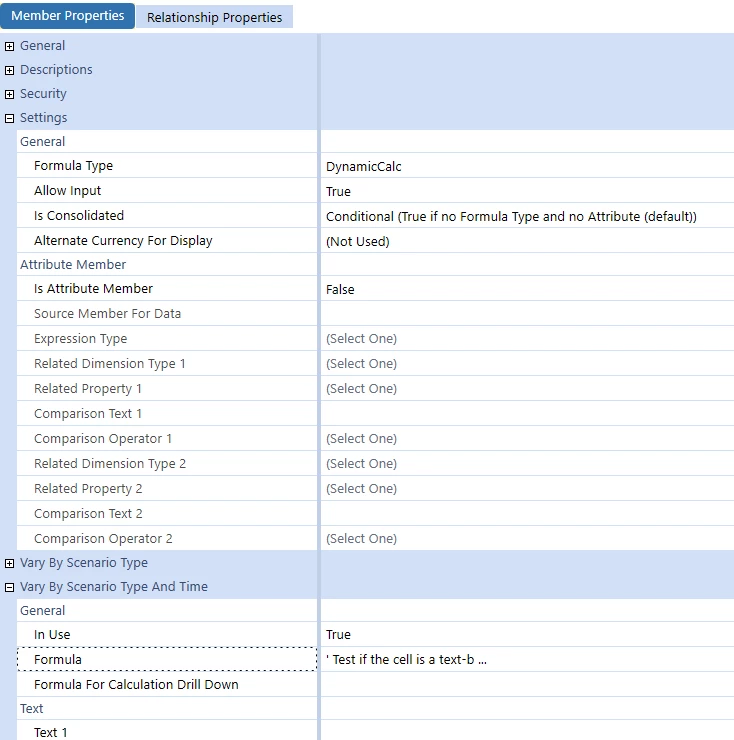
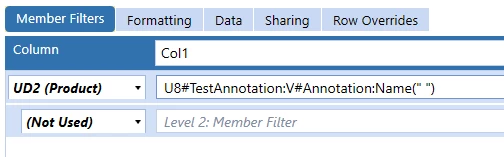
You are a life-saver!! Thanks. May i have the code to this formula and it's settings? Also, if you can give me a screen shot of how this cubeview calls the formula, that will be great.
My I will change your formula to suit my needs - by making it returning a text (e.g. color pink)  to my cubeview.

Thanks again for your hard work!! 
Maybe I can pay you back by recommending some great movies?  I usually watch only movies based on real events of incredible people


It is an UD8 member formula and it has to be used together with a text view member like annotation:

ChristianW_2-1662113225224.png


ChristianW_1-1662113144985.png


The member formula might look like this:

' Test if the cell is a text-based dataCell.
If api.View.IsAnnotationType() Then
	'Has the cell a cell text or an attachement?
	If Not api.Data.HasDataAttachments("O#Forms:V#Periodic:Ud8#None") Then
		'Retrieves the cells to test		
		Dim amount As DataCell = api.Data.GetDataCell("O#Top:V#Periodic:UD8#None")
		Dim budget As DataCell = api.Data.GetDataCell("O#Top:V#Periodic:UD8#None:S#BudgetV2")
		'Calculate the variance percent
		Dim variance As Decimal = (amount.CellAmount - budget.CellAmount  ) / budget.CellAmount

		'Is there a negative variance?
		If variance < 0 Then
			Return "<== Explantion Required"
		Else 
			Return Nothing
		End If
	Else
		Return Nothing		
	End If
End If

Return Nothing


3 replies

OneStream Employee
August 31, 2022

Yes, there is a faster way: api.Pov.GetDataCellPk.GetMemberScript(si)

This only works for financial business rules and member formula.

OneStream Employee
August 31, 2022

The XFBR function in a cubeview, will be resolved before the system retrieves the datacells, so there is no way for the rule to get the POV of a cell (because it doesn't exist yet).

The problem are dynamic queries like A#IS.descendants, when the xfbr is executed, the query isn't resolved yet.

There are several ways to work around this limitation, can you help us to understand, what you try to achieve?


DavyAuthor
Contributor
August 31, 2022

Wow!! I have no idea what the differences are between XFBR vs using formula and financial business rules. Obviously, you are some big shot developer at 1S. Or are you a consultant? If yes, which company do you work for?

I was studying some XFBR code written over 5 years ago, that I inherited.  I suspected there was some issue with XFBR not being able to read the cell's POV.  I think what you wrote is true- which means that case, 1S consultants' use of XFBR to do conditional formatting is flawed.
I guess my first question is - why would anyone use XFBR, except to process something before retrieving datacells!! 


OneStream Employee
August 31, 2022

There are plenty of great use cases for xfbr, including for conditional formatting, but you need to understand how it works. 5 years ago, we hadn't conditional formatting, but for some years now, it is a function of cubeviews.

There might be a much simpler solution for your problem.


I work for Onestream.