Newcomer
December 9, 2021
Solved

Transformation Rules

  • December 9, 2021
  • 4 replies
  • 0 views

Is there a way to export the Transformation Rules into an Excel file? 

Best answer by ChristianW

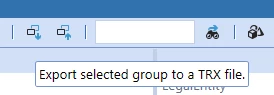
You can export the selected transformation rule as csv (even if it is called trx) if you click on this icon: ChristianW_1-1639143160398.png


ChristianW_0-1639143012704.png


4 replies

Contributor
December 9, 2021

Hi Ronnie: you can extract using the standard Application Load/Extract tool > Select Transformation Rules > the Group(s) you want > and then open the resulting XML file in Excel > As an XML Table. It formats in a standard looking table that you can review/filter from there.


Newcomer
May 31, 2022

This was great help. Especially to convert to xml table. Thanks!

OneStream Employee
December 10, 2021

You can export the selected transformation rule as csv (even if it is called trx) if you click on this icon: ChristianW_1-1639143160398.png
 

ChristianW_0-1639143012704.png


Newcomer
December 11, 2021

This is exactly what I needed, thank you!

OneStream Employee
May 31, 2022

Great to help you, can you mark it as a solution? It helps others with similar questions. Thanks

Newcomer
June 1, 2022

Hi Christian, not sure how to mark as as a solution. 

OneStream Employee
June 8, 2022

you can't only Ronnie can, he should have a button for it:

ChristianW_0-1654711628848.png