Has anyone used a business rule to create either a sound notification or email notification for tasks you’re waiting to finish running in task activity? When force consolidating, I often find myself working in other applications and constantly having to go back to OS to see if the consolidation has finished running. It would be nice to be able to set a sound notification once its complete or receive a quick email saying your task has completed.
Haha, I'm not sure if sound notifications are possible! (def something to look in to) But you can definitely trigger an email if a process succeeds or fails.
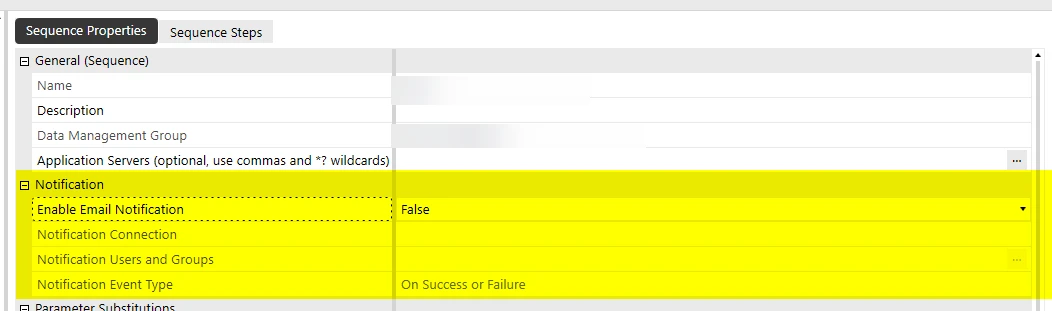
Assuming you’re running this via a Data Management sequence, there's a native built-in notification feature you can use. I’ve not tried it myself but I take it works the same way an email via BR.
Alternatively, you could add this to a BR and call it in step within the Force Consolidation sequence. You could even have the BR check the task activity table for that specific activity to trigger the email. There are definitely multiple ways to approach it.
Dim emailConnectionName As String = "AddEmailConnectionName"
'Email Content Dim subjectline As String = "This is my subject"
Dim messagebody As String = "Message Body"
' Add email addresses Dim EmailList As New List(Of String)
Dim userEmailAddress1 As String = "recipient1@example.com" Dim userEmailAddress2 As String = "recipient2@example.com"
Haha, I'm not sure if sound notifications are possible! (def something to look in to) But you can definitely trigger an email if a process succeeds or fails.
Assuming you’re running this via a Data Management sequence, there's a native built-in notification feature you can use. I’ve not tried it myself but I take it works the same way an email via BR.
Alternatively, you could add this to a BR and call it in step within the Force Consolidation sequence. You could even have the BR check the task activity table for that specific activity to trigger the email. There are definitely multiple ways to approach it.
Dim emailConnectionName As String = "AddEmailConnectionName"
'Email Content Dim subjectline As String = "This is my subject"
Dim messagebody As String = "Message Body"
' Add email addresses Dim EmailList As New List(Of String)
Dim userEmailAddress1 As String = "recipient1@example.com" Dim userEmailAddress2 As String = "recipient2@example.com"