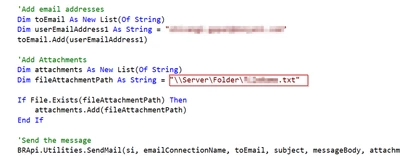
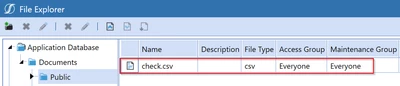
Anusha_MP Files in the application database filesystem are stored in a table and accessible via the BRApi FileSystem object. As such, 'folder path' is more of an attribute than a real path to the file somewhere:
Dim fileFullName As String = "EmailAttachment.png"
Dim failGracefully As Boolean = True
Dim includeContentFileBytes As Boolean = True
Dim objXFFileEx As XFFileEx = BRApi.FileSystem.GetFile(si, FileSystemLocation.ApplicationDatabase, fileFullName, includeContentFileBytes, failGracefully)
Dim folderName As String = objXFFileEx.XFFile.FileInfo.FolderFullName 'Just an attribute
Dim bytes As Byte() = objXFFileEx.XFFile.ContentFileBytes
Dim att As Attachment = New Attachment(New MemoryStream(bytes), fileFullName)
Dim attachments As List(Of Attachment) = New List(Of Attachment)() From
{
  att
}
string fileFullName = "EmailAttachment.png";
bool failGracefully = true;
bool includeContentFileBytes = true;
XFFileEx objXFFileEx = BRApi.FileSystem.GetFile(si, FileSystemLocation.ApplicationDatabase, fileFullName, includeContentFileBytes, failGracefully);
String folderName = objXFFileEx.XFFile.FileInfo.FolderFullName; // Just an attribute
Byte[] bytes = objXFFileEx.XFFile.ContentFileBytes;
Attachment att = new Attachment(new MemoryStream(bytes), fileFullName);

List<Attachment> attachments = new List<Attachment>(){att};