Sorry I thought sharing the other post would help you resolve
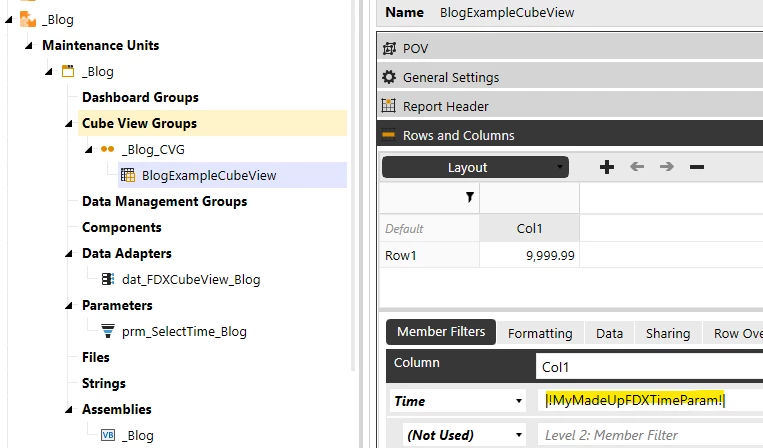
Below is an example of overriding the Time Value in a CubeView using a Parameter. This works with real parameters and namevaluepairs created by us.
Example1 (FDX specific “Parameter”)
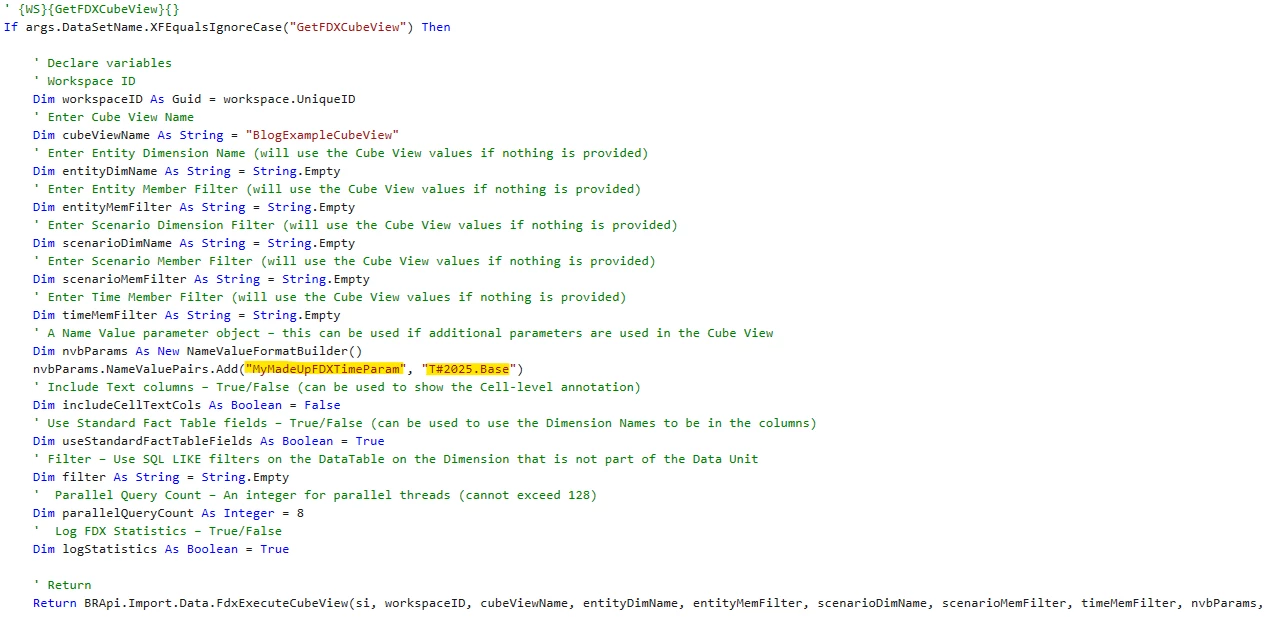
This enables us to supply a value for the parameter at runtime using the NameValueFormatBuilder object e.g.
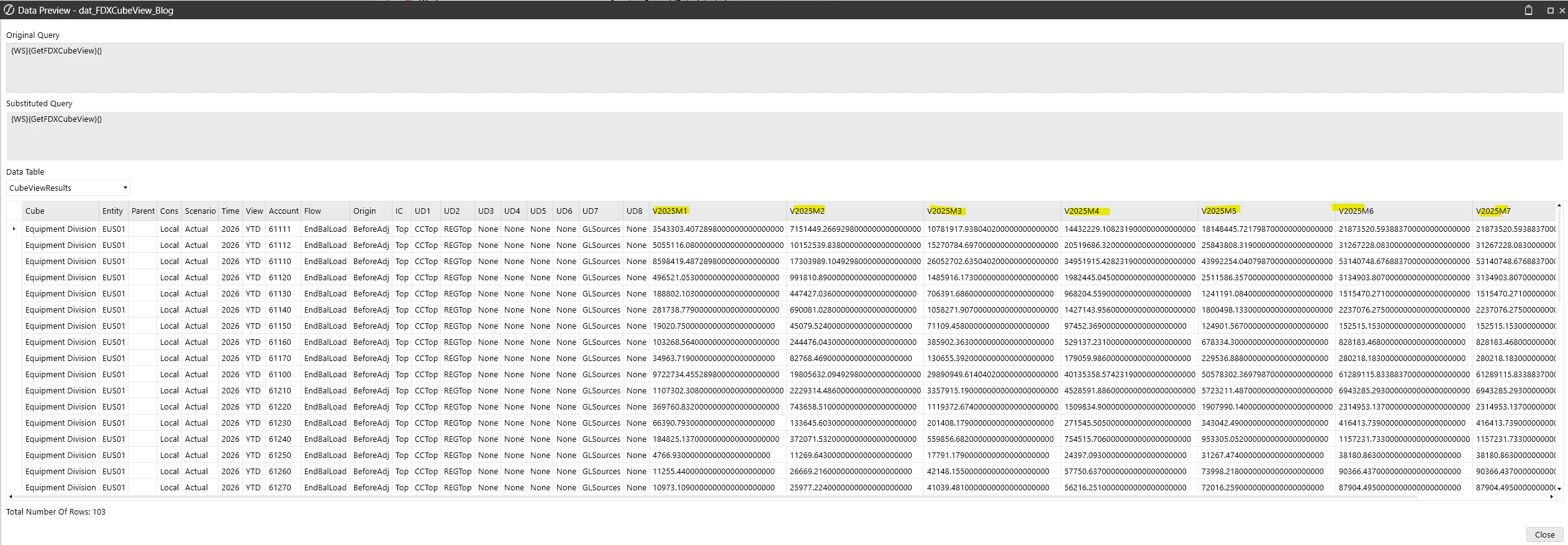
So this would return T#2025.Base. e.g.
Please note if not using a real parameter, the CubeView will not execute on its own since that parameter value is being supplied in code, only via Data Adapter invocation)
Example2 (Workspace Parameter)
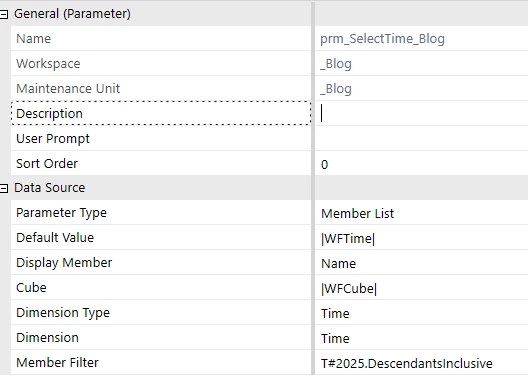
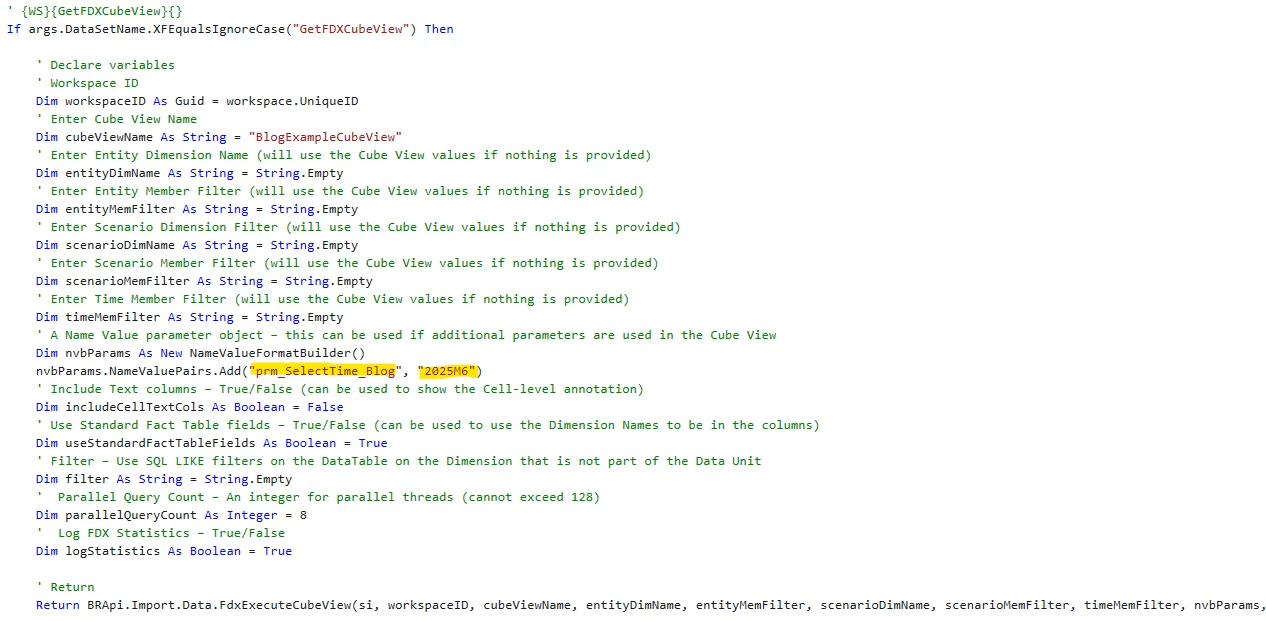
Similarly if I use a real Parameter e.g. prm_SelectTime_Blog
I can update it in exactly the same way in my business rule using NameValueFormatBuilder
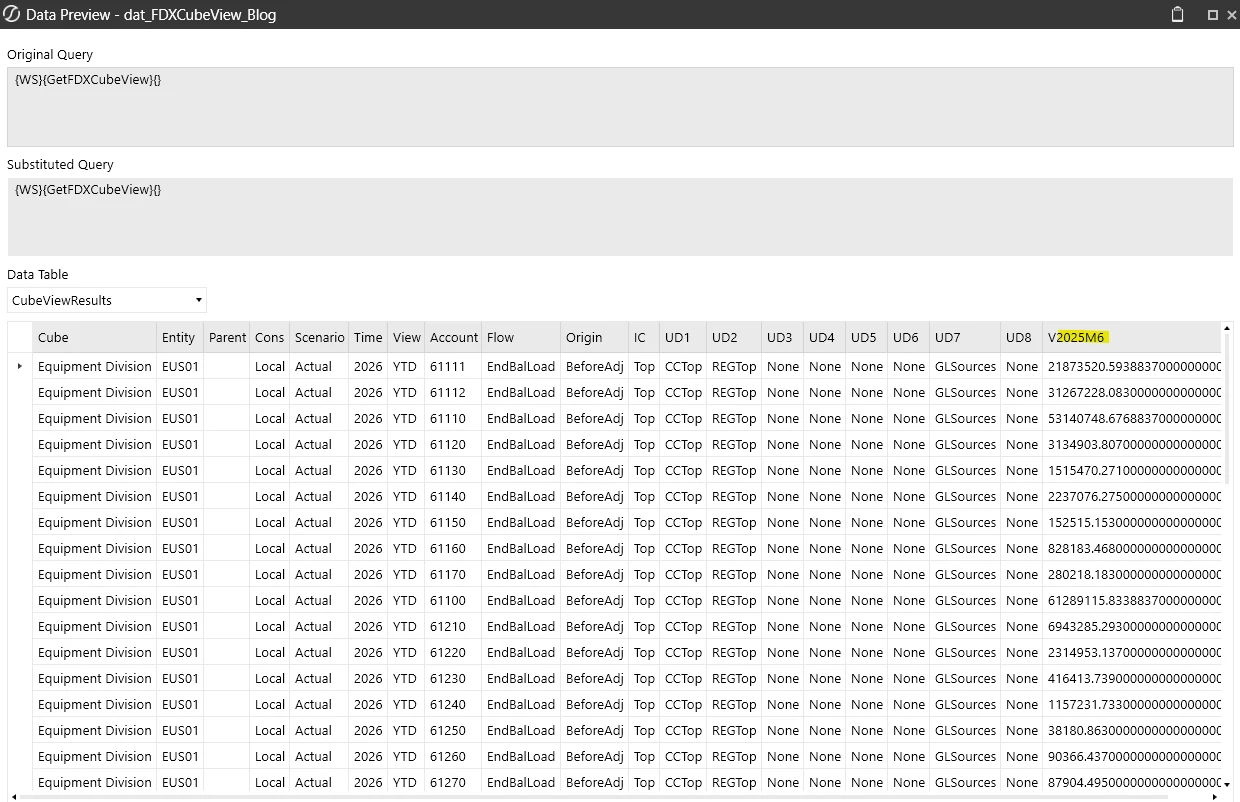
This will return T#2025M6. for example
If using a real parameter then you need to ensure one of the values you are supplying is the same as a value the parameter would normally invoke
Example code below
' {WS}{GetFDXCubeView}{CVName=[|!prm_SelectCubeView_FDX!|],prm_SelectEntity_FDX=|!prm_SelectEntity_FDX!|,prm_SelectTime_FDX=[|!prm_SelectTime_FDX!|]} If args.DataSetName.XFEqualsIgnoreCase("GetFDXCubeView") Then
' Declare variables ' Workspace ID Dim workspaceID As Guid = workspace.UniqueID ' Enter Cube View Name Dim cubeViewName As String = args.NameValuePairs.XFGetValue("CVName") ' Enter Entity Dimension Name (will use the Cube View values if nothing is provided) Dim entityDimName As String = String.Empty ' Enter Entity Member Filter (will use the Cube View values if nothing is provided) Dim entityMemFilter As String = String.Empty ' Enter Scenario Dimension Filter (will use the Cube View values if nothing is provided) Dim scenarioDimName As String = String.Empty ' Enter Scenario Member Filter (will use the Cube View values if nothing is provided) Dim scenarioMemFilter As String = String.Empty ' Enter Time Member Filter (will use the Cube View values if nothing is provided) Dim timeMemFilter As String = String.Empty ' A Name Value parameter object – this can be used if additional parameters are used in the Cube View Dim nvbParams As New NameValueFormatBuilder() nvbParams.NameValuePairs.Add("YourParamName1", "YourParamValue1")) nvbParams.NameValuePairs.Add("YourParamName2", "YourParamValue2")) ' Include Text columns – True/False (can be used to show the Cell-level annotation) Dim includeCellTextCols As Boolean = False ' Use Standard Fact Table fields – True/False (can be used to use the Dimension Names to be in the columns) Dim useStandardFactTableFields As Boolean = True ' Filter – Use SQL LIKE filters on the DataTable on the Dimension that is not part of the Data Unit Dim filter As String = String.Empty ' Parallel Query Count – An integer for parallel threads (cannot exceed 128) Dim parallelQueryCount As Integer = 8 ' Log FDX Statistics – True/False Dim logStatistics As Boolean = True
Sorry I thought sharing the other post would help you resolve
Below is an example of overriding the Time Value in a CubeView using a Parameter. This works with real parameters and namevaluepairs created by us.
Example1 (FDX specific “Parameter”)
This enables us to supply a value for the parameter at runtime using the NameValueFormatBuilder object e.g.
So this would return T#2025.Base. e.g.
Please note if not using a real parameter, the CubeView will not execute on its own since that parameter value is being supplied in code, only via Data Adapter invocation)
Example2 (Workspace Parameter)
Similarly if I use a real Parameter e.g. prm_SelectTime_Blog
I can update it in exactly the same way in my business rule using NameValueFormatBuilder
This will return T#2025M6. for example
If using a real parameter then you need to ensure one of the values you are supplying is the same as a value the parameter would normally invoke
Example code below
' {WS}{GetFDXCubeView}{CVName=[|!prm_SelectCubeView_FDX!|],prm_SelectEntity_FDX=|!prm_SelectEntity_FDX!|,prm_SelectTime_FDX=[|!prm_SelectTime_FDX!|]} If args.DataSetName.XFEqualsIgnoreCase("GetFDXCubeView") Then
' Declare variables ' Workspace ID Dim workspaceID As Guid = workspace.UniqueID ' Enter Cube View Name Dim cubeViewName As String = args.NameValuePairs.XFGetValue("CVName") ' Enter Entity Dimension Name (will use the Cube View values if nothing is provided) Dim entityDimName As String = String.Empty ' Enter Entity Member Filter (will use the Cube View values if nothing is provided) Dim entityMemFilter As String = String.Empty ' Enter Scenario Dimension Filter (will use the Cube View values if nothing is provided) Dim scenarioDimName As String = String.Empty ' Enter Scenario Member Filter (will use the Cube View values if nothing is provided) Dim scenarioMemFilter As String = String.Empty ' Enter Time Member Filter (will use the Cube View values if nothing is provided) Dim timeMemFilter As String = String.Empty ' A Name Value parameter object – this can be used if additional parameters are used in the Cube View Dim nvbParams As New NameValueFormatBuilder() nvbParams.NameValuePairs.Add("YourParamName1", "YourParamValue1")) nvbParams.NameValuePairs.Add("YourParamName2", "YourParamValue2")) ' Include Text columns – True/False (can be used to show the Cell-level annotation) Dim includeCellTextCols As Boolean = False ' Use Standard Fact Table fields – True/False (can be used to use the Dimension Names to be in the columns) Dim useStandardFactTableFields As Boolean = True ' Filter – Use SQL LIKE filters on the DataTable on the Dimension that is not part of the Data Unit Dim filter As String = String.Empty ' Parallel Query Count – An integer for parallel threads (cannot exceed 128) Dim parallelQueryCount As Integer = 8 ' Log FDX Statistics – True/False Dim logStatistics As Boolean = True