
Newcomer
August 9, 2024
Solved

Parameter - Is there a way to update the Filter Property via a Business rule?

  • August 9, 2024
  • 4 replies
  • 0 views

I am writing to the community to see if anyone knows of a way to programmatically update a Parameter from a Business Rule to update the Filter Property (for a Member List or really any type of list). I can see the way to set the "Default Value" of a property but not a way to update the List which the property gets its values from.
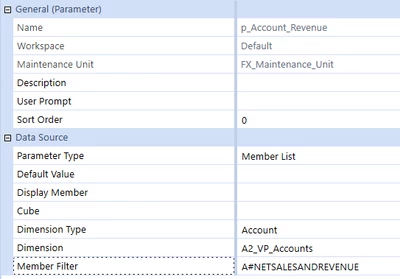
DavidT_0-1723207763201.png

The member Filter is set to just reference Net Sales, but what I'd like to really do here is build the Member Filter from a list that I create in a business rule (Dashboard Extender, call to an Extender Rule, etc). I only see these options:

This will set the value to 2024, but it has to be already in the List...

DavidT_1-1723207875343.png

This throws an error after the 1st entry, but still won't render in a combo box because I'm not really adding it to the List of Member Filters...

DavidT_2-1723208020913.png

This will set the 1st value, but doesn't work for a list ... only 1 value...

DavidT_3-1723208086564.png

I don't see in the api an ability to modify the Filter property or really inspect a parameter and change its other properties.

Has anyone been able to do this?

Thanks,
David


Best answer by TheJonG

If you are trying to assign a dashboard dataset rule to a parameter, the parameter type must be Bound List with Command Type = Method and Method Type = BusinessRule. If you want to use a Member Filter parameter, you will need to go the XFBR route. 

4 replies

OneStream Employee
August 9, 2024

I might not be fully understanding what you are trying to do but you could generate the Member Filter via an XFBR rule. Ultimately, your XFBR rule would return a list of Accounts based off parameter selections or whatever logic needed to generate the list. 

DavidTAuthor
Newcomer
August 9, 2024

Hi,

I'm wondering if its possible to change the Filter on a MemberList type parameter to programmatically create a list and pass it back to the parameter. I found some writeups on Dashboard DataSet rules, so I'm trying that as well. You know how you can build a lists file in HFM and load it, something along those lines. I figured if they have parameters, there must be a way to programmatically return a list to assign to a parameter rather than having to build it out via the GUI. I'm relatively new to OneStream, but I would prefer to not use the GUI to build out the List but rather some type of business rule.

DavidTAuthor
Newcomer
August 9, 2024

for the dashboard dataset rule

DavidT_0-1723217458632.png

and the config to the parameter:

DavidT_1-1723217491572.png


but its not actually updating the combox that's assigned the parameter


TheJonGOneStream EmployeeAnswer
OneStream Employee
August 9, 2024

If you are trying to assign a dashboard dataset rule to a parameter, the parameter type must be Bound List with Command Type = Method and Method Type = BusinessRule. If you want to use a Member Filter parameter, you will need to go the XFBR route. 

DavidTAuthor
Newcomer
August 9, 2024

Thanks Jon!