Hi Yashwant,
The easiest way is to add a "Confirm" step to your import Workflow step:
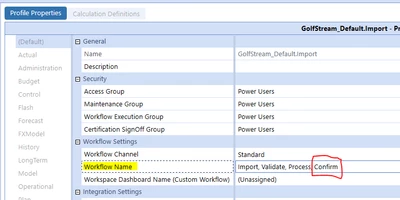
(ensure to create a Confirmation Rule profile that has your to be created rule in it and attach it to the workflow)
If you need help setting up confirmation rules, there is a chapter called "Confirmation Rules" in the OneStream Design & Reference Guide. You will also find examples in GolfStream, if you have access to it. Here is one you may be able to use:
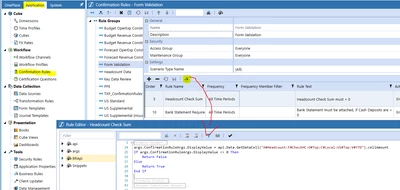
In your case it might look e.g. like this:
args.ConfirmationRuleArgs.DisplayValue = api.Data.GetDataCell("A#YourAccount:F#Top:U1#Top:U2#.........").cellAmount
If args.ConfirmationRuleArgs.DisplayValue < 0 Then
Return False
Else
Return True
End If
There are a few more settings to possibly consider, but I assume that you only need an general direction to continue your work.
