
Newcomer
January 28, 2025
Solved

How to save the outputs of ExportCubeViewGridsToExcelFile() to a .xlsx file?

  • January 28, 2025
  • 2 replies
  • 0 views

I've tried to implement this function as per the Business Rules Editor snippet:

Dim objByte() As Byte() = BRApi.CubeViews.Process.ExportCubeViewGridsToExcelFile(si, custSubstVarsForAllCubeViews, cubeViewNamesAndVars)

However, I've had a few problems with this, the main one being that I've been unable to save whatever it returns to an Excel file. Here's what I've tried:

Dim fileName As String = "test.xlsx"
Dim filePath As String = $"Documents/Users/{StringHelper.RemoveSystemCharacters(si.UserName,False,False)}"

Dim XFfileDataInfo As New XFFileInfo(FileSystemLocation.ApplicationDatabase,fileName,filePath)
Dim XFfileData As New XFFile(XFfileDataInfo, String.Empty, objByte)
BRApi.FileSystem.InsertOrUpdateFile(si, XFfileData)

Whenever I run this code the output file is an XML. How do I save this to a .xlsx file?
Best answer by MarcusH

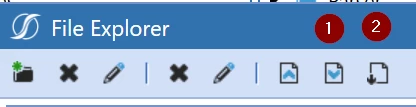
Which download button are you using?

Button 1 downloads in 'OneStream format' i.e. xml. Button 2 downloads in file format eg xlsx

2 replies

Expert
January 29, 2025

I think you need to tell OS that the file has contents. Try this: 

Dim fileName As String = "test.xlsx"
Dim filePath As String = $"Documents/Users/{StringHelper.RemoveSystemCharacters(si.UserName,False,False)}"

Dim XFfileDataInfo As New XFFileInfo(FileSystemLocation.ApplicationDatabase,fileName,filePath)
XFfileDataInfo.ContentFileContainsData = True
XFfileDataInfo.ContentFileExtension = XFfileDataInfo.Extension
Dim XFfileData As New XFFile(XFfileDataInfo, String.Empty, objByte)
BRApi.FileSystem.InsertOrUpdateFile(si, XFfileData)


mirelesAuthor
Newcomer
January 30, 2025

Hi Marcus, thank you so much for your reply! Unfortunately the file is still being saved as an XML. To clarify, when I download it to my computer it is saved as an XML. When I try to open it from the OneStream file explorer it does open in Excel but with no content.

MarcusHAnswer
Expert
January 30, 2025

Which download button are you using?

Button 1 downloads in 'OneStream format' i.e. xml. Button 2 downloads in file format eg xlsx

mirelesAuthor
Newcomer
January 30, 2025

.