


Solved
How to LogMessage the content of a list of objects (member, memberinfo, and more)?
How can I use the api.LogMessage or BRApi.ErrorLog.LogMessage functions to print out the member names of a list of objects like member, or memberinfo?

How can I use the api.LogMessage or BRApi.ErrorLog.LogMessage functions to print out the member names of a list of objects like member, or memberinfo?
You can use the LINQ (Language Integrated Query is a Microsoft .NET Framework component that adds native data querying capabilities to .NET languages) function select for it:
Dim memberInfoList As List(Of MemberInfo) = BRApi.Finance.Members.GetMembersUsingFilter(si, aDimPk, aQuery, False)

api.logmessage("List of Membernames", String.Join(vbnewline, memberInfoList.Select(Function(x) x.NameAndDescription)))
It uses a little strange syntax, but when you get familiar with it, it gives you access to many other helpful query functions (like find, and findall) for list and other collection objects.
function(x) x.something gives you one by one access to the objects within the list, you can use this syntax to access strings like here, but you can also use it for more complex requirements.
String.Join(vbnewline,something) concatenates the string members of a list together using vbnewline as separator.
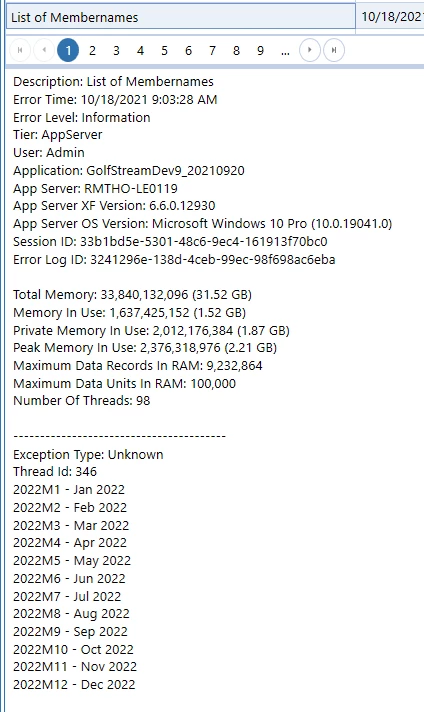
With this little trick debugging should become much easier.
Enter your E-mail address. We'll send you an e-mail with instructions to reset your password.