
Contributor
Sep 4, 2024 10:55 PM UTC

How to Create a .base in a Step Using a Calculate

Hi everyone.

i want to make the following calculate, but i want to make the one of all the departments and all the projects, but when i put it as .base it gives me error in the calculate, then i would like to know how i can solve it or in what other way it should be made so that it works correctly.
an image of my step configuration

api.Data.Calculate("CB#[HLFPLN]:E#"& entity &":S#[" & scenario & "]:T#" & time & ":A#cra_639950:F#InCostsAllocation:O#Forms:I#11201_11207:U1#ALL_DEPARTMENTS.Base:U2#P0000:U3#LOCAL_DATA:U4#ALL_PROJECTS:U5#None:U6#None:U7#None:U8#None = (E#11201_11207:S#[ForecastAllocation]:T#" & time & ":A#cra_ALLOCPRCT:F#None:O#Import:I#11201_11257:U1#ALL_DEPARTMENTS.Base:U2#P0000:U3#LOCAL_DATA:U4#ALL_PROJECTS:U5#None:U6#None:U7#None:U8#None)*(E#11201_11207:S#[" & scenario & "]:T#" & time & ":A#cra_639950:F#None:O#Top:I#None:U1#ALL_DEPARTMENTS.Base:U2#P0000:U3#LOCAL_DATA:U4#ALL_PROJECTS:U5#None:U6#None:U7#None:U8#None)",False)
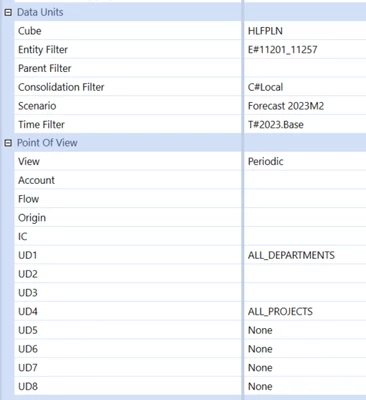
Marco_0-1725490476686.png


4 replies

Employee - Advisor
Sep 5, 2024 6:56 AM UTC

Hi,

you cannot use filters in a calculation like this. You will have to use a different way, out of which there are several. In your case you'll probably want to explore overload functions.

You can find more information e.g. here:

https://documentation.onestream.com/1375907/Content/API%20Overview/Finance%20Functions%20APIs/8%20-%20Writing%20Stored%20Calculations.html

And then here:

https://documentation.onestream.com/1375907/Content/API%20Overview/Finance%20Functions%20APIs/8.1%20-%20Overload%20Function.html

You can also find an account-based example here in this forum, such as:

Solved: U8 Member formula - OneStream Community (onestreamsoftware.com)

MarcoAuthor
Contributor
Sep 5, 2024 4:59 PM UTC

Hi Henning.

check the other method, but I wanted to ask if the way I have it is correct, since what I want to modify is an exact section, as I have it in the question, but I don't know if this way it will work

api.Data.Calculate("E#"& entity &":S#[" & scenario & "]:T#" & time & ":A#cra_639950:F#InCostsAllocation:O#Forms:I#11201_11207:U2#P0000:U3#LOCAL_DATA:U5#None:U6#None:U7#None:U8#None = (E#11201_11207:S#[ForecastAllocation]:T#" & time & ":A#cra_ALLOCPRCT:F#None:O#Import:I#11201_11257:U2#P0000:U3#LOCAL_DATA:U5#None:U6#None:U7#None:U8#None)",,,,"U1#ALL_DEPARTMENTS.Base",,,"U4#ALL_PROJECTS.Base",,,,,,,True

or do I need something else to be able to do what I want to do?

Employee - Advisor
Sep 6, 2024 7:03 AM UTC

Hi, as rhankey said, not all dimensions make sense to be included in the target (left hand side of the equal sign). All data unit dimensions are naturally pulled / used from the point of view that the rule is executed in. Also, you had a comma missing. And the durable flag in the end, I removed this as this is often not needed.

api.Data.Calculate("A#cra_639950:F#InCostsAllocation:O#Forms:I#11201_11207:U2#P0000:U3#LOCAL_DATA:U5#None:U6#None:U7#None:U8#None = (E#11201_11207:S#[ForecastAllocation]:T#" & time & ":A#cra_ALLOCPRCT:F#None:O#Import:I#11201_11257:U2#P0000:U3#LOCAL_DATA:U5#None:U6#None:U7#None:U8#None)",,,,,"U1#ALL_DEPARTMENTS.Base",,,"U4#ALL_PROJECTS.Base")

There is plenty of material on writing rules which may help you such as training and a book, amongst other things. And the forum here is a fantastic resource too, of course, so thank you for participating!

Newcomer
Sep 5, 2024 12:15 PM UTC

Use FilterMembers() to filter the source UD1, and remove UD1 from the destination intersection, as expansion/filter functions are not valid in any intersection definition.

If U4#All_Projects is a parent member, then remove it from both the source and destination intersections, as you cannot write to a parent member.  If the formula must be applied to the All_Projects member, then specify that on the source side, but specify a U4# base member on the destination side.

Why are you referencing so many dims in your intersections?  Time as an example is totally pointless to include.