
Contributor
April 26, 2024
Solved

Getting the Workflow Profile Text2 ( or 3 or 4 ) attribute value using BRApi ( Not Text1 )

  • April 26, 2024
  • 3 replies
  • 0 views

Hi all,

I am baffled as to why I am unable to retrieve the Text2 ( or 3 or 4 ) attribute value in a workflow profile. I use the following code to get the Text1 value :

Dim wfClusterPK As WorkflowUnitClusterPk = si.WorkflowClusterPk
Dim wfScenarioTypeID As Integer = BRApi.Workflow.General.GetScenarioTypeId(si, wfClusterPK)
Dim sVarStep2 As String =BRApi.Workflow.Metadata.GetParent(si,args.SubstVarSourceInfo.WorkflowUnitInfo.ProfileName).GetAttributeValue(wfScenarioTypeID, 18000)

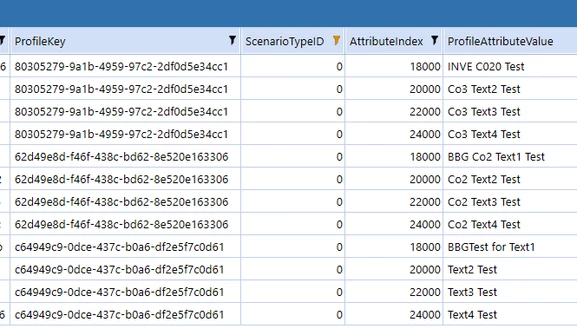
However, if I substitute 20000, 22000 or 24000 as the attribute it will not apply this in the business rule. I have checked the database tables and the values are there with those attribute values and the scenarioTypeId is set to 0 for Actual.

Here is the database filter, so the value are there, but why even I hard code the scenariotype as 0 will it not retrieve these values for me. At present, am only just trying to get them to show in the error log.
MarkHoughton_0-1714125894429.png

I am running the cubeview from the workflow profile, previously I found when trying to pull in Text1 that it would give intermittent results if I ran from the cubeview builder rather than from calling the cubeview whilst in a WFProfile.

Any thoughts please ?

Regards


Best answer by MarcusH

You have this code:

Dim sVarStep2 As String =BRApi.Workflow.Metadata.GetParent(si,args.SubstVarSourceInfo.WorkflowUnitInfo.ProfileName).GetAttributeValue(wfScenarioTypeID, 18000)

Instead of 18000 you use SharedConstants.WorkflowProfileAttributeIndexes.Text2

Dim sVarStep2 As String =BRApi.Workflow.Metadata.GetParent(si,args.SubstVarSourceInfo.WorkflowUnitInfo.ProfileName).GetAttributeValue(wfScenarioTypeID, SharedConstants.WorkflowProfileAttributeIndexes.Text2)


3 replies

OneStream Employee
April 26, 2024

I'm sorry, can you clarify exactly what type of rule this is? Is it a Cube View Extender? A Custom Calculate? Or what?

Contributor
April 26, 2024

Hi,

From a cubeview I want to send certain information about the workflow, I know I can send |WFText2| as a parameter to the business rule and I can work from that, but I wanted to understand why it is that inside a business rule I can retrieve using VBScript the Text1 attribute, but am not able to get the Text2 or 3 or 4 attribute, even though the syntax I have used ( or would have expected to work ) is not working. If the index values from the database are 18000,20000,22000 & 24000 for Text1,2,3 & 4, then how come I cannot substitute those index values and retrieve the contents even though the database shows they exist.

Cheers

OneStream Employee
April 26, 2024

It's still not clear - what does "from a CubeView" mean - is it a Cube View Extender you are writing? A dynamic Member Formula? A Dashboard Extender? Can you give us a screenshot of the client while writing the rule?

I'm not trying to be awkward: the question is because you're relying on si.WorkflowClusterPk to identify the workflow profile, but depending on context, this might not actually be what you think it is.

Expert
April 26, 2024

Instead of the actual numbers try using the constants: SharedConstants.WorkflowProfileAttributeIndexes.Text1 etc

Contributor
April 26, 2024

Hi,

Thanks for the info, but what is the full syntax to retrieve that ?

Dim myText2item As String = BRApi.Workflow.SharedConstants.WorkflowProfileAttributeIndexes.Text2

That does not work, so what should I have ? There are no samples in the business rule snippets which feature "sharedconstants" or at least all that pop up when you start to type "shar" is related to sharedfilefolders

Cheers

MarcusHAnswer
Expert
April 26, 2024

You have this code:

Dim sVarStep2 As String =BRApi.Workflow.Metadata.GetParent(si,args.SubstVarSourceInfo.WorkflowUnitInfo.ProfileName).GetAttributeValue(wfScenarioTypeID, 18000)

Instead of 18000 you use SharedConstants.WorkflowProfileAttributeIndexes.Text2

Dim sVarStep2 As String =BRApi.Workflow.Metadata.GetParent(si,args.SubstVarSourceInfo.WorkflowUnitInfo.ProfileName).GetAttributeValue(wfScenarioTypeID, SharedConstants.WorkflowProfileAttributeIndexes.Text2)


Contributor
April 26, 2024

Hi, 

That works now, although it didn't initially. But just ran it again and it does. So thank you.


Expert
April 26, 2024

MarkHoughton  - Here is an another example

Dim wfList As New Dictionary(Of String, WorkFlowProfileInfo)
For Each w As WorkflowProfileInfo In objList
w.GetAttributeValue(ScenarioTypeID.Actual, SharedConstants.WorkflowProfileAttributeIndexes.Text3)

Next