
Newcomer
September 18, 2023

Extract MultiPeriod Uploaded File Using ExportStageArchives

  • September 18, 2023
  • 2 replies
  • 0 views

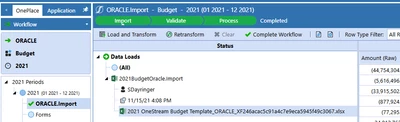
I'm able to extract the monthly csv files uploaded using BRAPi.Import.Data.ExportStageArchives, but this doesn't seem to work for multiperiod uploads (specifically budget) or I'm just referencing a parameter incorrectly. I've tried entering the time parameter as "2021", "2021M12", "2021M1", even "2021M1-2021M12" within the business rule, but nothing is exported at all for the Budget scenario.... Any ideas?
sdayringer_0-1695047531138.png


2 replies

OneStream Employee
September 21, 2023

This smells like a known bug with Scenarios with the Workflow Tracking Frequency set to Yearly, first observed on 6.4. I would get in touch with Support for details.

Newcomer
July 12, 2024

Hi Both,

please help me to find, where the files are stored once it's loaded in OneStream, i couldn't find the path even within onestream.

is there any configuration setting which needs to be enabled to locate the file in file share ?

Regards 

Darpan

OneStream Employee
July 12, 2024

They're not on the FileShare, they are in the application database. You should use the API for extraction.

Newcomer
July 12, 2024

Hi JackLacava , thanks for the quick response, i understand that the source file name and log file name i can get into an application database table - StageArchivesinformation.

yes as you mentioned, we can use the api - brapi.stagearchivesinformation, but again, it's asking for the source path, which i am unable to find 😞 

Regards 

Darpan