
Newcomer
April 21, 2022
Solved

Dashboard - How to pass a condition within a label component?

  • April 21, 2022
  • 1 reply
  • 0 views

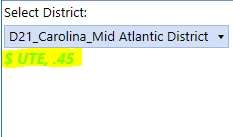
I'm trying to build a label that shows target goals for each entity. Now since each region has different goals. I'm looking for my label to change the value based on the entity selected. 

Here is an example (We're still in development so not the most eye catching)
Mustafa_A_0-1650546301458.png

Its referencing a parameter -- 

Mustafa_A_0-1650547240732.png

How can I pass a condition or a rule that reads the POV entity and shows me that specific value.
Best answer by TheJonG

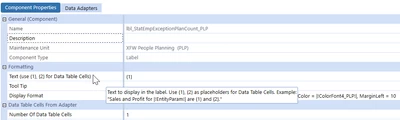
You will need to create a data adapter which returns a set of data cells and attach it to the label component. Then use curly brackets to reference the data cells within the table. The Data Adapter can use a cube view as it's data source which would assumedly reference the POV Entity (or entity parameter selected in the combo box).   

An alternative approach would be to use XFBR rules.


TheJonG_0-1650547124078.png


1 reply

TheJonGOneStream EmployeeAnswer
OneStream Employee
April 21, 2022

You will need to create a data adapter which returns a set of data cells and attach it to the label component. Then use curly brackets to reference the data cells within the table. The Data Adapter can use a cube view as it's data source which would assumedly reference the POV Entity (or entity parameter selected in the combo box).   

An alternative approach would be to use XFBR rules.


TheJonG_0-1650547124078.png


Newcomer
April 22, 2022

Thank you! Very Helpful.  got it to work.
