Contributor
Oct 24, 2023 5:05 PM UTC
Solved

Confirmation Rule to check for nodata vs 0

I need to be able to write a confirmation rule that checks for nodata vs a value of zero.   Can someone help with the syntax


I have this - 

Dim cellstatus As DataCellStatus = api.Data.GetDataCell("Cb#CimpressConsol:P#TotCimpress:C#Local:S#Actual:V#YTD:A#BS_NoMap:F#EndBal:O#Top:I#Top:U1#Top:U2#Top:U3#Top:U4#Top:U5#Top:U6#None:U7#None:U8#None").cellstatus

but I dont know how to build the If to check on the result.
 

Member
Oct 24, 2023 5:23 PM UTC

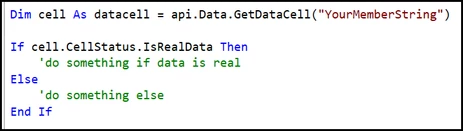
The cellStatus property has several Boolean properties/methods you can call to determine the status. I would do something such as the following:

image.png

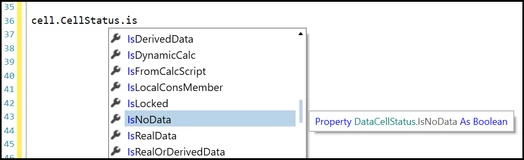
The below shows all the available Boolean properties you can use from a DataCell cell status:

image.png

3 replies

Member
Oct 24, 2023 5:23 PM UTC

The cellStatus property has several Boolean properties/methods you can call to determine the status. I would do something such as the following:

image.png

The below shows all the available Boolean properties you can use from a DataCell cell status:

image.png

Contributor
Oct 25, 2023 1:51 PM UTC

Thanks!  This is perfect.   Can I ask where you get this information on how to do this?   I was not able to find anything in the OS documentation or even in the OS books.

Member
Oct 26, 2023 2:56 PM UTC

Some of the guides, such as the 'Design and Reference Guide' or 'OneStream Finance Rules and Calculations Handbook' mention cell status properties for either a data cell or data buffer cell, but they do not explicitly show examples like you mention. For me, I find scrolling through the IntelliSense window in the OS IDE to be the easiest approach for finding methods to use.