Feb 26, 2024 7:51 PM UTC
Solved

Batch posting of journals

Hi All, 

I would like to execute a batch posting of all unposted journals in all base workflow profiles.

Is there a way I can execute the posting via business rule? 

Thank you in advance. 

Employee - Sage
Feb 27, 2024 10:31 AM UTC

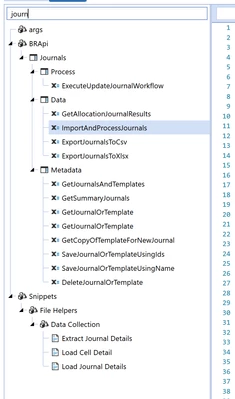
Of course. Have a look at these api calls:

JackLacava_0-1709029830237.png

JackLacava_1-1709029924361.png


5 replies

Employee - Sage
Feb 27, 2024 10:31 AM UTC

Of course. Have a look at these api calls:

JackLacava_0-1709029830237.png

JackLacava_1-1709029924361.png


cons1Author
Feb 27, 2024 11:07 AM UTC

Yes, thank you. I was able to see what my error is and now my code works. Thank you. 🙂

Employee - Advisor
Feb 27, 2024 12:26 PM UTC

Hi, just a word of caution, please make sure that batch-posting all open journals in all base workflow profiles aligns with the closing process. (Possibly) Without any signal or flag from the actual users who entered the journals and may still be working on those, I see the danger of posting journals which were not posted (yet) on purpose. This could be because the actual amount is still in discussion, or a non-needed journals has just been unposted but not deleted, etc. Also, when this applies, the balance sheet may not match, simply due to this. Batch-posting all journals could eventually create more problems than solutions in the overall closing process.

This is mostly be used for loading historical journals, but not for the actual closing process after go live.

cons1Author
Feb 27, 2024 12:46 PM UTC

Appreciate the heads up, and yes I agree. This is only for historical journal data and will be disabled permanently after. 

Newcomer
Dec 16, 2024 3:37 PM UTC

Would you have an example of this code you used to batch post historical journals with code?