Newcomer
Sep 6, 2022 5:47 PM UTC

Zeroes into -

DGC_0-1662486377852.png


I am trying to change the zeroes in my report to become '-'.

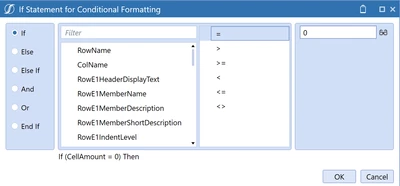
Can I accomplish the above with an If Statement?

 

6 replies

Sep 7, 2022 2:21 AM UTC

Have you tried adding something like this in the Cell Format under Number Format? 0;-0;"-"?  If you have a Custom Number Format, it follows the same formatting as Excel.  Excel Custom Number Format offers 4 arguments.  Argument 1 is for the Display of Positive Numbers, Argument 2 is for the Display of Negative Numbers, Argument 3 is for the Number Zero Format, and Argument 4 is for Text.  There are plenty of links on this subject online.  

TonyToniTone_0-1662516879180.png

Hope this helps

DCarrilloAuthor
Newcomer
Sep 7, 2022 3:20 PM UTC

How would I transform my zeroes into dashes in OS though?

Sep 7, 2022 3:36 PM UTC

Add here in your Cube View and see what happens

TonyToniTone_0-1662564995364.png


DCarrilloAuthor
Newcomer
Sep 7, 2022 3:43 PM UTC

The text is not available under the drop-down menu so the zeroes are now blanks instead of dashes.

Sep 7, 2022 7:30 PM UTC

I tested with a Cube View with derived 0's

TonyToniTone_0-1662578721905.png

Used [#,###,0;(#,###,0);"-"] in Number Format for Cell Format

TonyToniTone_1-1662578892385.png

Zeros turned in dashes

TonyToniTone_2-1662578943381.png

Also worked in a If Statement

If (CellAmount = 0.00) Then
    NumberFormat = [#,###,0;(#,###,0);"-"]
Else
    NumberFormat = [#,###,0;(#,###,0);0]
End If


DCarrilloAuthor
Newcomer
Sep 7, 2022 7:42 PM UTC

Ok, for the Cell Format am I entering that information in Row or Column? Or below in the screenshot?

DGC_0-1662579700800.png