
Newcomer
April 4, 2022
Solved

WriteableTextColor

  • April 4, 2022
  • 2 replies
  • 0 views
Hi All,
 
Does anyone know of a formatting string that will allow us to edit the textcolor of writeable cells in a cube view? I could split out the columns so that we have locked and writeable cells seperately and then we edit the textcolor of all the rows, but what I am looking for is almost a "WriteableBackGroundColor = White", but for TextColor.
 
I tried using "WriteableTextColor" (a string I tried to derive), but it unfortunately doesn't do anything
Best answer by NidhiMangtani

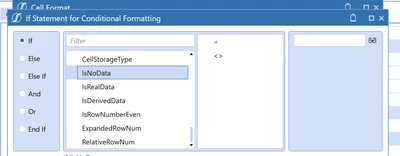
Try exploring conditional formatting.

If cell is readonly Then

 color1

else

color2

End If

I do not see readonly property in conditional formatting options though. See if you can use any other property there.

BhartiParyani_0-1649069761968.png


2 replies

Veteran
April 4, 2022

Try using just TextColor.

Newcomer
April 4, 2022

Hi Bharti,

Thanks for this. However I am trying to have separate textcolors. One for cells where a user is not able to input data, and the other for cells where they can (Writeable cells).

Any ideas?

Veteran
April 4, 2022

Try exploring conditional formatting.

If cell is readonly Then

 color1

else

color2

End If

I do not see readonly property in conditional formatting options though. See if you can use any other property there.

BhartiParyani_0-1649069761968.png


Newcomer
April 4, 2022

Thanks Bharti, we came right using this idea.