
Newcomer
September 12, 2023

Why are blank lines appearing only in pdf version and only for some rows?

  • September 12, 2023
  • 1 reply
  • 0 views

I would truly appreciate any help you can provide in eliminating the blank rows in this pdf version below. These blank rows appear after my header, after all the current asset accounts, and again after total assets. Thank you.
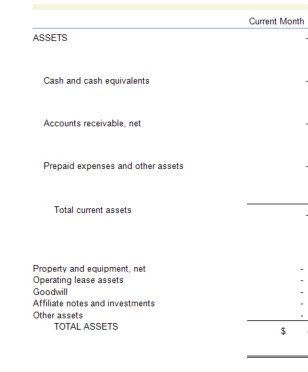
agabby_0-1694479968811.png


1 reply

Expert
September 12, 2023

Hi, it probably depends on the formatting of those rows. I would suggest to check the top line and bottom line options for the cell format.

agabbyAuthor
Newcomer
September 12, 2023

Thank you for your response.

I've zeroed out all cell and header formatting as a process of elimination to solve this issue. With no cell or header formatting, my problem still is unresolved.

agabbyAuthor
Newcomer
October 2, 2023

I had to delete my blank columns to the right, as the formatting contained there caused these extra rows problems. I'm not sure what the permanent solution is for this issue but deleting these columns did solve this problem.

Thank you for your help.