
Contributor
October 25, 2023
Solved

Unable to trigger an Action through a Grid View

  • October 25, 2023
  • 1 reply
  • 0 views

Hello there,

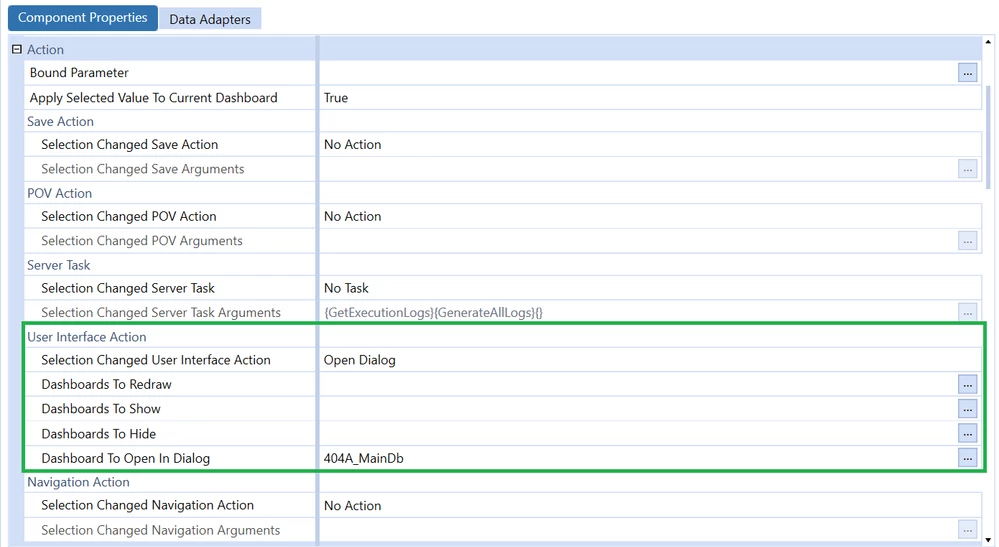
I am wondering how to use the 'Action' section in a GridView's configuration ... I tried something as simple as opening a Dialog (image below) but I cannot seem to trigger the event. Is there a specific place on the GridView where we need to click or it's not even possible ?

Any kind of help would be much appreciated !
Community3.png

Best answer by NickBolinger

Hi Keyser Soze, 

The user interface actions run when you set a parameter or run a task (ex. button click or selecting a member in a combo box). By default, when you select a row or something in the grid view, these actions aren't triggered because you aren't "doing" anything. If you create & assign a literal parameter to your grid view and also assign a column name for that bound parameter, it will display your dialog because you are then running an action that will trigger these settings. You don't have to do anything with the parameter value you are setting, it just needs to be in place to trigger the action.

These two settings:

NBolinger_0-1698241801665.png

NBolinger_1-1698241816915.png

Hope it helps!

Nick


1 reply

OneStream Employee
October 25, 2023

Hi Keyser Soze, 

The user interface actions run when you set a parameter or run a task (ex. button click or selecting a member in a combo box). By default, when you select a row or something in the grid view, these actions aren't triggered because you aren't "doing" anything. If you create & assign a literal parameter to your grid view and also assign a column name for that bound parameter, it will display your dialog because you are then running an action that will trigger these settings. You don't have to do anything with the parameter value you are setting, it just needs to be in place to trigger the action.

These two settings:

NBolinger_0-1698241801665.png

NBolinger_1-1698241816915.png

Hope it helps!

Nick


Contributor
October 25, 2023

Amazing ! Thank you for this response

