Following upon @sameburn’s suggestion, here is our version of this function.
Business Rule Type: Dashboard XFBR String
(only relevant block of code is shown; this is not a complete BR)
'TrimNameForExcel
'	Dimension:		NA
'   Usage Example:	XFBR(redacted_CubeviewHelper, TrimNameForExcel, Text=[SomeString])
'   Descriptions:	Trims text down to 31 characters (the max sheet length in Excel)
'	Output:			String

#Region "TrimNameForExcel"
If args.FunctionName.XFEqualsIgnoreCase("TrimNameForExcel")
	'Required Inputs
	Dim name As String = args.NameValuePairs.XFGetValue("Text", String.Empty)

	' !!! Critical - Substitution List !!!
	' We'll run through this list to try and shorten to less than the 31 character limit
	Dim substitutions As New Dictionary(Of String, String)
	substitutions.Add("PRODUCT", "PROD")
	substitutions.Add("DISTRIBUTION", "DISTR")
	substitutions.Add("DEVELOPMENT", "DEV")
	substitutions.Add("ADMINISTRATION", "ADMIN")
	substitutions.Add("ADMINISTRATIVE", "ADMIN")
	substitutions.Add("Orders - 3rd party", "Orders 3rdPty")
	substitutions.Add("Revenue - Total 3rd party", "Revenue 3rdPty")
	substitutions.Add("Orderbook - 3rd party", "Orderbook 3rdPty")
	substitutions.Add("Monthly", "Mthly")
	substitutions.Add("TOTAL", "TOT")

	'Early exit check
	If String.IsNullOrEmpty(name) Then
		Return Guid.NewGuid.ToString.Substring(0,8)
	Else If Len(name) <= 31 Then
		Return name
	Else
		'Do all the substitutions, checking each time if we can exit because we are below the limit
		For Each kvp In substitutions
			If name.Contains(kvp.Key) Then
				name = name.Replace(kvp.Key, kvp.Value)
				If name.Length <= 31 Then
					Return name
				End If
			End If
		Next
	End If
	'If we've exhausted our options trim down to 31
	Return name.Substring(0, 31)
End If
#End Region
We do some substitutions first to shorten common phrases before simply truncating the output. You could remove all the inner substitution stuff and simply do the final ‘Return name.Substring(0,31)’.
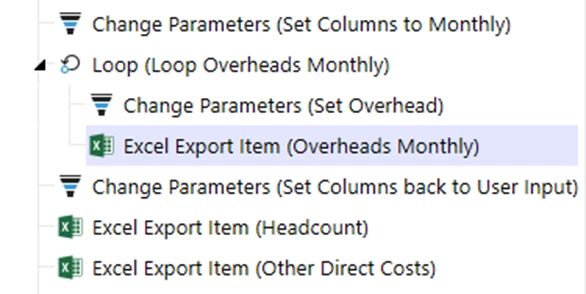
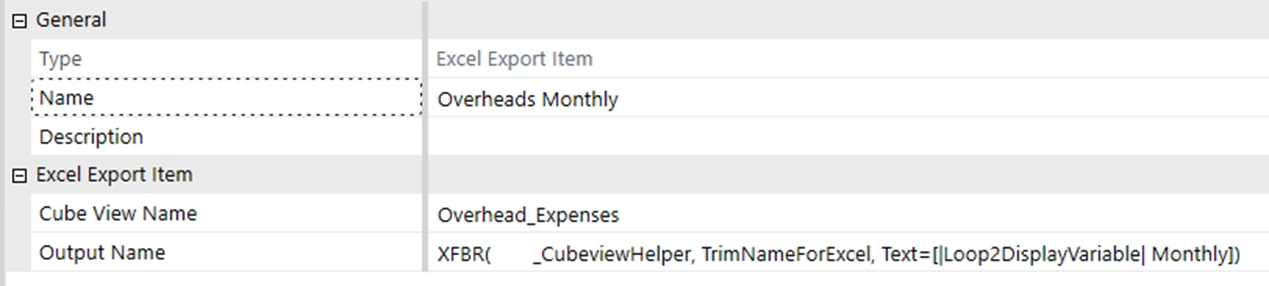
An example of it in use (for a list of cost centers that have long names):
Following upon @sameburn’s suggestion, here is our version of this function.
Business Rule Type: Dashboard XFBR String
(only relevant block of code is shown; this is not a complete BR)
'TrimNameForExcel
'	Dimension:		NA
'   Usage Example:	XFBR(redacted_CubeviewHelper, TrimNameForExcel, Text=[SomeString])
'   Descriptions:	Trims text down to 31 characters (the max sheet length in Excel)
'	Output:			String

#Region "TrimNameForExcel"
If args.FunctionName.XFEqualsIgnoreCase("TrimNameForExcel")
	'Required Inputs
	Dim name As String = args.NameValuePairs.XFGetValue("Text", String.Empty)

	' !!! Critical - Substitution List !!!
	' We'll run through this list to try and shorten to less than the 31 character limit
	Dim substitutions As New Dictionary(Of String, String)
	substitutions.Add("PRODUCT", "PROD")
	substitutions.Add("DISTRIBUTION", "DISTR")
	substitutions.Add("DEVELOPMENT", "DEV")
	substitutions.Add("ADMINISTRATION", "ADMIN")
	substitutions.Add("ADMINISTRATIVE", "ADMIN")
	substitutions.Add("Orders - 3rd party", "Orders 3rdPty")
	substitutions.Add("Revenue - Total 3rd party", "Revenue 3rdPty")
	substitutions.Add("Orderbook - 3rd party", "Orderbook 3rdPty")
	substitutions.Add("Monthly", "Mthly")
	substitutions.Add("TOTAL", "TOT")

	'Early exit check
	If String.IsNullOrEmpty(name) Then
		Return Guid.NewGuid.ToString.Substring(0,8)
	Else If Len(name) <= 31 Then
		Return name
	Else
		'Do all the substitutions, checking each time if we can exit because we are below the limit
		For Each kvp In substitutions
			If name.Contains(kvp.Key) Then
				name = name.Replace(kvp.Key, kvp.Value)
				If name.Length <= 31 Then
					Return name
				End If
			End If
		Next
	End If
	'If we've exhausted our options trim down to 31
	Return name.Substring(0, 31)
End If
#End Region
We do some substitutions first to shorten common phrases before simply truncating the output. You could remove all the inner substitution stuff and simply do the final ‘Return name.Substring(0,31)’.
An example of it in use (for a list of cost centers that have long names):
Namespace OneStream.BusinessRule.DashboardStringFunction.TruncateReportName
	Public Class MainClass
	'TruncateReportName
	'Dimension:		NA
	'Usage Example:	XFBR(TruncateReportName,OutputName=[|Loop1Variable|])
	'Descriptions:	Trims text down To 31 characters (the max sheet length In Excel tab)
	'Output:		outputName

		Public Function Main(si As SessionInfo, globals As BRGlobals, api As Object, args As XFBRStringArgs) As String
    		Dim outputName As String = args.NameValuePairs.XFGetValue("OutputName")

		    If Not String.IsNullOrEmpty(outputName) AndAlso outputName.Length > 31 Then
				Return outputName.Substring(0, 31)
		    End If

		    Return outputName
		End Function
	End Class
End Namespace
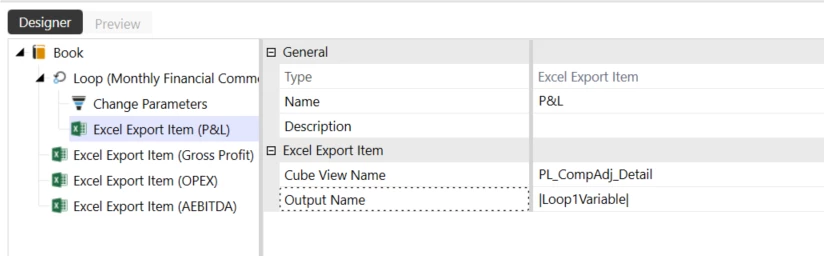
For the Excel Export Item:
Unfortunately, the Excel tabs are defaulting to default “Sheet 1, Sheet 2” etc.
Is there something left out that’s preventing the functioning of the business rule?
Looks like you are calling the Business Rule name but not the function name. Note how db_pdx called the BR name (CubeViewHelper), and then the function (TrimNameForExcel), then the parameter.