Contributor
Aug 29, 2023 8:08 AM UTC

Text color in advanced chart dashboard component

Hi everyone,

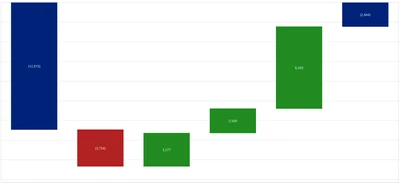
I have created a waterfall as below using the advanced chart component. 
FlorisvdPoel_0-1693296252786.png

Is there a way to change the font size/color for the data labels within the waterfall bars? I cannot seem to find this option. The request is to make the text more readible.

Any help is highly appreciated!

BR,

Floris


2 replies

Employee - Sage
Aug 31, 2023 2:41 PM UTC

Not as far as I can see. You can change the actual text but not how it's displayed. If you want more control, look into BiViewer or the Report component.

Member
Sep 1, 2023 2:16 PM UTC

This will sound real crazy, but you can create charts using business rules, so if you don't like BI viewer, then that is one option you can look at.