Newcomer
June 14, 2023
Solved

Table View Numer Formatting

  • June 14, 2023
  • 3 replies
  • 0 views

Hi all,

I have an issue with table view number formatting. On my SQL query, I'm introducing the format: 

Select FORMAT (Sum(Year_01), 'N2', 'es-es') as Year_01 ")

After that, I populate the table view applying the true option in "UseDataTypes"

tv.PopulateFromDataTable(dt, True, True)

My issue is the next one: the format seems correct but, after openning or refreshing the tableview, it introduces the value as Text. 
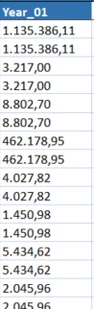
aprats_0-1686729088307.png

I must enter on a cell and click the enter button to be able to recognize it as number. 
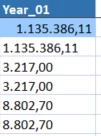
aprats_1-1686729218170.png


Does anyone have the same issue? 

Thanks,

Albert


Best answer by aprats

Hi MikeG and  JackLacava ,

After beeing testing a lot of different options, I have solve it. JackLacava you was right. If I use FORMAT in my SQL, the column is stored as Text and it's imposible to solve the issue. 

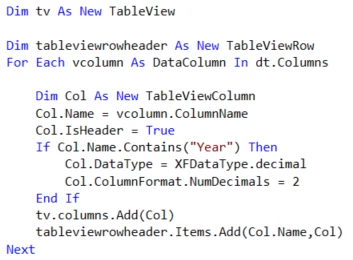
At last, the way to obtain the column in number format has been this one: 

1. Define the text columns as Decimal. In my case, the columns that contains "Year":

aprats_0-1686755464682.png

2. After that, the system is making an error derivated from the culture. I don't know why exactly, but if you are using ',' as decimal and '.' for thousands (for example: 1.150,12), the table view shows 115012. It seems that it can't be able to read ',' as decimal separator. 

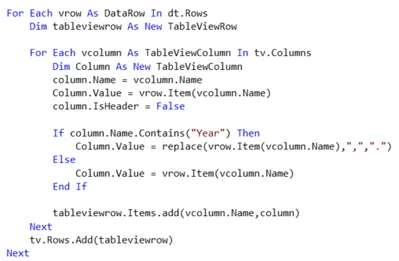
3. To solve it, when I'm inserting the rows, for number columns, I'm replacing ',' for '.'.

aprats_1-1686755734969.png

Whit this, the system understand that the '.' is the decimal separator and it shows perfectly. The only thing left is the thousand indicator. I don't find a way to solve it.

aprats_2-1686755886345.png

Hope it help you!

Albert


3 replies

MikeG
Contributor
June 14, 2023

Can you handle the number format directly in your Dashboard component?  Is it a Grid View or SQL Table Editor dashboard component?  It would look something like this:

MikeG_0-1686742740337.png


OneStream Employee
June 14, 2023

Can't find it right now, but there was another thread with this same issue. I believe the fact is that, once you use FORMAT in your SQL, the DataTable object will contain the column as Text.

You should try without FORMAT, and then ensuring your DataTable object has been configured to see that column with the right datatype, at which point the Populate call should do the right thing and give you a TableView containing numbers. Have a look at this thread for that.

apratsAuthorAnswer
Newcomer
June 14, 2023

Hi MikeG and  JackLacava ,

After beeing testing a lot of different options, I have solve it. JackLacava you was right. If I use FORMAT in my SQL, the column is stored as Text and it's imposible to solve the issue. 

At last, the way to obtain the column in number format has been this one: 

1. Define the text columns as Decimal. In my case, the columns that contains "Year":

aprats_0-1686755464682.png

2. After that, the system is making an error derivated from the culture. I don't know why exactly, but if you are using ',' as decimal and '.' for thousands (for example: 1.150,12), the table view shows 115012. It seems that it can't be able to read ',' as decimal separator. 

3. To solve it, when I'm inserting the rows, for number columns, I'm replacing ',' for '.'.

aprats_1-1686755734969.png

Whit this, the system understand that the '.' is the decimal separator and it shows perfectly. The only thing left is the thousand indicator. I don't find a way to solve it.

aprats_2-1686755886345.png

Hope it help you!

Albert