


Employee - Guide
Aug 31, 2022 1:33 AM UTC
Solved

State Indicator Dashboard Component ?

Hi !

I came accross the "State Indicator" dashboard component, but I can't seem to find any information about how it's used and how to configure it, either in the online help and on the community.

Could you please let me know if someone has already used it and what's the purpose of it ?


Many thanks !

Regads,
Veteran
Sep 1, 2022 7:02 PM UTC

Hi, 

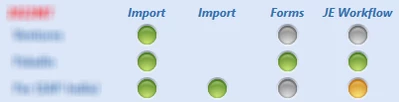
We use them on a dashboard to show the status of some workflows: 

NicoleBruno_0-1662058938634.png


3 replies

ChristianW
Employee - Advisor
Employee - Advisor
Aug 31, 2022 5:03 PM UTC

Hi Sergey

It functions with a data adapter (like advanced label components), you attache a data adapter to the state indicator and then you define where to find the data and how to display it.

ChristianW_0-1661964800155.png

It only shows the first defined cell, you can use other cells for tool tips.

In my example, it uses the data from the first row (zero based) in the column Value.

I think you can achieve better results with an image or a button component and a xfbr business rule to control the image, but if business rules are a no go, this might be a possible solution to visualize status information. Th BiViewer component is able to deliver similar functionality as well.

Veteran
Sep 1, 2022 7:02 PM UTC

Hi, 

We use them on a dashboard to show the status of some workflows: 

NicoleBruno_0-1662058938634.png


SergeyEmployee - GuideAuthor
Employee - Guide
Sep 5, 2022 12:04 PM UTC

Hi Nicole !

That looks very nice !! I'll try to have a similar dashboard as yours !

Thank you both for your answers !!