Expert
March 16, 2023
Solved

Return the parent member using XFGetHierarchyProperty function

  • March 16, 2023
  • 5 replies
  • 0 views
Hi,
 
I am trying to use the XFGetHierarchyProperty Spreadsheet function to return the "Parent member name" property of a member.
 
I tested the function by returning the HasChildren property and that is working fine.
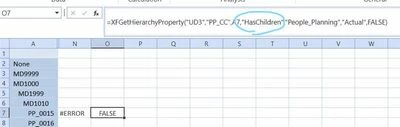
AndreaF_0-1678971395860.jpeg


However, how do I return the "Parent member name" property? Is that possible and what should I use as property string in the function? (the one below is not working and returns an error as you can see)
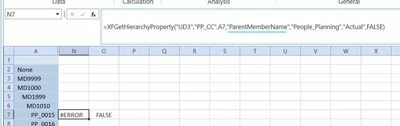
AndreaF_1-1678971395860.jpeg


Thank you

Best answer by AndreaF

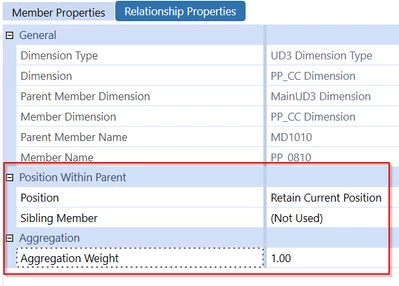
Thank you for your reply. Since the parent member is a relationship property, looking at the XFGetRelationshipProperty function probably makes more sense. However, as you pointed out a member can have multiple parents. Looking in the dimension library I believe the properties that are greyed out can be used to identify the relationship, but cannot be retrieve using the XFGetRelationshipProperty function, while what is not greyed out can be retrieved with the XFGetRelationshipProperty function.

AndreaF_1-1679061043370.png


5 replies

OneStream Employee
March 16, 2023

From documentation:

This function determines whether or not a Dimension has children and returns True or False

XFGetHierarchyProperty(“DimTypeName”,”DimName”,“MemberName or Script”,“PropertyName”,”PrimaryCubeName”,”ScenarioTypeNameForMembers”,
”MergeMembersfromReferencedCubes”)

Example: Retrieving Child  Hierarchy
XFGetHierarchyProperty("entity","HoustonEntities","Houston Heights","HasChildren","Houston","Actual",FALSE)

There is no mention of parents. I would argue returning a parent would be difficult, because any member can have multiple ones in a hierarchy.

AndreaFAuthorAnswer
Expert
March 17, 2023

Thank you for your reply. Since the parent member is a relationship property, looking at the XFGetRelationshipProperty function probably makes more sense. However, as you pointed out a member can have multiple parents. Looking in the dimension library I believe the properties that are greyed out can be used to identify the relationship, but cannot be retrieve using the XFGetRelationshipProperty function, while what is not greyed out can be retrieved with the XFGetRelationshipProperty function.

AndreaF_1-1679061043370.png


Newcomer
October 2, 2024

Hi Andrea,

Curious if since your post you've tried to find other ways to do this or not? I need to return a similar result and format of the member and parent. Thinking I might have to do a tree of the hierarchy and do some Excel wizardry. 

AndreaFAuthor
Expert
October 7, 2024

Hi, if you want something more robust and structured (although it will probably take a bit more time then just extracting the hierarchy in Excel and using Vlookups), you could write a Data Set business rule, and use the rule as a Method in a Bound List parameter to test and extract the output of the Data Set.

Contributor
March 20, 2023

There is a function called "Parents" in Member Filter Builder. You can use that to retrieve parents. 

Syntax would be like this: 

MyMember.Parents


sridharm92_1-1679277553604.png


AndreaFAuthor
Expert
March 21, 2023

That would return the Parents of a member, but I don't think I would be able to use it for my purpose, which is having a list of all members from a dimension and their parent next to it.

Newcomer
April 17, 2023

This should be something for the IdeaStream for sure!  I have had similar requests from our users.  Realize that there is the possibility of having multiple results but perhaps OneStream could create an XF function where one of the arguments is the individual hierarchy parent.  The only other way I can think of to try to make this happen is to use one of the Text fields for the member to identify it's parent and then pull that but again that can be a LOT of manual effort.

Member
October 20, 2023

I would like to do the same.