
Newcomer
March 8, 2023

Reporting from vDataRecordAll view

  • March 8, 2023
  • 2 replies
  • 0 views

Hi everyone,

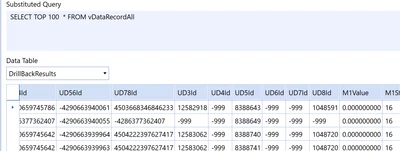
I don't find a lot of documentation about the vDataRecordAll view. Is there a reason as to why this is not easily available?

How hard is to get the JOINS to the main tables, so we can see the dimension name, dimension value, etc? Or even a relationship diagram.
 

RafMarques_0-1678239641288.png


Thx

Raf


2 replies

Contributor
March 8, 2023

I try to stay away from direct SQL calls as much as possible, when it comes to Cube data. Instead I suggest to dive into the API to find relevant calls, that can produce the expected output. Could be one of the FDX options: Link to info 

Veteran
March 8, 2023

Hey Raf!
I am with Frank on this one. 🙂 Be careful with your SQL!
I think you could explain us what you try to achieve. We might guide you.

That being said, here is below the details on how the vDataRecordAll View is made of :

CREATE VIEW [dbo].[vDataRecordAll] AS
SELECT
*
FROM
DataRecord1996
UNION ALL
SELECT
*
FROM
DataRecord1997
UNION ALL
..... UNTIL
SELECT
*
FROM
DataRecord2099
UNION ALL
SELECT
*
FROM
DataRecord2100

As you can see, it is just putting the tables above eachother... nothing more. 

And now you are going to ask how those DataRecordYYYY are made of ‌‌... well it is the cube data per year!

Newcomer
March 8, 2023

Hi FrankDK  / NicolasArgente 

Thanks for the feedback.

I also agree with that statement 🙂 I also know the content of the view, I was interested in getting the dimension members aligned with the IDs i see in there.

I am having some performance issues while doing allocations. I get the result, but its just far too many combinations - we are trying to drop some of the details with the client.

So I thought of bringing the data from Cube to Table (in this case i would access the source data from the table) and apply the logic with an output in a different table. As I would believe that this could run a bit quicker (done a ton of times in the past) 🙂 currently it is taking 10hrs for 12 periods, 10k+ entities. I have a breakdown by Accounts (few thousands), and Cost Centre (another few thousands).


Cheers

Contributor
March 8, 2023

Is this allocation using a Custom Calc (Finance Business Rule). If yes, then make sure you really go deep dive to optimize the performance on that part. Maybe test if you can gain speed using a custom parallel run.