
Newcomer
January 24, 2022
Solved

Report Header - Report Title Placement

  • January 24, 2022
  • 1 reply
  • 0 views

Hi All,


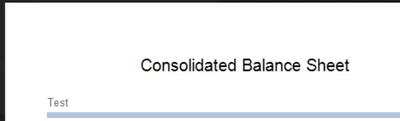
Thanks in advance for the help on this. I am looking for configure the Report Title in a cube to to be aligned left rather than center. In the screenshot below I would like "Consolidated Balance Sheet" to be aligned with Subtitle 1: Left - "Test". 
 

amarrandhawa1_0-1643062653524.png

Here is the current syntax I have to move this but it looks like it moving the title left on center rather than aligning it left.


'Move page header left
If uiItem.UIItemType = XFReportUIItemType.PageHeaderLabelTitle
uiItem.Visible = True
uiItem.Left = args.Report.CurrentPageInfo.LeftPosition
End If


This formula is within the Custom Report Task rules.

Cheers,

Amar

Best answer by db_pdx

Hi Amar,

Try this:

Dim uiItem As CVExtenderReportUIItem = args.Report.CurrentUIItem
If uiItem.UIItemType = XFReportUIItemType.PageHeaderLabelTitle
uiItem.Visible = True
uiItem.TextAlignment = 2 'BottomLeft
uiItem.Left = 1
End If

TextAlignment has an enumerated list deep in the API Details & Database Documentation.  .Left I actually didn't find in the documentation but guessed on a test value and it seemed to work. 

Note for my reports, this ended up overlapping with the default logo position. So, the other option you might consider is putting this Page Header text in the Subtitle Left 1 section and shifting your other text ("Test") to Subtitle Left 2.

Cheers,

-DB

1 reply

db_pdxAnswer
Contributor
January 24, 2022

Hi Amar,

Try this:

Dim uiItem As CVExtenderReportUIItem = args.Report.CurrentUIItem
If uiItem.UIItemType = XFReportUIItemType.PageHeaderLabelTitle
uiItem.Visible = True
uiItem.TextAlignment = 2 'BottomLeft
uiItem.Left = 1
End If

TextAlignment has an enumerated list deep in the API Details & Database Documentation.  .Left I actually didn't find in the documentation but guessed on a test value and it seemed to work. 

Note for my reports, this ended up overlapping with the default logo position. So, the other option you might consider is putting this Page Header text in the Subtitle Left 1 section and shifting your other text ("Test") to Subtitle Left 2.

Cheers,

-DB

Newcomer
January 25, 2022

Thank for this DB! This worked like a charm.  It looks like it was pretty tough to find. I appreciate you taking the time. Luckily the client required the logo on the right side.

Cheers!